How do I earn rewards on items?
A step-by-step guide to item offers in Forage.
Item offers let you earn rewards on specific grocery products when you buy them. Unlike store-wide rewards, item offers do not require you to pay with EBT. Depending on the item, you can earn with either uploading a photo of a receipt or linking a store account.
How item-level rewards with a receipt photo work
Some item offers require a receipt photo. To earn rewards on these items, you need to complete all of the steps below. Activating an item offer alone does not earn rewards.
Step 1: Activate the item offer
Find the item in the Forage app and tap the + button to activate it. You can also activate it by opening the item details and tapping Activate item.
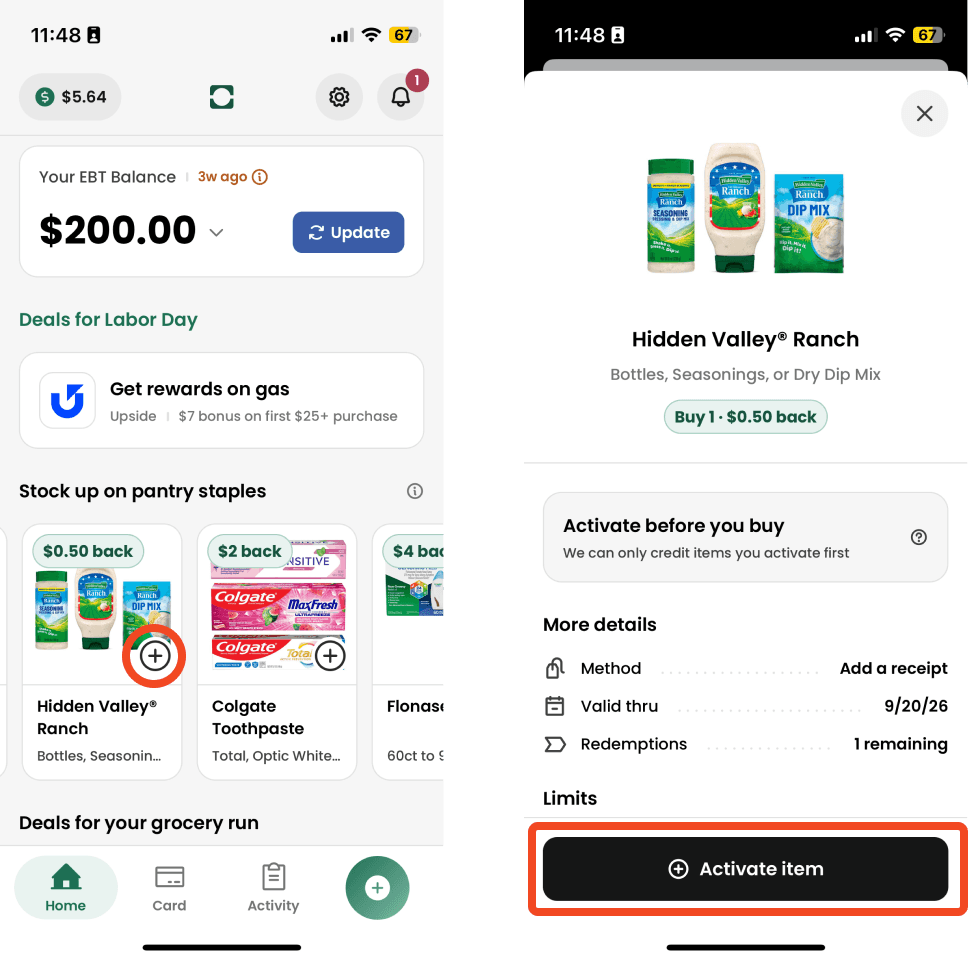
Activating an offer:
Does not charge you
Does not earn rewards by itself
Simply makes the item eligible once you buy it
Make sure you activate before you buy. We can only credit items you activate first.
Step 2: Buy the item
Buy the activated item before the offer expires. Check the More details and Limits sections for everything your purchase needs to qualify, including:
Method: For receipt upload items, you’ll need to upload a receipt photo
Valid thru date: the last day you can buy the item and still earn the reward before the offer expires
Redemption limits: how many times you can earn the offer
Additional limits: the specific kind of items the offer applies to, minimum quantities you need to buy, the number of redemptions per receipt, and any other limits
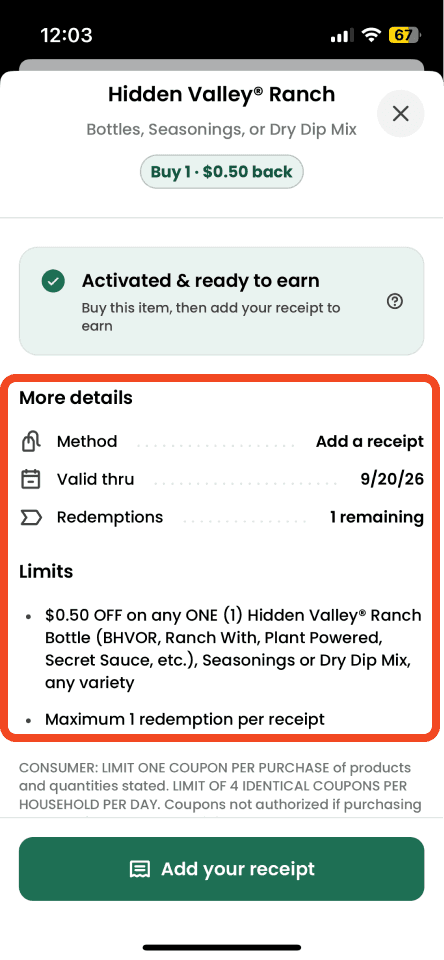
You can pay with any payment method—EBT is not required for item offers.
Step 3: Add your receipt within 7 days of purchase
After your purchase, add your receipt in the Forage app. You can tap Add your receipt on the offer, or tap the + button in the bottom navigation bar.
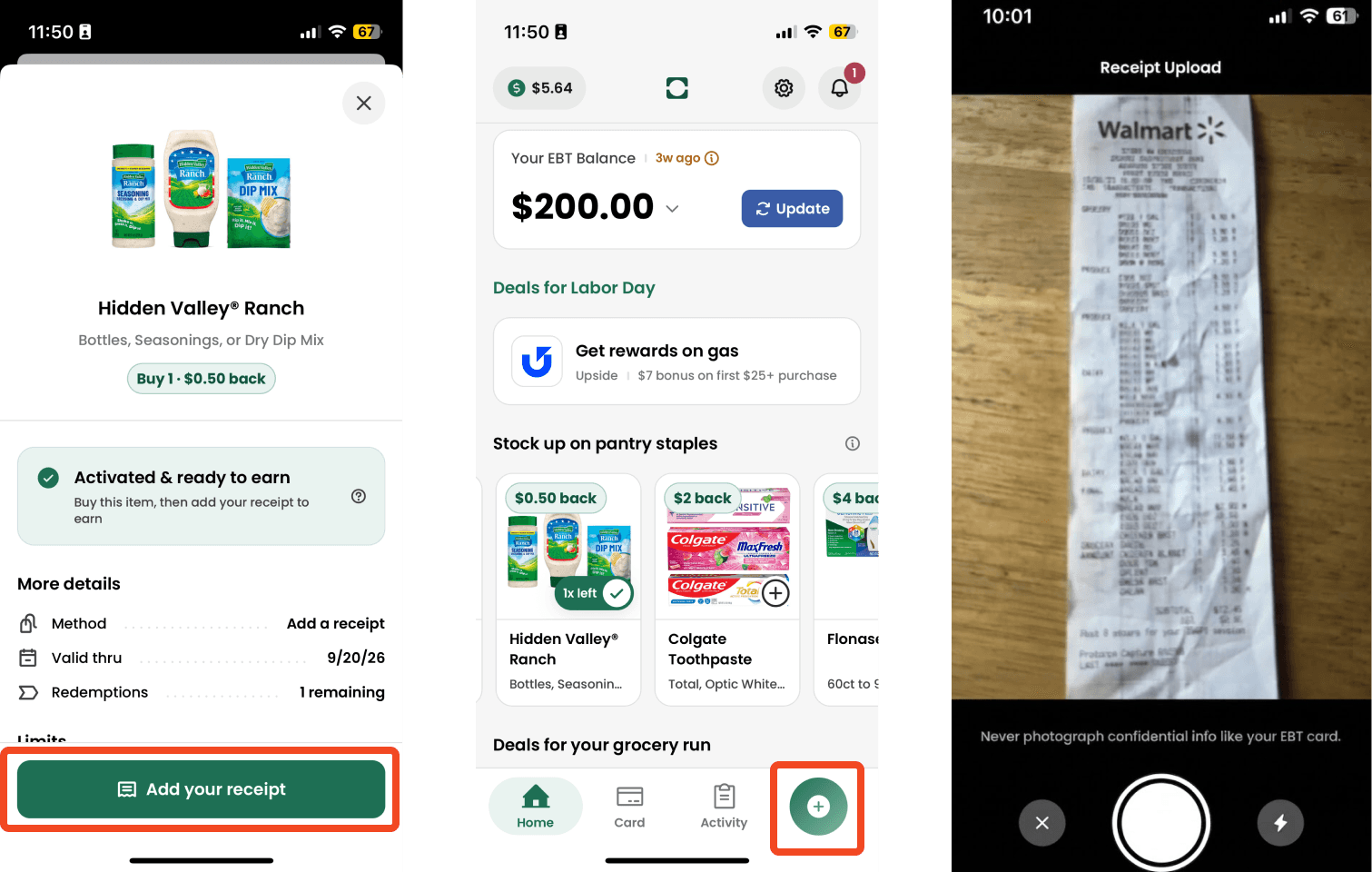
You can take a photo of your receipt or upload a photo or PDF—a photo works best. For now, video receipts are not eligible for item rewards. For your receipt to be verified, make sure:
The date is within 7 days of your purchase
Every item on the receipt is readable. We check your receipt against all of your activated offers, so a complete, clear receipt means you won't miss out on any rewards.
The store name is readable. We need to confirm where you made the purchase. Even if your receipt doesn't earn store rewards, your activated item offers can still pay out.
For more detail, see How do I upload receipts in Forage?
Step 4: Earn rewards
Once we verify that you bought the item, your rewards are added to your balance. Verification can take up to 2 business days.
You can check the status of your receipt and rewards anytime in the Activity tab.
How item-level rewards with a linked account work
Some item offers require a linked account. To earn rewards on these items, you need to complete all of the steps below. Activating an item offer alone does not earn rewards.
Step 1: Link your store account (if not already linked)
Item offers will work at Walmart or Amazon or Gopuff and require you to make the purchase while signed into your account. You can learn how to do this in How do I link my store account?
Linking your account allows Forage to verify your receipt automatically. This step is required even if you plan to pay with a non-EBT payment method.
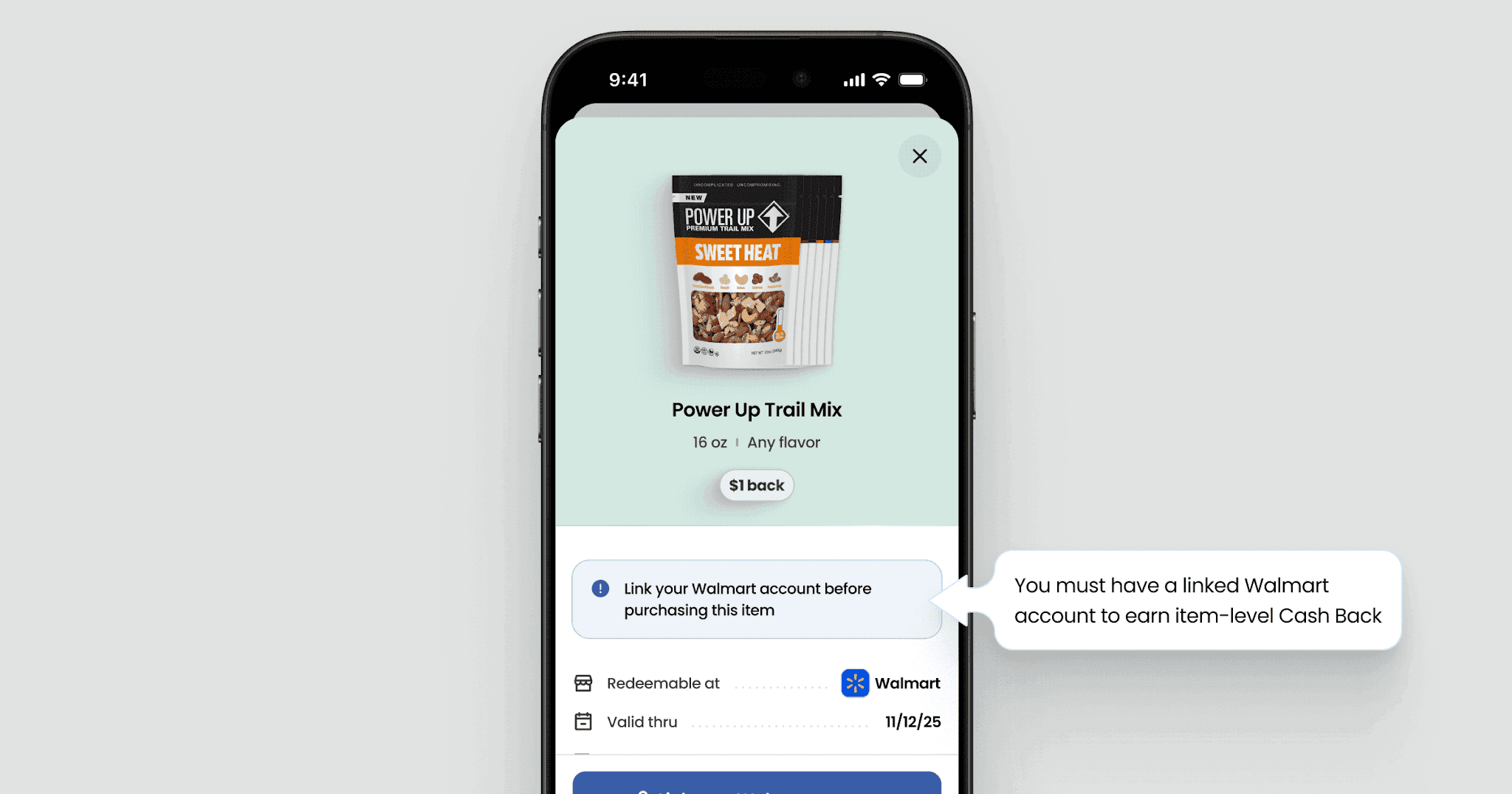
Step 2: Activate the item offer
Find the item in the Forage app and tap the + button to activate it. You can also activate it by opening the item details and tapping Activate.
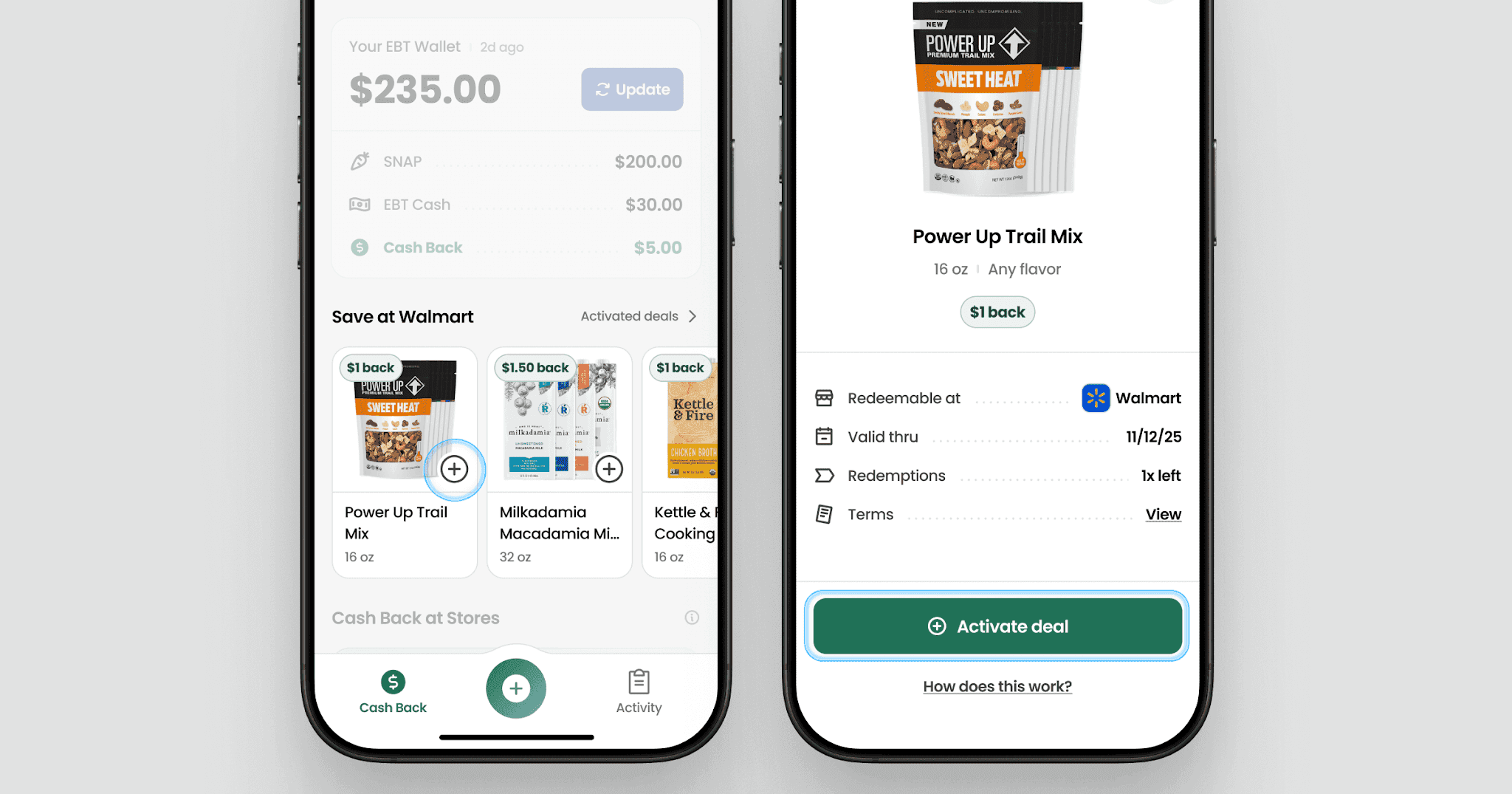
Activating an offer:
Does not charge you
Does not earn rewards by itself
Simply makes the item eligible once you buy it
Step 3: Buy the item while signed in to your store account
Once the offer is activated and your store account is linked:
Shop at the eligible store (in-store or online)
Make sure you're signed into that store account at checkout
Buy the item using any payment method
Step 4: Receive your rewards
After your purchase, your rewards are verified automatically and will be added to your balance within 2 business days.
Important things to know about item offers
You don't need to link an EBT card to earn rewards on items. However, without a linked EBT card you won't earn store rewards on your purchase. Learn more in How do rewards work in Forage?
Redemption limits, expiration dates, and other restrictions may apply. You can find these on the item detail page in the app.
Item offers are subject to our Rewards Program Terms.
Still need help?
If your receipt was rejected or your rewards haven't shown up after 2 business days, contact Forage Support from the app. Tell us:
The item offer you activated
The store where you bought the item
We'll help you figure out what happened.
How do I earn rewards on items?
A step-by-step guide to item offers in Forage.
Item offers let you earn rewards on specific grocery products when you buy them. Unlike store-wide rewards, item offers do not require you to pay with EBT. Depending on the item, you can earn with either uploading a photo of a receipt or linking a store account.
How item-level rewards with a receipt photo work
Some item offers require a receipt photo. To earn rewards on these items, you need to complete all of the steps below. Activating an item offer alone does not earn rewards.
Step 1: Activate the item offer
Find the item in the Forage app and tap the + button to activate it. You can also activate it by opening the item details and tapping Activate item.
Activating an offer:
Does not charge you
Does not earn rewards by itself
Simply makes the item eligible once you buy it
Make sure you activate before you buy. We can only credit items you activate first.
Step 2: Buy the item
Buy the activated item before the offer expires. Check the More details and Limits sections for everything your purchase needs to qualify, including:
Method: For receipt upload items, you’ll need to upload a receipt photo
Valid thru date: the last day you can buy the item and still earn the reward before the offer expires
Redemption limits: how many times you can earn the offer
Additional limits: the specific kind of items the offer applies to, minimum quantities you need to buy, the number of redemptions per receipt, and any other limits
You can pay with any payment method—EBT is not required for item offers.
Step 3: Add your receipt within 7 days of purchase
After your purchase, add your receipt in the Forage app. You can tap Add your receipt on the offer, or tap the + button in the bottom navigation bar.
You can take a photo of your receipt or upload a photo or PDF—a photo works best. For now, video receipts are not eligible for item rewards. For your receipt to be verified, make sure:
The date is within 7 days of your purchase
Every item on the receipt is readable. We check your receipt against all of your activated offers, so a complete, clear receipt means you won't miss out on any rewards.
The store name is readable. We need to confirm where you made the purchase. Even if your receipt doesn't earn store rewards, your activated item offers can still pay out.
For more detail, see How do I upload receipts in Forage?
Step 4: Earn rewards
Once we verify that you bought the item, your rewards are added to your balance. Verification can take up to 2 business days.
You can check the status of your receipt and rewards anytime in the Activity tab.
How item-level rewards with a linked account work
Some item offers require a linked account. To earn rewards on these items, you need to complete all of the steps below. Activating an item offer alone does not earn rewards.
Step 1: Link your store account (if not already linked)
Item offers will work at Walmart or Amazon or Gopuff and require you to make the purchase while signed into your account. You can learn how to do this in How do I link my store account?
Linking your account allows Forage to verify your receipt automatically. This step is required even if you plan to pay with a non-EBT payment method.
Step 2: Activate the item offer
Find the item in the Forage app and tap the + button to activate it. You can also activate it by opening the item details and tapping Activate.
Activating an offer:
Does not charge you
Does not earn rewards by itself
Simply makes the item eligible once you buy it
Step 3: Buy the item while signed in to your store account
Once the offer is activated and your store account is linked:
Shop at the eligible store (in-store or online)
Make sure you're signed into that store account at checkout
Buy the item using any payment method
Step 4: Receive your rewards
After your purchase, your rewards are verified automatically and will be added to your balance within 2 business days.
Important things to know about item offers
You don't need to link an EBT card to earn rewards on items. However, without a linked EBT card you won't earn store rewards on your purchase. Learn more in How do rewards work in Forage?
Redemption limits, expiration dates, and other restrictions may apply. You can find these on the item detail page in the app.
Item offers are subject to our Rewards Program Terms.
Still need help?
If your receipt was rejected or your rewards haven't shown up after 2 business days, contact Forage Support from the app. Tell us:
The item offer you activated
The store where you bought the item
We'll help you figure out what happened.
How do I earn rewards on items?
A step-by-step guide to item offers in Forage.
Item offers let you earn rewards on specific grocery products when you buy them. Unlike store-wide rewards, item offers do not require you to pay with EBT. Depending on the item, you can earn with either uploading a photo of a receipt or linking a store account.
How item-level rewards with a receipt photo work
Some item offers require a receipt photo. To earn rewards on these items, you need to complete all of the steps below. Activating an item offer alone does not earn rewards.
Step 1: Activate the item offer
Find the item in the Forage app and tap the + button to activate it. You can also activate it by opening the item details and tapping Activate item.
Activating an offer:
Does not charge you
Does not earn rewards by itself
Simply makes the item eligible once you buy it
Make sure you activate before you buy. We can only credit items you activate first.
Step 2: Buy the item
Buy the activated item before the offer expires. Check the More details and Limits sections for everything your purchase needs to qualify, including:
Method: For receipt upload items, you’ll need to upload a receipt photo
Valid thru date: the last day you can buy the item and still earn the reward before the offer expires
Redemption limits: how many times you can earn the offer
Additional limits: the specific kind of items the offer applies to, minimum quantities you need to buy, the number of redemptions per receipt, and any other limits
You can pay with any payment method—EBT is not required for item offers.
Step 3: Add your receipt within 7 days of purchase
After your purchase, add your receipt in the Forage app. You can tap Add your receipt on the offer, or tap the + button in the bottom navigation bar.
You can take a photo of your receipt or upload a photo or PDF—a photo works best. For now, video receipts are not eligible for item rewards. For your receipt to be verified, make sure:
The date is within 7 days of your purchase
Every item on the receipt is readable. We check your receipt against all of your activated offers, so a complete, clear receipt means you won't miss out on any rewards.
The store name is readable. We need to confirm where you made the purchase. Even if your receipt doesn't earn store rewards, your activated item offers can still pay out.
For more detail, see How do I upload receipts in Forage?
Step 4: Earn rewards
Once we verify that you bought the item, your rewards are added to your balance. Verification can take up to 2 business days.
You can check the status of your receipt and rewards anytime in the Activity tab.
How item-level rewards with a linked account work
Some item offers require a linked account. To earn rewards on these items, you need to complete all of the steps below. Activating an item offer alone does not earn rewards.
Step 1: Link your store account (if not already linked)
Item offers will work at Walmart or Amazon or Gopuff and require you to make the purchase while signed into your account. You can learn how to do this in How do I link my store account?
Linking your account allows Forage to verify your receipt automatically. This step is required even if you plan to pay with a non-EBT payment method.
Step 2: Activate the item offer
Find the item in the Forage app and tap the + button to activate it. You can also activate it by opening the item details and tapping Activate.
Activating an offer:
Does not charge you
Does not earn rewards by itself
Simply makes the item eligible once you buy it
Step 3: Buy the item while signed in to your store account
Once the offer is activated and your store account is linked:
Shop at the eligible store (in-store or online)
Make sure you're signed into that store account at checkout
Buy the item using any payment method
Step 4: Receive your rewards
After your purchase, your rewards are verified automatically and will be added to your balance within 2 business days.
Important things to know about item offers
You don't need to link an EBT card to earn rewards on items. However, without a linked EBT card you won't earn store rewards on your purchase. Learn more in How do rewards work in Forage?
Redemption limits, expiration dates, and other restrictions may apply. You can find these on the item detail page in the app.
Item offers are subject to our Rewards Program Terms.
Still need help?
If your receipt was rejected or your rewards haven't shown up after 2 business days, contact Forage Support from the app. Tell us:
The item offer you activated
The store where you bought the item
We'll help you figure out what happened.
How do I earn rewards on items?
A step-by-step guide to item offers in Forage.
Item offers let you earn rewards on specific grocery products when you buy them. Unlike store-wide rewards, item offers do not require you to pay with EBT. Depending on the item, you can earn with either uploading a photo of a receipt or linking a store account.
How item-level rewards with a receipt photo work
Some item offers require a receipt photo. To earn rewards on these items, you need to complete all of the steps below. Activating an item offer alone does not earn rewards.
Step 1: Activate the item offer
Find the item in the Forage app and tap the + button to activate it. You can also activate it by opening the item details and tapping Activate item.
Activating an offer:
Does not charge you
Does not earn rewards by itself
Simply makes the item eligible once you buy it
Make sure you activate before you buy. We can only credit items you activate first.
Step 2: Buy the item
Buy the activated item before the offer expires. Check the More details and Limits sections for everything your purchase needs to qualify, including:
Method: For receipt upload items, you’ll need to upload a receipt photo
Valid thru date: the last day you can buy the item and still earn the reward before the offer expires
Redemption limits: how many times you can earn the offer
Additional limits: the specific kind of items the offer applies to, minimum quantities you need to buy, the number of redemptions per receipt, and any other limits
You can pay with any payment method—EBT is not required for item offers.
Step 3: Add your receipt within 7 days of purchase
After your purchase, add your receipt in the Forage app. You can tap Add your receipt on the offer, or tap the + button in the bottom navigation bar.
You can take a photo of your receipt or upload a photo or PDF—a photo works best. For now, video receipts are not eligible for item rewards. For your receipt to be verified, make sure:
The date is within 7 days of your purchase
Every item on the receipt is readable. We check your receipt against all of your activated offers, so a complete, clear receipt means you won't miss out on any rewards.
The store name is readable. We need to confirm where you made the purchase. Even if your receipt doesn't earn store rewards, your activated item offers can still pay out.
For more detail, see How do I upload receipts in Forage?
Step 4: Earn rewards
Once we verify that you bought the item, your rewards are added to your balance. Verification can take up to 2 business days.
You can check the status of your receipt and rewards anytime in the Activity tab.
How item-level rewards with a linked account work
Some item offers require a linked account. To earn rewards on these items, you need to complete all of the steps below. Activating an item offer alone does not earn rewards.
Step 1: Link your store account (if not already linked)
Item offers will work at Walmart or Amazon or Gopuff and require you to make the purchase while signed into your account. You can learn how to do this in How do I link my store account?
Linking your account allows Forage to verify your receipt automatically. This step is required even if you plan to pay with a non-EBT payment method.
Step 2: Activate the item offer
Find the item in the Forage app and tap the + button to activate it. You can also activate it by opening the item details and tapping Activate.
Activating an offer:
Does not charge you
Does not earn rewards by itself
Simply makes the item eligible once you buy it
Step 3: Buy the item while signed in to your store account
Once the offer is activated and your store account is linked:
Shop at the eligible store (in-store or online)
Make sure you're signed into that store account at checkout
Buy the item using any payment method
Step 4: Receive your rewards
After your purchase, your rewards are verified automatically and will be added to your balance within 2 business days.
Important things to know about item offers
You don't need to link an EBT card to earn rewards on items. However, without a linked EBT card you won't earn store rewards on your purchase. Learn more in How do rewards work in Forage?
Redemption limits, expiration dates, and other restrictions may apply. You can find these on the item detail page in the app.
Item offers are subject to our Rewards Program Terms.
Still need help?
If your receipt was rejected or your rewards haven't shown up after 2 business days, contact Forage Support from the app. Tell us:
The item offer you activated
The store where you bought the item
We'll help you figure out what happened.
How do I earn rewards on items?
A step-by-step guide to item offers in Forage.
Item offers let you earn rewards on specific grocery products when you buy them. Unlike store-wide rewards, item offers do not require you to pay with EBT. Depending on the item, you can earn with either uploading a photo of a receipt or linking a store account.
How item-level rewards with a receipt photo work
Some item offers require a receipt photo. To earn rewards on these items, you need to complete all of the steps below. Activating an item offer alone does not earn rewards.
Step 1: Activate the item offer
Find the item in the Forage app and tap the + button to activate it. You can also activate it by opening the item details and tapping Activate item.
Activating an offer:
Does not charge you
Does not earn rewards by itself
Simply makes the item eligible once you buy it
Make sure you activate before you buy. We can only credit items you activate first.
Step 2: Buy the item
Buy the activated item before the offer expires. Check the More details and Limits sections for everything your purchase needs to qualify, including:
Method: For receipt upload items, you’ll need to upload a receipt photo
Valid thru date: the last day you can buy the item and still earn the reward before the offer expires
Redemption limits: how many times you can earn the offer
Additional limits: the specific kind of items the offer applies to, minimum quantities you need to buy, the number of redemptions per receipt, and any other limits
You can pay with any payment method—EBT is not required for item offers.
Step 3: Add your receipt within 7 days of purchase
After your purchase, add your receipt in the Forage app. You can tap Add your receipt on the offer, or tap the + button in the bottom navigation bar.
You can take a photo of your receipt or upload a photo or PDF—a photo works best. For now, video receipts are not eligible for item rewards. For your receipt to be verified, make sure:
The date is within 7 days of your purchase
Every item on the receipt is readable. We check your receipt against all of your activated offers, so a complete, clear receipt means you won't miss out on any rewards.
The store name is readable. We need to confirm where you made the purchase. Even if your receipt doesn't earn store rewards, your activated item offers can still pay out.
For more detail, see How do I upload receipts in Forage?
Step 4: Earn rewards
Once we verify that you bought the item, your rewards are added to your balance. Verification can take up to 2 business days.
You can check the status of your receipt and rewards anytime in the Activity tab.
How item-level rewards with a linked account work
Some item offers require a linked account. To earn rewards on these items, you need to complete all of the steps below. Activating an item offer alone does not earn rewards.
Step 1: Link your store account (if not already linked)
Item offers will work at Walmart or Amazon or Gopuff and require you to make the purchase while signed into your account. You can learn how to do this in How do I link my store account?
Linking your account allows Forage to verify your receipt automatically. This step is required even if you plan to pay with a non-EBT payment method.
Step 2: Activate the item offer
Find the item in the Forage app and tap the + button to activate it. You can also activate it by opening the item details and tapping Activate.
Activating an offer:
Does not charge you
Does not earn rewards by itself
Simply makes the item eligible once you buy it
Step 3: Buy the item while signed in to your store account
Once the offer is activated and your store account is linked:
Shop at the eligible store (in-store or online)
Make sure you're signed into that store account at checkout
Buy the item using any payment method
Step 4: Receive your rewards
After your purchase, your rewards are verified automatically and will be added to your balance within 2 business days.
Important things to know about item offers
You don't need to link an EBT card to earn rewards on items. However, without a linked EBT card you won't earn store rewards on your purchase. Learn more in How do rewards work in Forage?
Redemption limits, expiration dates, and other restrictions may apply. You can find these on the item detail page in the app.
Item offers are subject to our Rewards Program Terms.
Still need help?
If your receipt was rejected or your rewards haven't shown up after 2 business days, contact Forage Support from the app. Tell us:
The item offer you activated
The store where you bought the item
We'll help you figure out what happened.
How do I earn rewards on items?
A step-by-step guide to item offers in Forage.
Item offers let you earn rewards on specific grocery products when you buy them. Unlike store-wide rewards, item offers do not require you to pay with EBT. Depending on the item, you can earn with either uploading a photo of a receipt or linking a store account.
How item-level rewards with a receipt photo work
Some item offers require a receipt photo. To earn rewards on these items, you need to complete all of the steps below. Activating an item offer alone does not earn rewards.
Step 1: Activate the item offer
Find the item in the Forage app and tap the + button to activate it. You can also activate it by opening the item details and tapping Activate item.
Activating an offer:
Does not charge you
Does not earn rewards by itself
Simply makes the item eligible once you buy it
Make sure you activate before you buy. We can only credit items you activate first.
Step 2: Buy the item
Buy the activated item before the offer expires. Check the More details and Limits sections for everything your purchase needs to qualify, including:
Method: For receipt upload items, you’ll need to upload a receipt photo
Valid thru date: the last day you can buy the item and still earn the reward before the offer expires
Redemption limits: how many times you can earn the offer
Additional limits: the specific kind of items the offer applies to, minimum quantities you need to buy, the number of redemptions per receipt, and any other limits
You can pay with any payment method—EBT is not required for item offers.
Step 3: Add your receipt within 7 days of purchase
After your purchase, add your receipt in the Forage app. You can tap Add your receipt on the offer, or tap the + button in the bottom navigation bar.
You can take a photo of your receipt or upload a photo or PDF—a photo works best. For now, video receipts are not eligible for item rewards. For your receipt to be verified, make sure:
The date is within 7 days of your purchase
Every item on the receipt is readable. We check your receipt against all of your activated offers, so a complete, clear receipt means you won't miss out on any rewards.
The store name is readable. We need to confirm where you made the purchase. Even if your receipt doesn't earn store rewards, your activated item offers can still pay out.
For more detail, see How do I upload receipts in Forage?
Step 4: Earn rewards
Once we verify that you bought the item, your rewards are added to your balance. Verification can take up to 2 business days.
You can check the status of your receipt and rewards anytime in the Activity tab.
How item-level rewards with a linked account work
Some item offers require a linked account. To earn rewards on these items, you need to complete all of the steps below. Activating an item offer alone does not earn rewards.
Step 1: Link your store account (if not already linked)
Item offers will work at Walmart or Amazon or Gopuff and require you to make the purchase while signed into your account. You can learn how to do this in How do I link my store account?
Linking your account allows Forage to verify your receipt automatically. This step is required even if you plan to pay with a non-EBT payment method.
Step 2: Activate the item offer
Find the item in the Forage app and tap the + button to activate it. You can also activate it by opening the item details and tapping Activate.
Activating an offer:
Does not charge you
Does not earn rewards by itself
Simply makes the item eligible once you buy it
Step 3: Buy the item while signed in to your store account
Once the offer is activated and your store account is linked:
Shop at the eligible store (in-store or online)
Make sure you're signed into that store account at checkout
Buy the item using any payment method
Step 4: Receive your rewards
After your purchase, your rewards are verified automatically and will be added to your balance within 2 business days.
Important things to know about item offers
You don't need to link an EBT card to earn rewards on items. However, without a linked EBT card you won't earn store rewards on your purchase. Learn more in How do rewards work in Forage?
Redemption limits, expiration dates, and other restrictions may apply. You can find these on the item detail page in the app.
Item offers are subject to our Rewards Program Terms.
Still need help?
If your receipt was rejected or your rewards haven't shown up after 2 business days, contact Forage Support from the app. Tell us:
The item offer you activated
The store where you bought the item
We'll help you figure out what happened.
How do I earn rewards on items?
A step-by-step guide to item offers in Forage.
Item offers let you earn rewards on specific grocery products when you buy them. Unlike store-wide rewards, item offers do not require you to pay with EBT. Depending on the item, you can earn with either uploading a photo of a receipt or linking a store account.
How item-level rewards with a receipt photo work
Some item offers require a receipt photo. To earn rewards on these items, you need to complete all of the steps below. Activating an item offer alone does not earn rewards.
Step 1: Activate the item offer
Find the item in the Forage app and tap the + button to activate it. You can also activate it by opening the item details and tapping Activate item.
Activating an offer:
Does not charge you
Does not earn rewards by itself
Simply makes the item eligible once you buy it
Make sure you activate before you buy. We can only credit items you activate first.
Step 2: Buy the item
Buy the activated item before the offer expires. Check the More details and Limits sections for everything your purchase needs to qualify, including:
Method: For receipt upload items, you’ll need to upload a receipt photo
Valid thru date: the last day you can buy the item and still earn the reward before the offer expires
Redemption limits: how many times you can earn the offer
Additional limits: the specific kind of items the offer applies to, minimum quantities you need to buy, the number of redemptions per receipt, and any other limits
You can pay with any payment method—EBT is not required for item offers.
Step 3: Add your receipt within 7 days of purchase
After your purchase, add your receipt in the Forage app. You can tap Add your receipt on the offer, or tap the + button in the bottom navigation bar.
You can take a photo of your receipt or upload a photo or PDF—a photo works best. For now, video receipts are not eligible for item rewards. For your receipt to be verified, make sure:
The date is within 7 days of your purchase
Every item on the receipt is readable. We check your receipt against all of your activated offers, so a complete, clear receipt means you won't miss out on any rewards.
The store name is readable. We need to confirm where you made the purchase. Even if your receipt doesn't earn store rewards, your activated item offers can still pay out.
For more detail, see How do I upload receipts in Forage?
Step 4: Earn rewards
Once we verify that you bought the item, your rewards are added to your balance. Verification can take up to 2 business days.
You can check the status of your receipt and rewards anytime in the Activity tab.
How item-level rewards with a linked account work
Some item offers require a linked account. To earn rewards on these items, you need to complete all of the steps below. Activating an item offer alone does not earn rewards.
Step 1: Link your store account (if not already linked)
Item offers will work at Walmart or Amazon or Gopuff and require you to make the purchase while signed into your account. You can learn how to do this in How do I link my store account?
Linking your account allows Forage to verify your receipt automatically. This step is required even if you plan to pay with a non-EBT payment method.
Step 2: Activate the item offer
Find the item in the Forage app and tap the + button to activate it. You can also activate it by opening the item details and tapping Activate.
Activating an offer:
Does not charge you
Does not earn rewards by itself
Simply makes the item eligible once you buy it
Step 3: Buy the item while signed in to your store account
Once the offer is activated and your store account is linked:
Shop at the eligible store (in-store or online)
Make sure you're signed into that store account at checkout
Buy the item using any payment method
Step 4: Receive your rewards
After your purchase, your rewards are verified automatically and will be added to your balance within 2 business days.
Important things to know about item offers
You don't need to link an EBT card to earn rewards on items. However, without a linked EBT card you won't earn store rewards on your purchase. Learn more in How do rewards work in Forage?
Redemption limits, expiration dates, and other restrictions may apply. You can find these on the item detail page in the app.
Item offers are subject to our Rewards Program Terms.
Still need help?
If your receipt was rejected or your rewards haven't shown up after 2 business days, contact Forage Support from the app. Tell us:
The item offer you activated
The store where you bought the item
We'll help you figure out what happened.
Forage is equal opportunity. ©️ 2026 Forage Technology Corporation, Inc.
Forage is equal opportunity. ©️ 2026 Forage Technology Corporation, Inc.
Forage is equal opportunity. ©️ 2026 Forage Technology Corporation, Inc.
Forage is equal opportunity. ©️ 2026 Forage Technology Corporation, Inc.
Forage is equal opportunity. ©️ 2026 Forage Technology Corporation, Inc.
Forage is equal opportunity. ©️ 2026 Forage Technology Corporation, Inc.
Forage is equal opportunity. ©️ 2026 Forage Technology Corporation, Inc.