How do I link my store account?
Use account linking instead of uploading receipts.
Linking a store account lets Forage verify eligible purchases without you needing to take a photo of your receipt. This is still considered Receipt Required rewards (we’re just able to get the receipt for you through your linked account instead of a photo).
What store accounts can I link?
Currently, you can link your account at the following stores:
Walmart
Amazon
Gopuff
How to link your store account
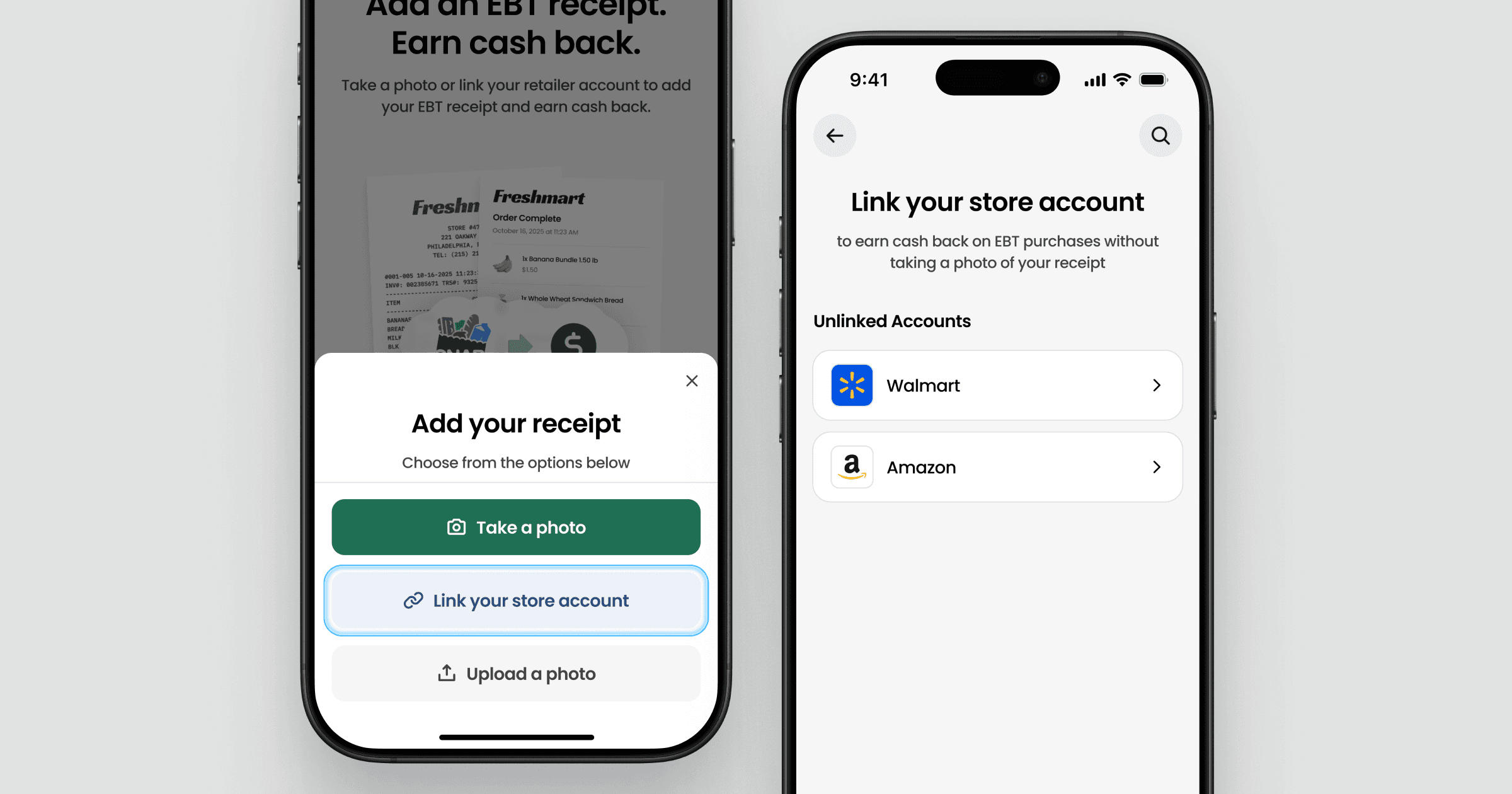
You can link your store account directly from the receipt upload flow in the Forage app.
Open the Forage app
Start the receipt upload flow (tap the + button or Add receipt)
Tap Get started
Tap Link your store account
Select a store card
You’ll then be guided through a secure sign-in flow to connect your store account.
Signing in to your store account
When you select a store, you’ll be redirected to a secure connection flow hosted by our partner Knot.
In this step:
You sign in using your store username and password
Your login details are not shared with or stored by Forage
Linking allows Forage to retrieve your receipt after eligible purchases
Once completed, your store account will be linked.
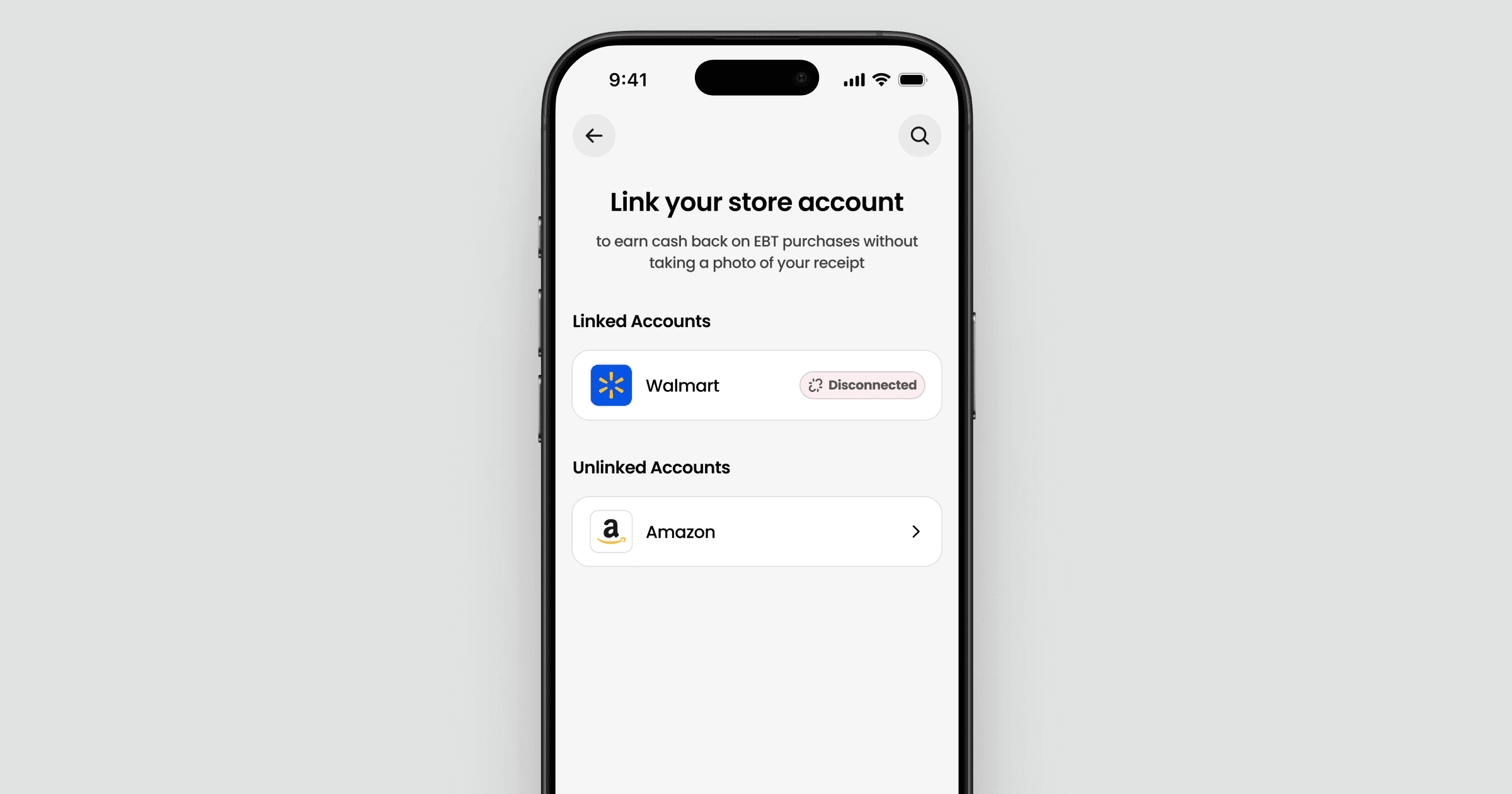
If your store account is disconnected
If your store account is ever disconnected, you'll be notified in the app. This can happen if:
The store requires you to sign in again
The connection is removed from the store's side
You can reconnect at any time by following the same steps above.
Unlinking your store account
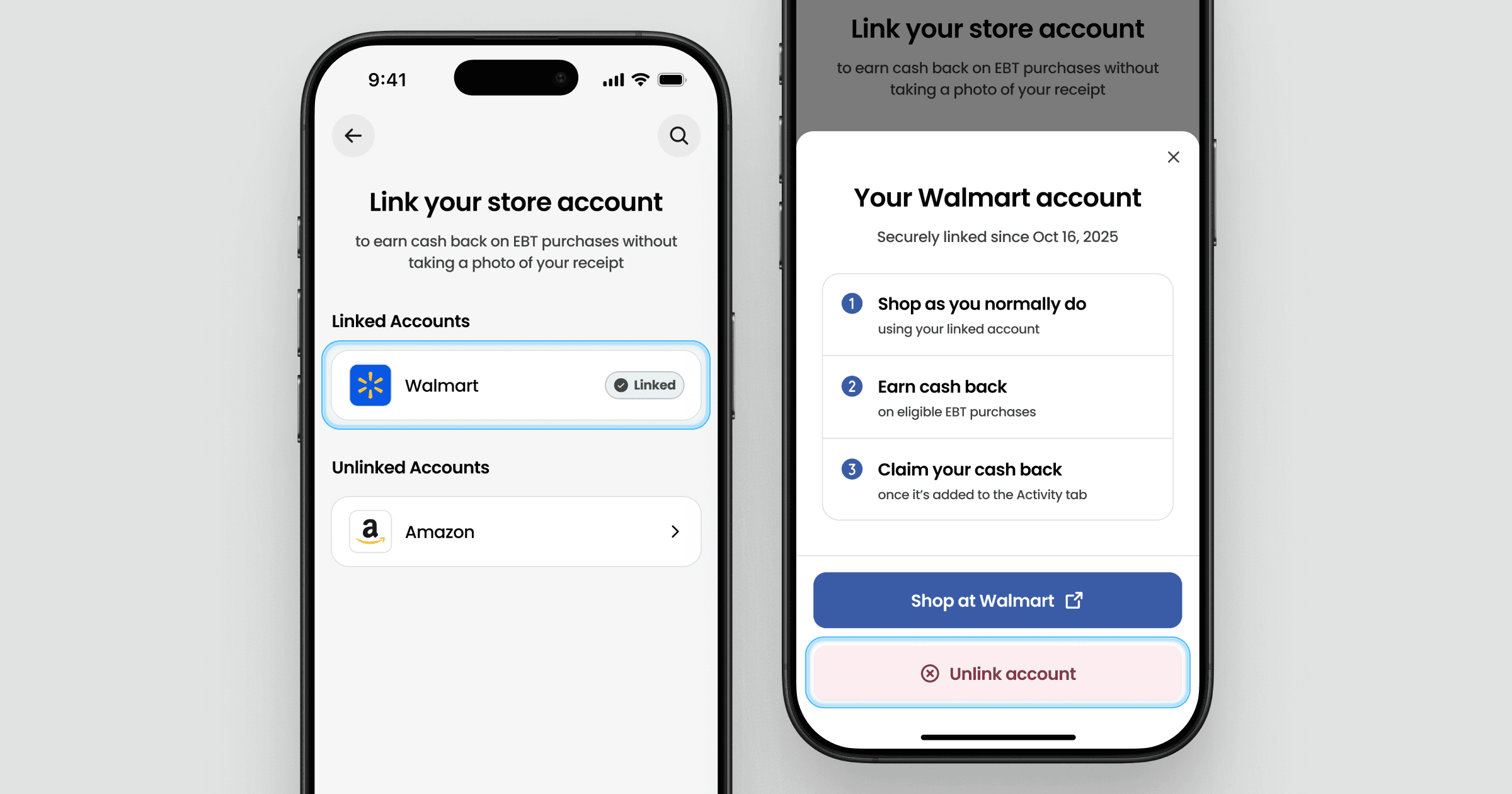
You can unlink your store account at any time by following the same steps above and tapping on its card. Once unlinked, future store purchases will require receipt upload until you reconnect your account.
Still have questions?
If you’re having trouble linking your store account or aren’t sure whether a purchase was verified, contact Forage Support from the app and we’ll help you sort it out.
How do I link my store account?
Use account linking instead of uploading receipts.
Linking a store account lets Forage verify eligible purchases without you needing to take a photo of your receipt. This is still considered Receipt Required rewards (we’re just able to get the receipt for you through your linked account instead of a photo).
What store accounts can I link?
Currently, you can link your account at the following stores:
Walmart
Amazon
Gopuff
How to link your store account
You can link your store account directly from the receipt upload flow in the Forage app.
Open the Forage app
Start the receipt upload flow (tap the + button or Add receipt)
Tap Get started
Tap Link your store account
Select a store card
You’ll then be guided through a secure sign-in flow to connect your store account.
Signing in to your store account
When you select a store, you’ll be redirected to a secure connection flow hosted by our partner Knot.
In this step:
You sign in using your store username and password
Your login details are not shared with or stored by Forage
Linking allows Forage to retrieve your receipt after eligible purchases
Once completed, your store account will be linked.
If your store account is disconnected
If your store account is ever disconnected, you'll be notified in the app. This can happen if:
The store requires you to sign in again
The connection is removed from the store's side
You can reconnect at any time by following the same steps above.
Unlinking your store account
You can unlink your store account at any time by following the same steps above and tapping on its card. Once unlinked, future store purchases will require receipt upload until you reconnect your account.
Still have questions?
If you’re having trouble linking your store account or aren’t sure whether a purchase was verified, contact Forage Support from the app and we’ll help you sort it out.
How do I link my store account?
Use account linking instead of uploading receipts.
Linking a store account lets Forage verify eligible purchases without you needing to take a photo of your receipt. This is still considered Receipt Required rewards (we’re just able to get the receipt for you through your linked account instead of a photo).
What store accounts can I link?
Currently, you can link your account at the following stores:
Walmart
Amazon
Gopuff
How to link your store account
You can link your store account directly from the receipt upload flow in the Forage app.
Open the Forage app
Start the receipt upload flow (tap the + button or Add receipt)
Tap Get started
Tap Link your store account
Select a store card
You’ll then be guided through a secure sign-in flow to connect your store account.
Signing in to your store account
When you select a store, you’ll be redirected to a secure connection flow hosted by our partner Knot.
In this step:
You sign in using your store username and password
Your login details are not shared with or stored by Forage
Linking allows Forage to retrieve your receipt after eligible purchases
Once completed, your store account will be linked.
If your store account is disconnected
If your store account is ever disconnected, you'll be notified in the app. This can happen if:
The store requires you to sign in again
The connection is removed from the store's side
You can reconnect at any time by following the same steps above.
Unlinking your store account
You can unlink your store account at any time by following the same steps above and tapping on its card. Once unlinked, future store purchases will require receipt upload until you reconnect your account.
Still have questions?
If you’re having trouble linking your store account or aren’t sure whether a purchase was verified, contact Forage Support from the app and we’ll help you sort it out.
How do I link my store account?
Use account linking instead of uploading receipts.
Linking a store account lets Forage verify eligible purchases without you needing to take a photo of your receipt. This is still considered Receipt Required rewards (we’re just able to get the receipt for you through your linked account instead of a photo).
What store accounts can I link?
Currently, you can link your account at the following stores:
Walmart
Amazon
Gopuff
How to link your store account
You can link your store account directly from the receipt upload flow in the Forage app.
Open the Forage app
Start the receipt upload flow (tap the + button or Add receipt)
Tap Get started
Tap Link your store account
Select a store card
You’ll then be guided through a secure sign-in flow to connect your store account.
Signing in to your store account
When you select a store, you’ll be redirected to a secure connection flow hosted by our partner Knot.
In this step:
You sign in using your store username and password
Your login details are not shared with or stored by Forage
Linking allows Forage to retrieve your receipt after eligible purchases
Once completed, your store account will be linked.
If your store account is disconnected
If your store account is ever disconnected, you'll be notified in the app. This can happen if:
The store requires you to sign in again
The connection is removed from the store's side
You can reconnect at any time by following the same steps above.
Unlinking your store account
You can unlink your store account at any time by following the same steps above and tapping on its card. Once unlinked, future store purchases will require receipt upload until you reconnect your account.
Still have questions?
If you’re having trouble linking your store account or aren’t sure whether a purchase was verified, contact Forage Support from the app and we’ll help you sort it out.
How do I link my store account?
Use account linking instead of uploading receipts.
Linking a store account lets Forage verify eligible purchases without you needing to take a photo of your receipt. This is still considered Receipt Required rewards (we’re just able to get the receipt for you through your linked account instead of a photo).
What store accounts can I link?
Currently, you can link your account at the following stores:
Walmart
Amazon
Gopuff
How to link your store account
You can link your store account directly from the receipt upload flow in the Forage app.
Open the Forage app
Start the receipt upload flow (tap the + button or Add receipt)
Tap Get started
Tap Link your store account
Select a store card
You’ll then be guided through a secure sign-in flow to connect your store account.
Signing in to your store account
When you select a store, you’ll be redirected to a secure connection flow hosted by our partner Knot.
In this step:
You sign in using your store username and password
Your login details are not shared with or stored by Forage
Linking allows Forage to retrieve your receipt after eligible purchases
Once completed, your store account will be linked.
If your store account is disconnected
If your store account is ever disconnected, you'll be notified in the app. This can happen if:
The store requires you to sign in again
The connection is removed from the store's side
You can reconnect at any time by following the same steps above.
Unlinking your store account
You can unlink your store account at any time by following the same steps above and tapping on its card. Once unlinked, future store purchases will require receipt upload until you reconnect your account.
Still have questions?
If you’re having trouble linking your store account or aren’t sure whether a purchase was verified, contact Forage Support from the app and we’ll help you sort it out.
How do I link my store account?
Use account linking instead of uploading receipts.
Linking a store account lets Forage verify eligible purchases without you needing to take a photo of your receipt. This is still considered Receipt Required rewards (we’re just able to get the receipt for you through your linked account instead of a photo).
What store accounts can I link?
Currently, you can link your account at the following stores:
Walmart
Amazon
Gopuff
How to link your store account
You can link your store account directly from the receipt upload flow in the Forage app.
Open the Forage app
Start the receipt upload flow (tap the + button or Add receipt)
Tap Get started
Tap Link your store account
Select a store card
You’ll then be guided through a secure sign-in flow to connect your store account.
Signing in to your store account
When you select a store, you’ll be redirected to a secure connection flow hosted by our partner Knot.
In this step:
You sign in using your store username and password
Your login details are not shared with or stored by Forage
Linking allows Forage to retrieve your receipt after eligible purchases
Once completed, your store account will be linked.
If your store account is disconnected
If your store account is ever disconnected, you'll be notified in the app. This can happen if:
The store requires you to sign in again
The connection is removed from the store's side
You can reconnect at any time by following the same steps above.
Unlinking your store account
You can unlink your store account at any time by following the same steps above and tapping on its card. Once unlinked, future store purchases will require receipt upload until you reconnect your account.
Still have questions?
If you’re having trouble linking your store account or aren’t sure whether a purchase was verified, contact Forage Support from the app and we’ll help you sort it out.
How do I link my store account?
Use account linking instead of uploading receipts.
Linking a store account lets Forage verify eligible purchases without you needing to take a photo of your receipt. This is still considered Receipt Required rewards (we’re just able to get the receipt for you through your linked account instead of a photo).
What store accounts can I link?
Currently, you can link your account at the following stores:
Walmart
Amazon
Gopuff
How to link your store account
You can link your store account directly from the receipt upload flow in the Forage app.
Open the Forage app
Start the receipt upload flow (tap the + button or Add receipt)
Tap Get started
Tap Link your store account
Select a store card
You’ll then be guided through a secure sign-in flow to connect your store account.
Signing in to your store account
When you select a store, you’ll be redirected to a secure connection flow hosted by our partner Knot.
In this step:
You sign in using your store username and password
Your login details are not shared with or stored by Forage
Linking allows Forage to retrieve your receipt after eligible purchases
Once completed, your store account will be linked.
If your store account is disconnected
If your store account is ever disconnected, you'll be notified in the app. This can happen if:
The store requires you to sign in again
The connection is removed from the store's side
You can reconnect at any time by following the same steps above.
Unlinking your store account
You can unlink your store account at any time by following the same steps above and tapping on its card. Once unlinked, future store purchases will require receipt upload until you reconnect your account.
Still have questions?
If you’re having trouble linking your store account or aren’t sure whether a purchase was verified, contact Forage Support from the app and we’ll help you sort it out.
Forage is equal opportunity. ©️ 2026 Forage Technology Corporation, Inc.
Forage is equal opportunity. ©️ 2026 Forage Technology Corporation, Inc.
Forage is equal opportunity. ©️ 2026 Forage Technology Corporation, Inc.
Forage is equal opportunity. ©️ 2026 Forage Technology Corporation, Inc.
Forage is equal opportunity. ©️ 2026 Forage Technology Corporation, Inc.
Forage is equal opportunity. ©️ 2026 Forage Technology Corporation, Inc.
Forage is equal opportunity. ©️ 2026 Forage Technology Corporation, Inc.