I can't sign-in / sign-up
What to check if you're having trouble getting into Forage.
If you’re having trouble signing up for Forage or signing back in, the issue is usually quick to fix. This guide walks through how sign-up and sign-in work, and what to do if something isn’t going through.
How sign-up works
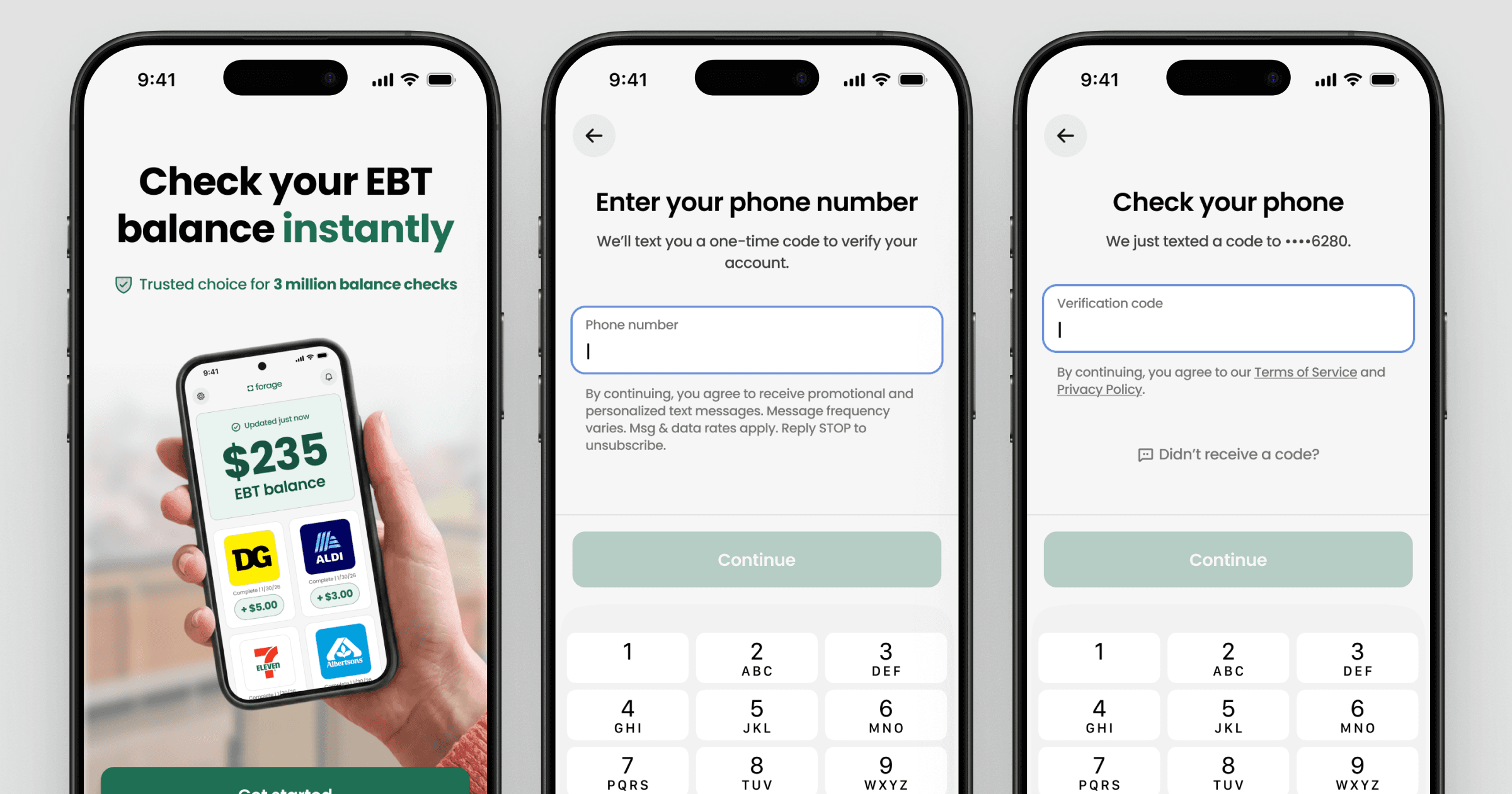
To create a Forage account:
Download the Forage app
Enter a valid U.S. phone number
Enter the verification code sent by SMS
Follow the remaining instructions on your screen
You can then link your EBT card to check your balance in seconds.
If you're having trouble signing up
Here are the most common reasons sign-up doesn't work:
Your phone number can't receive SMS.
Make sure it's a valid U.S. number and that your phone has service.
The app needs to be updated.
Check the App Store or Google Play for the latest version.
The app isn't functioning correctly.
Closing the app completely and reopen it, then try again. Also, make sure you have a stable internet connection.
You're receiving errors while linking your EBT card.
Follow this guide to troubleshoot issues with your EBT card or PIN.
If sign-up still isn't working after trying the above, email us at app-support@joinforage.com and let us know what you're seeing.
How sign-in works
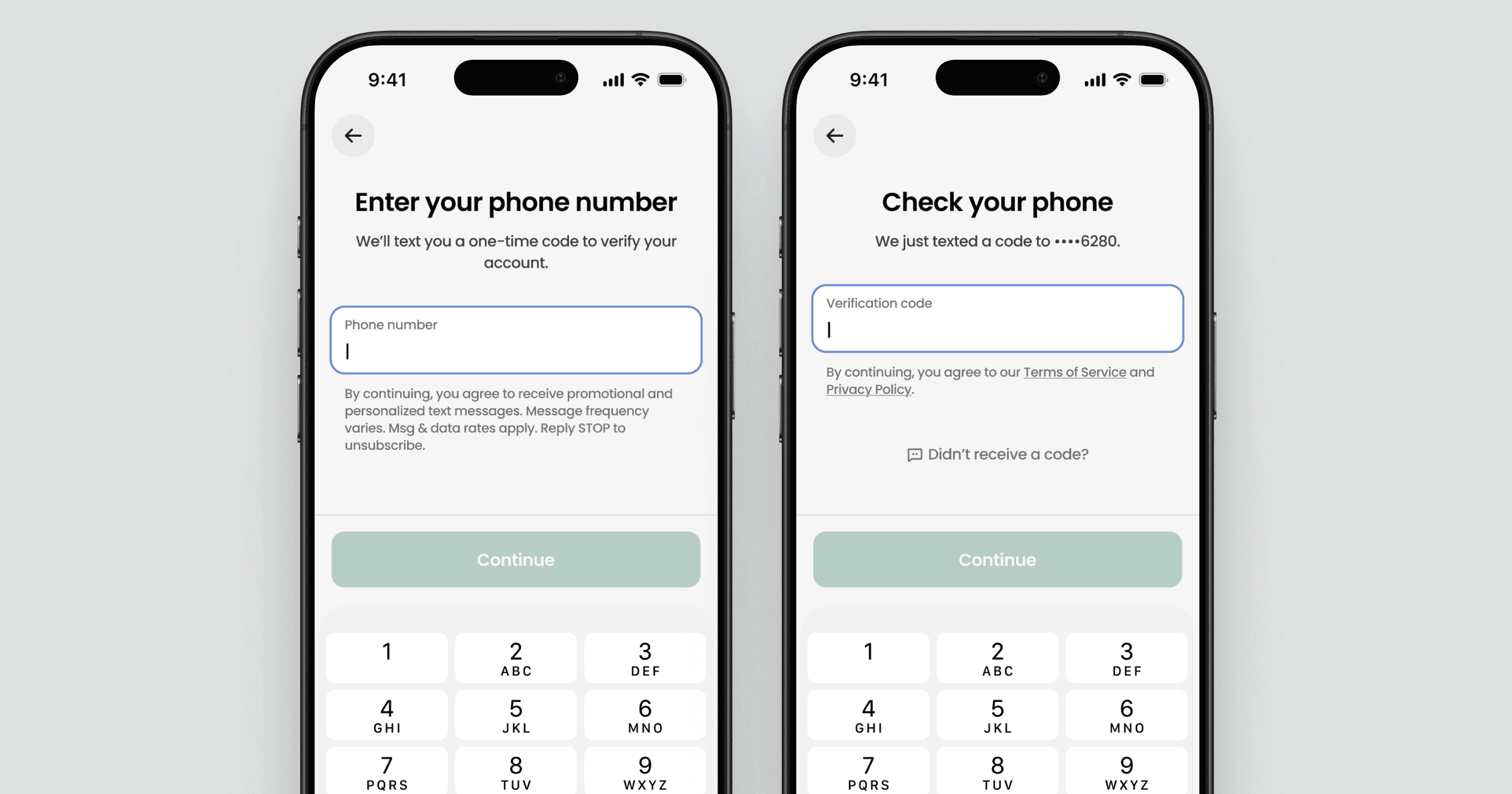
To sign back into Forage:
Enter the phone number linked to your account
Enter the verification code sent by SMS
If you're having trouble signing back in
Here are the most common reasons sign-in doesn't work:
Your phone number isn't correct.
Make sure you're entering the phone number you used to create your account.
You can't receive text messages at that number.
Make sure your phone has service and messages aren't filtered or blocked.
If you no longer have access to that phone number, you'll need to change your phone number.
If sign-in still isn't working after trying the above, email us at app-support@joinforage.com and let us know what you're seeing.
I can't sign-in / sign-up
What to check if you're having trouble getting into Forage.
If you’re having trouble signing up for Forage or signing back in, the issue is usually quick to fix. This guide walks through how sign-up and sign-in work, and what to do if something isn’t going through.
How sign-up works
To create a Forage account:
Download the Forage app
Enter a valid U.S. phone number
Enter the verification code sent by SMS
Follow the remaining instructions on your screen
You can then link your EBT card to check your balance in seconds.
If you're having trouble signing up
Here are the most common reasons sign-up doesn't work:
Your phone number can't receive SMS.
Make sure it's a valid U.S. number and that your phone has service.
The app needs to be updated.
Check the App Store or Google Play for the latest version.
The app isn't functioning correctly.
Closing the app completely and reopen it, then try again. Also, make sure you have a stable internet connection.
You're receiving errors while linking your EBT card.
Follow this guide to troubleshoot issues with your EBT card or PIN.
If sign-up still isn't working after trying the above, email us at app-support@joinforage.com and let us know what you're seeing.
How sign-in works
To sign back into Forage:
Enter the phone number linked to your account
Enter the verification code sent by SMS
If you're having trouble signing back in
Here are the most common reasons sign-in doesn't work:
Your phone number isn't correct.
Make sure you're entering the phone number you used to create your account.
You can't receive text messages at that number.
Make sure your phone has service and messages aren't filtered or blocked.
If you no longer have access to that phone number, you'll need to change your phone number.
If sign-in still isn't working after trying the above, email us at app-support@joinforage.com and let us know what you're seeing.
I can't sign-in / sign-up
What to check if you're having trouble getting into Forage.
If you’re having trouble signing up for Forage or signing back in, the issue is usually quick to fix. This guide walks through how sign-up and sign-in work, and what to do if something isn’t going through.
How sign-up works
To create a Forage account:
Download the Forage app
Enter a valid U.S. phone number
Enter the verification code sent by SMS
Follow the remaining instructions on your screen
You can then link your EBT card to check your balance in seconds.
If you're having trouble signing up
Here are the most common reasons sign-up doesn't work:
Your phone number can't receive SMS.
Make sure it's a valid U.S. number and that your phone has service.
The app needs to be updated.
Check the App Store or Google Play for the latest version.
The app isn't functioning correctly.
Closing the app completely and reopen it, then try again. Also, make sure you have a stable internet connection.
You're receiving errors while linking your EBT card.
Follow this guide to troubleshoot issues with your EBT card or PIN.
If sign-up still isn't working after trying the above, email us at app-support@joinforage.com and let us know what you're seeing.
How sign-in works
To sign back into Forage:
Enter the phone number linked to your account
Enter the verification code sent by SMS
If you're having trouble signing back in
Here are the most common reasons sign-in doesn't work:
Your phone number isn't correct.
Make sure you're entering the phone number you used to create your account.
You can't receive text messages at that number.
Make sure your phone has service and messages aren't filtered or blocked.
If you no longer have access to that phone number, you'll need to change your phone number.
If sign-in still isn't working after trying the above, email us at app-support@joinforage.com and let us know what you're seeing.
I can't sign-in / sign-up
What to check if you're having trouble getting into Forage.
If you’re having trouble signing up for Forage or signing back in, the issue is usually quick to fix. This guide walks through how sign-up and sign-in work, and what to do if something isn’t going through.
How sign-up works
To create a Forage account:
Download the Forage app
Enter a valid U.S. phone number
Enter the verification code sent by SMS
Follow the remaining instructions on your screen
You can then link your EBT card to check your balance in seconds.
If you're having trouble signing up
Here are the most common reasons sign-up doesn't work:
Your phone number can't receive SMS.
Make sure it's a valid U.S. number and that your phone has service.
The app needs to be updated.
Check the App Store or Google Play for the latest version.
The app isn't functioning correctly.
Closing the app completely and reopen it, then try again. Also, make sure you have a stable internet connection.
You're receiving errors while linking your EBT card.
Follow this guide to troubleshoot issues with your EBT card or PIN.
If sign-up still isn't working after trying the above, email us at app-support@joinforage.com and let us know what you're seeing.
How sign-in works
To sign back into Forage:
Enter the phone number linked to your account
Enter the verification code sent by SMS
If you're having trouble signing back in
Here are the most common reasons sign-in doesn't work:
Your phone number isn't correct.
Make sure you're entering the phone number you used to create your account.
You can't receive text messages at that number.
Make sure your phone has service and messages aren't filtered or blocked.
If you no longer have access to that phone number, you'll need to change your phone number.
If sign-in still isn't working after trying the above, email us at app-support@joinforage.com and let us know what you're seeing.
I can't sign-in / sign-up
What to check if you're having trouble getting into Forage.
If you’re having trouble signing up for Forage or signing back in, the issue is usually quick to fix. This guide walks through how sign-up and sign-in work, and what to do if something isn’t going through.
How sign-up works
To create a Forage account:
Download the Forage app
Enter a valid U.S. phone number
Enter the verification code sent by SMS
Follow the remaining instructions on your screen
You can then link your EBT card to check your balance in seconds.
If you're having trouble signing up
Here are the most common reasons sign-up doesn't work:
Your phone number can't receive SMS.
Make sure it's a valid U.S. number and that your phone has service.
The app needs to be updated.
Check the App Store or Google Play for the latest version.
The app isn't functioning correctly.
Closing the app completely and reopen it, then try again. Also, make sure you have a stable internet connection.
You're receiving errors while linking your EBT card.
Follow this guide to troubleshoot issues with your EBT card or PIN.
If sign-up still isn't working after trying the above, email us at app-support@joinforage.com and let us know what you're seeing.
How sign-in works
To sign back into Forage:
Enter the phone number linked to your account
Enter the verification code sent by SMS
If you're having trouble signing back in
Here are the most common reasons sign-in doesn't work:
Your phone number isn't correct.
Make sure you're entering the phone number you used to create your account.
You can't receive text messages at that number.
Make sure your phone has service and messages aren't filtered or blocked.
If you no longer have access to that phone number, you'll need to change your phone number.
If sign-in still isn't working after trying the above, email us at app-support@joinforage.com and let us know what you're seeing.
I can't sign-in / sign-up
What to check if you're having trouble getting into Forage.
If you’re having trouble signing up for Forage or signing back in, the issue is usually quick to fix. This guide walks through how sign-up and sign-in work, and what to do if something isn’t going through.
How sign-up works
To create a Forage account:
Download the Forage app
Enter a valid U.S. phone number
Enter the verification code sent by SMS
Follow the remaining instructions on your screen
You can then link your EBT card to check your balance in seconds.
If you're having trouble signing up
Here are the most common reasons sign-up doesn't work:
Your phone number can't receive SMS.
Make sure it's a valid U.S. number and that your phone has service.
The app needs to be updated.
Check the App Store or Google Play for the latest version.
The app isn't functioning correctly.
Closing the app completely and reopen it, then try again. Also, make sure you have a stable internet connection.
You're receiving errors while linking your EBT card.
Follow this guide to troubleshoot issues with your EBT card or PIN.
If sign-up still isn't working after trying the above, email us at app-support@joinforage.com and let us know what you're seeing.
How sign-in works
To sign back into Forage:
Enter the phone number linked to your account
Enter the verification code sent by SMS
If you're having trouble signing back in
Here are the most common reasons sign-in doesn't work:
Your phone number isn't correct.
Make sure you're entering the phone number you used to create your account.
You can't receive text messages at that number.
Make sure your phone has service and messages aren't filtered or blocked.
If you no longer have access to that phone number, you'll need to change your phone number.
If sign-in still isn't working after trying the above, email us at app-support@joinforage.com and let us know what you're seeing.
I can't sign-in / sign-up
What to check if you're having trouble getting into Forage.
If you’re having trouble signing up for Forage or signing back in, the issue is usually quick to fix. This guide walks through how sign-up and sign-in work, and what to do if something isn’t going through.
How sign-up works
To create a Forage account:
Download the Forage app
Enter a valid U.S. phone number
Enter the verification code sent by SMS
Follow the remaining instructions on your screen
You can then link your EBT card to check your balance in seconds.
If you're having trouble signing up
Here are the most common reasons sign-up doesn't work:
Your phone number can't receive SMS.
Make sure it's a valid U.S. number and that your phone has service.
The app needs to be updated.
Check the App Store or Google Play for the latest version.
The app isn't functioning correctly.
Closing the app completely and reopen it, then try again. Also, make sure you have a stable internet connection.
You're receiving errors while linking your EBT card.
Follow this guide to troubleshoot issues with your EBT card or PIN.
If sign-up still isn't working after trying the above, email us at app-support@joinforage.com and let us know what you're seeing.
How sign-in works
To sign back into Forage:
Enter the phone number linked to your account
Enter the verification code sent by SMS
If you're having trouble signing back in
Here are the most common reasons sign-in doesn't work:
Your phone number isn't correct.
Make sure you're entering the phone number you used to create your account.
You can't receive text messages at that number.
Make sure your phone has service and messages aren't filtered or blocked.
If you no longer have access to that phone number, you'll need to change your phone number.
If sign-in still isn't working after trying the above, email us at app-support@joinforage.com and let us know what you're seeing.
Forage is equal opportunity. ©️ 2026 Forage Technology Corporation, Inc.
Forage is equal opportunity. ©️ 2026 Forage Technology Corporation, Inc.
Forage is equal opportunity. ©️ 2026 Forage Technology Corporation, Inc.
Forage is equal opportunity. ©️ 2026 Forage Technology Corporation, Inc.
Forage is equal opportunity. ©️ 2026 Forage Technology Corporation, Inc.
Forage is equal opportunity. ©️ 2026 Forage Technology Corporation, Inc.
Forage is equal opportunity. ©️ 2026 Forage Technology Corporation, Inc.