How do I change my phone number?
A quick guide to updating your account information.
Your phone number is how you sign in to your Forage account. You can't change it yourself yet, but you can start the change right from the app and our team will take care of the rest.
How to change your phone number
Open Settings and find your phone number under Personal information.
Tap your Phone number.
A support chat opens with a message already written for you. Just tap send.
Scout, our support assistant, will connect you with a human agent who can update your number.
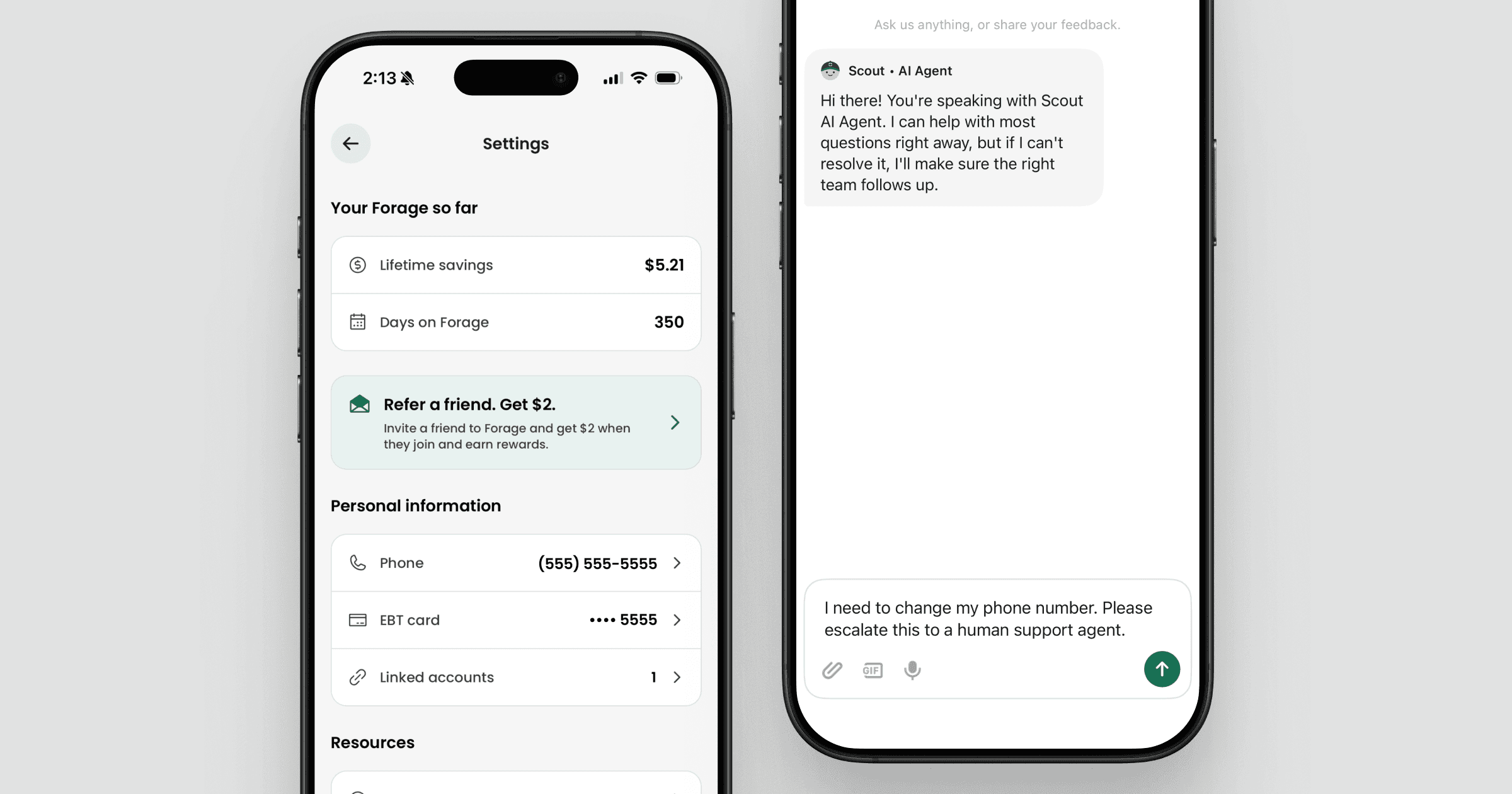
That's it. You don't need to write anything yourself. Sending the prefilled message is all it takes to get started.
Don't see a caret next to your phone number?
If there's no arrow to the right of your phone number in Settings, you're on an older version of the app. Update Forage, then open Settings and try again.
You can update in two ways: tap the blue Update banner on the Home tab, or update Forage directly in the App Store or Google Play.
What happens next
A human agent will confirm a few details to make sure they're updating the right account, then change your number on file. Once it's updated, you'll sign in with your new number.
Still need help?
If you can't get to the support chat or you're having trouble signing in, reach out from the Contact support option in Settings.
How do I change my phone number?
A quick guide to updating your account information.
Your phone number is how you sign in to your Forage account. You can't change it yourself yet, but you can start the change right from the app and our team will take care of the rest.
How to change your phone number
Open Settings and find your phone number under Personal information.
Tap your Phone number.
A support chat opens with a message already written for you. Just tap send.
Scout, our support assistant, will connect you with a human agent who can update your number.
That's it. You don't need to write anything yourself. Sending the prefilled message is all it takes to get started.
Don't see a caret next to your phone number?
If there's no arrow to the right of your phone number in Settings, you're on an older version of the app. Update Forage, then open Settings and try again.
You can update in two ways: tap the blue Update banner on the Home tab, or update Forage directly in the App Store or Google Play.
What happens next
A human agent will confirm a few details to make sure they're updating the right account, then change your number on file. Once it's updated, you'll sign in with your new number.
Still need help?
If you can't get to the support chat or you're having trouble signing in, reach out from the Contact support option in Settings.
How do I change my phone number?
A quick guide to updating your account information.
Your phone number is how you sign in to your Forage account. You can't change it yourself yet, but you can start the change right from the app and our team will take care of the rest.
How to change your phone number
Open Settings and find your phone number under Personal information.
Tap your Phone number.
A support chat opens with a message already written for you. Just tap send.
Scout, our support assistant, will connect you with a human agent who can update your number.
That's it. You don't need to write anything yourself. Sending the prefilled message is all it takes to get started.
Don't see a caret next to your phone number?
If there's no arrow to the right of your phone number in Settings, you're on an older version of the app. Update Forage, then open Settings and try again.
You can update in two ways: tap the blue Update banner on the Home tab, or update Forage directly in the App Store or Google Play.
What happens next
A human agent will confirm a few details to make sure they're updating the right account, then change your number on file. Once it's updated, you'll sign in with your new number.
Still need help?
If you can't get to the support chat or you're having trouble signing in, reach out from the Contact support option in Settings.
How do I change my phone number?
A quick guide to updating your account information.
Your phone number is how you sign in to your Forage account. You can't change it yourself yet, but you can start the change right from the app and our team will take care of the rest.
How to change your phone number
Open Settings and find your phone number under Personal information.
Tap your Phone number.
A support chat opens with a message already written for you. Just tap send.
Scout, our support assistant, will connect you with a human agent who can update your number.
That's it. You don't need to write anything yourself. Sending the prefilled message is all it takes to get started.
Don't see a caret next to your phone number?
If there's no arrow to the right of your phone number in Settings, you're on an older version of the app. Update Forage, then open Settings and try again.
You can update in two ways: tap the blue Update banner on the Home tab, or update Forage directly in the App Store or Google Play.
What happens next
A human agent will confirm a few details to make sure they're updating the right account, then change your number on file. Once it's updated, you'll sign in with your new number.
Still need help?
If you can't get to the support chat or you're having trouble signing in, reach out from the Contact support option in Settings.
How do I change my phone number?
A quick guide to updating your account information.
Your phone number is how you sign in to your Forage account. You can't change it yourself yet, but you can start the change right from the app and our team will take care of the rest.
How to change your phone number
Open Settings and find your phone number under Personal information.
Tap your Phone number.
A support chat opens with a message already written for you. Just tap send.
Scout, our support assistant, will connect you with a human agent who can update your number.
That's it. You don't need to write anything yourself. Sending the prefilled message is all it takes to get started.
Don't see a caret next to your phone number?
If there's no arrow to the right of your phone number in Settings, you're on an older version of the app. Update Forage, then open Settings and try again.
You can update in two ways: tap the blue Update banner on the Home tab, or update Forage directly in the App Store or Google Play.
What happens next
A human agent will confirm a few details to make sure they're updating the right account, then change your number on file. Once it's updated, you'll sign in with your new number.
Still need help?
If you can't get to the support chat or you're having trouble signing in, reach out from the Contact support option in Settings.
How do I change my phone number?
A quick guide to updating your account information.
Your phone number is how you sign in to your Forage account. You can't change it yourself yet, but you can start the change right from the app and our team will take care of the rest.
How to change your phone number
Open Settings and find your phone number under Personal information.
Tap your Phone number.
A support chat opens with a message already written for you. Just tap send.
Scout, our support assistant, will connect you with a human agent who can update your number.
That's it. You don't need to write anything yourself. Sending the prefilled message is all it takes to get started.
Don't see a caret next to your phone number?
If there's no arrow to the right of your phone number in Settings, you're on an older version of the app. Update Forage, then open Settings and try again.
You can update in two ways: tap the blue Update banner on the Home tab, or update Forage directly in the App Store or Google Play.
What happens next
A human agent will confirm a few details to make sure they're updating the right account, then change your number on file. Once it's updated, you'll sign in with your new number.
Still need help?
If you can't get to the support chat or you're having trouble signing in, reach out from the Contact support option in Settings.
How do I change my phone number?
A quick guide to updating your account information.
Your phone number is how you sign in to your Forage account. You can't change it yourself yet, but you can start the change right from the app and our team will take care of the rest.
How to change your phone number
Open Settings and find your phone number under Personal information.
Tap your Phone number.
A support chat opens with a message already written for you. Just tap send.
Scout, our support assistant, will connect you with a human agent who can update your number.
That's it. You don't need to write anything yourself. Sending the prefilled message is all it takes to get started.
Don't see a caret next to your phone number?
If there's no arrow to the right of your phone number in Settings, you're on an older version of the app. Update Forage, then open Settings and try again.
You can update in two ways: tap the blue Update banner on the Home tab, or update Forage directly in the App Store or Google Play.
What happens next
A human agent will confirm a few details to make sure they're updating the right account, then change your number on file. Once it's updated, you'll sign in with your new number.
Still need help?
If you can't get to the support chat or you're having trouble signing in, reach out from the Contact support option in Settings.
Forage is equal opportunity. ©️ 2026 Forage Technology Corporation, Inc.
Forage is equal opportunity. ©️ 2026 Forage Technology Corporation, Inc.
Forage is equal opportunity. ©️ 2026 Forage Technology Corporation, Inc.
Forage is equal opportunity. ©️ 2026 Forage Technology Corporation, Inc.
Forage is equal opportunity. ©️ 2026 Forage Technology Corporation, Inc.
Forage is equal opportunity. ©️ 2026 Forage Technology Corporation, Inc.
Forage is equal opportunity. ©️ 2026 Forage Technology Corporation, Inc.