Why was my receipt rejected?
Common reasons receipts don't get approved and what to do next.
Start here: check the rejection reason in Forage
Every rejected receipt includes a reason in the Activity tab.
What to do:
Open Forage
Go to Activity
Tap the rejected receipt
Read the reason shown
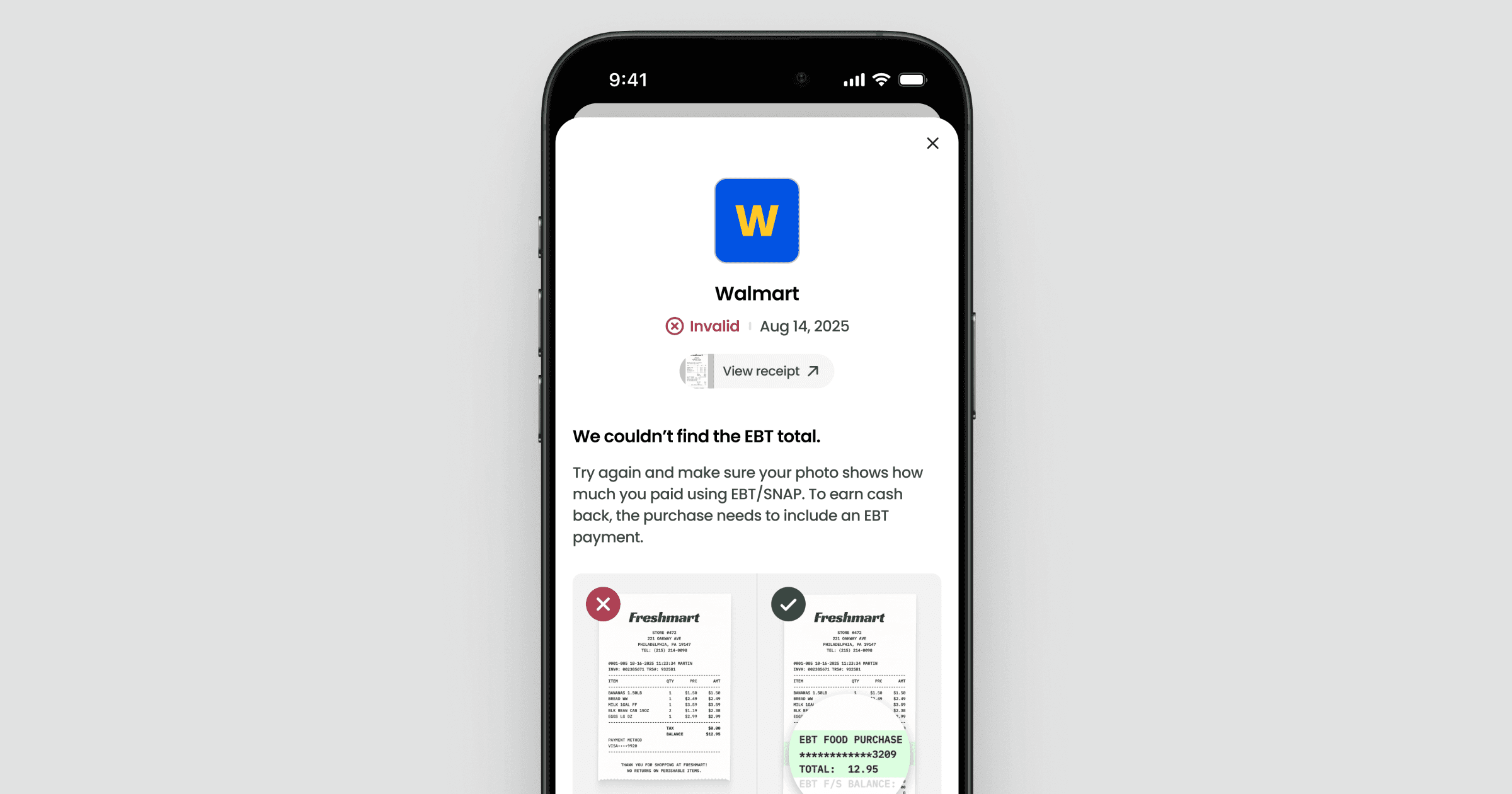
If anything is unclear, use the sections below to understand what it means and how to fix it.
Most common receipt rejection reasons
Missing EBT amount or not paid with EBT
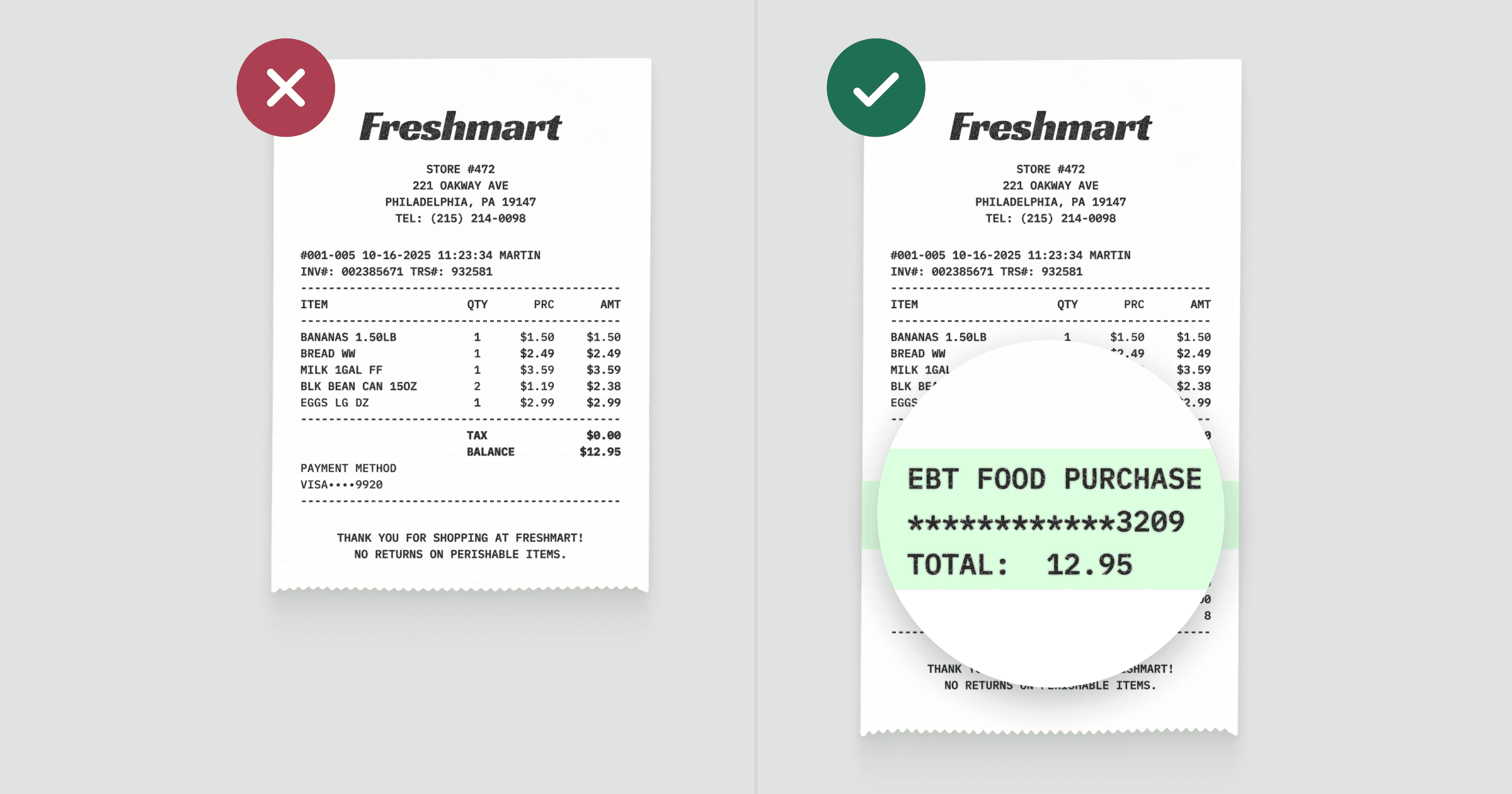
We can only approve receipts for purchases paid fully or partially with SNAP EBT. If the receipt doesn’t clearly show an EBT amount—or shows only debit or credit—it can’t be approved.
What to do:
Make sure the receipt photo clearly shows the line where SNAP or EBT Cash is listed with the amount paid.
Missing product items purchased
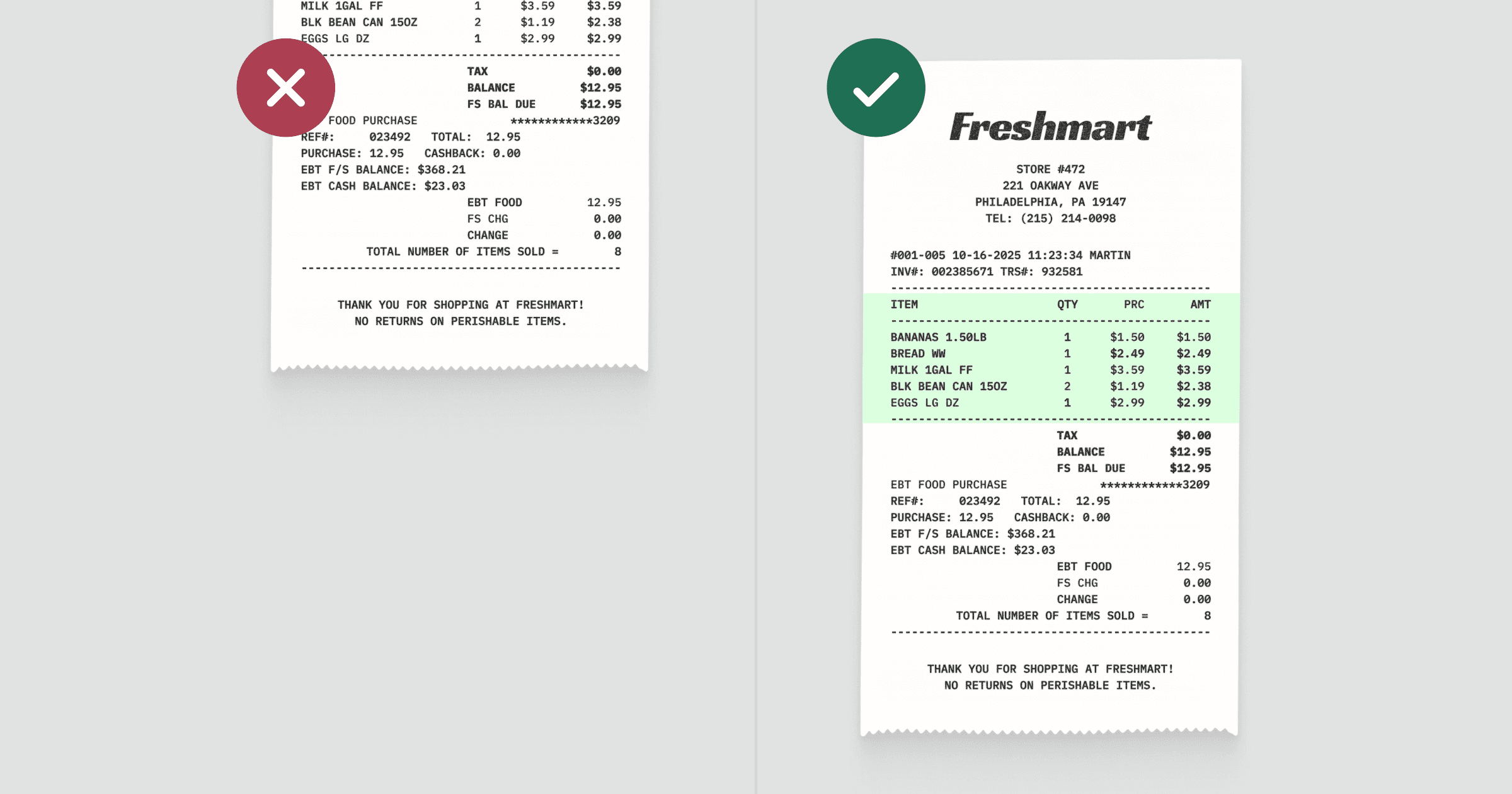
We need to see what was purchased, not just totals. If the item list is cut off or missing, we can’t verify the purchase.
What to do:
Take a photo that shows the full list of items purchased, even if that means zooming out so the receipt looks smaller.
Mismatched EBT card
The purchase must be made with the same EBT card linked to your Forage account. If the receipt was paid with a different card, it won’t be approved.
What to do:
Check that the EBT card used matches the one linked to your Forage account. If you recently changed cards, update the linked card in the app before uploading receipts.
Expired receipt
Receipts must be uploaded within 7 days of the purchase date.
What to do:
Upload receipts as soon as possible after shopping. Receipts older than 7 days aren’t eligible.
Unclear image
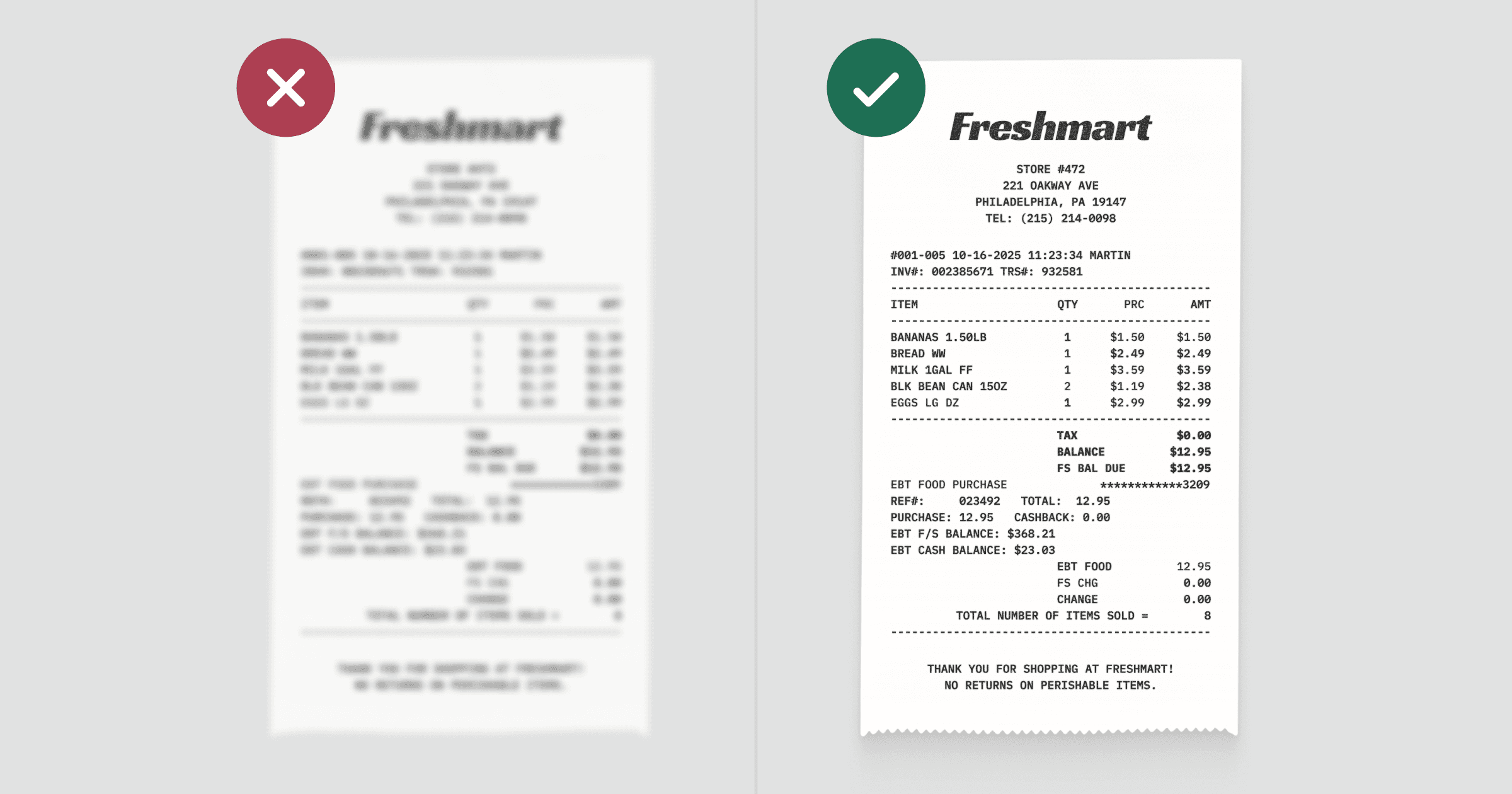
If the receipt details aren't clear and legible, the receipt can't be approved. This usually happens when the image is blurry, too dark, cropped, or taken at an angle.
What to do:
Retake the photo with the receipt:
Laid flat on a surface
Fully visible in one image
Well-lit, with no shadows
In focus and easy to read
Duplicate receipt
Each receipt can only earn rewards once, even if it’s uploaded again or by a different user.
What to do:
Upload a receipt from a different purchase.
Missing other key details
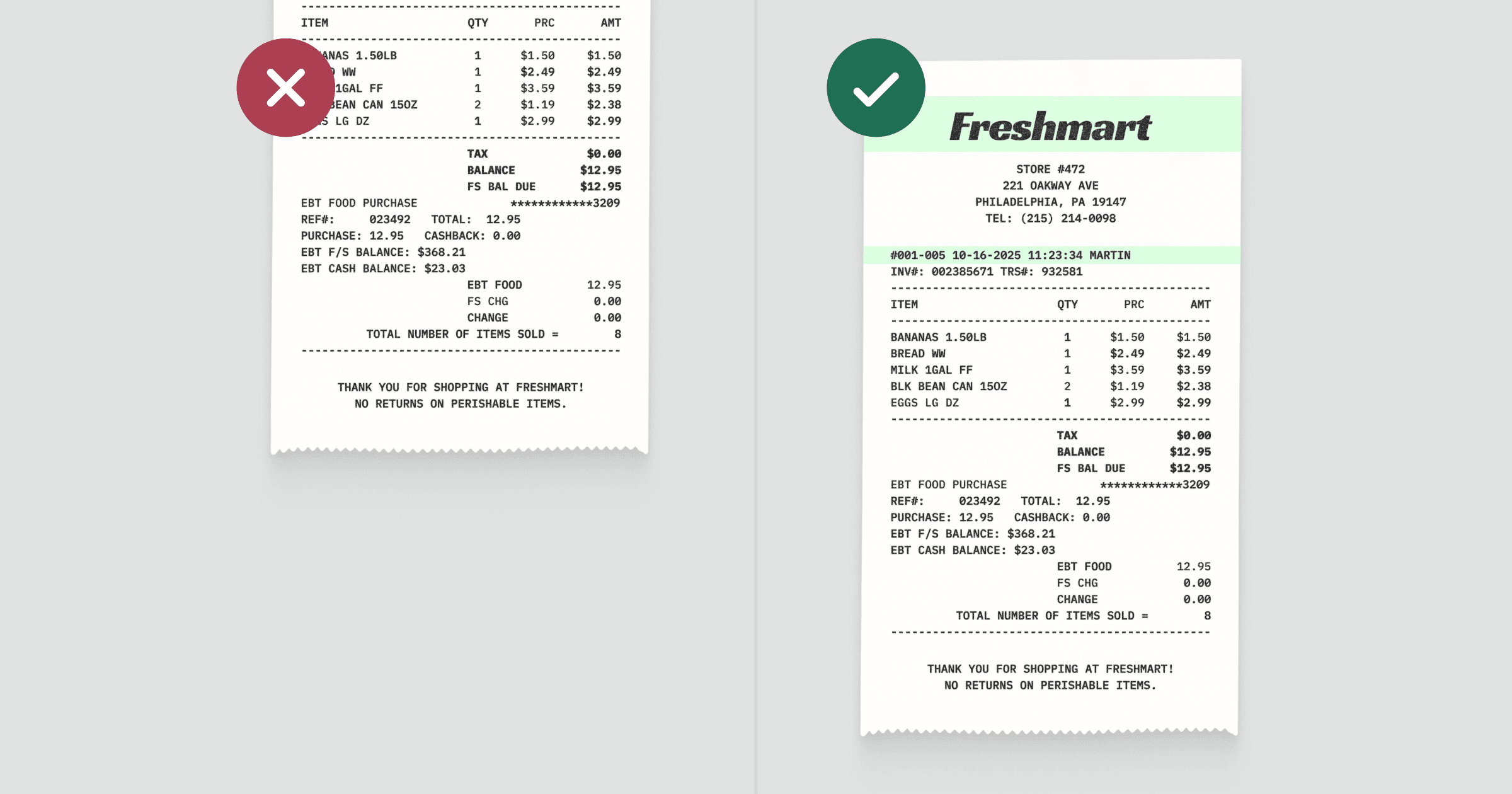
If we can’t find the store name or purchase date, we can’t approve the receipt.
What to do:
Retake the photo and make sure the top and bottom of the receipt are fully visible.
Not a receipt
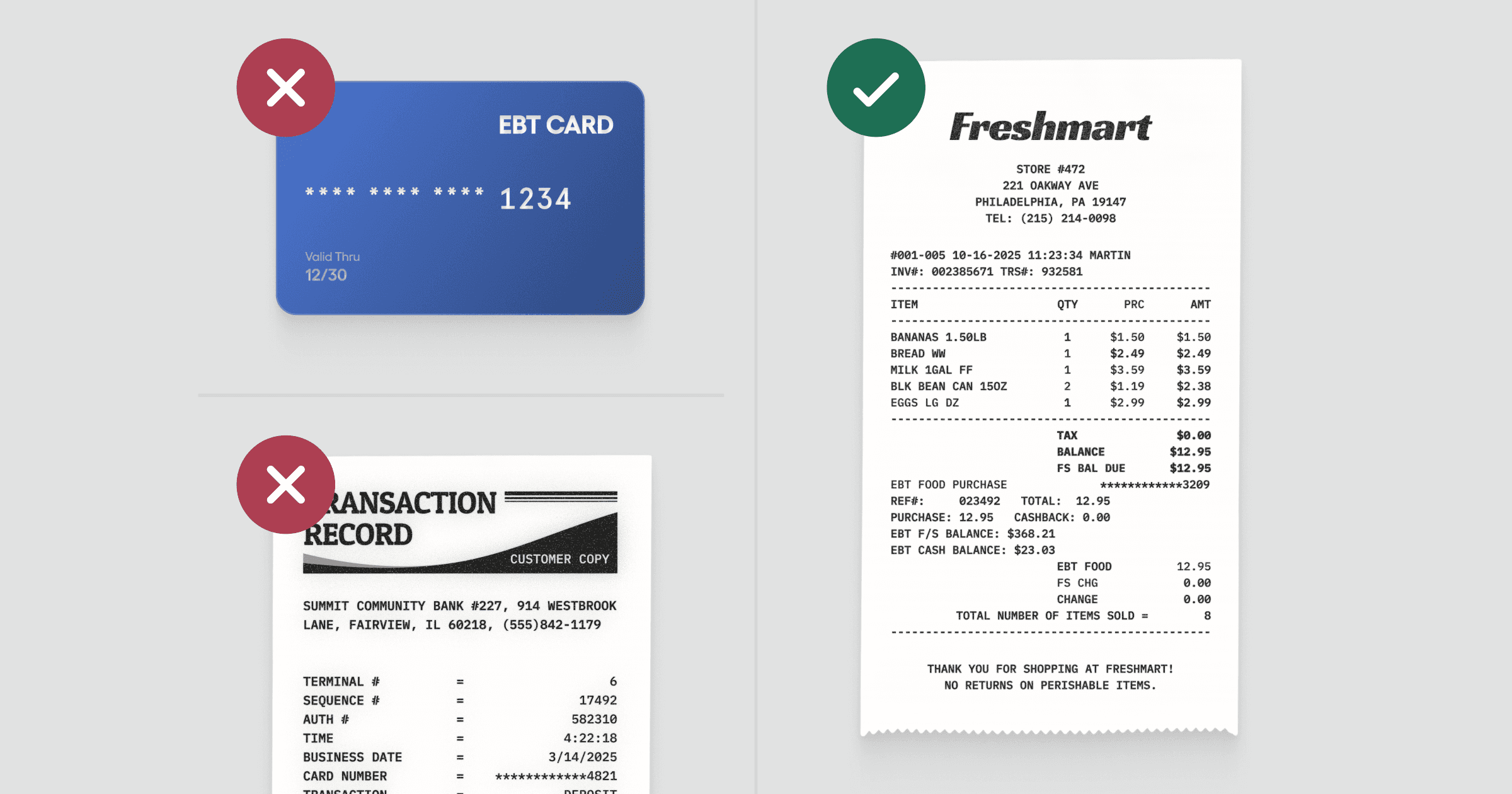
Photos of bank statements, EBT cards, order confirmations, or transaction summaries aren’t considered valid receipts.
What to do:
Upload a photo of the actual store receipt showing items purchased and EBT payment.
Still confused or think it was a mistake?
If you’ve checked the rejection reason in the app and believe your receipt meets all requirements, contact Forage Support from the app. You can also reference our Reward Terms.
Why was my receipt rejected?
Common reasons receipts don't get approved and what to do next.
Start here: check the rejection reason in Forage
Every rejected receipt includes a reason in the Activity tab.
What to do:
Open Forage
Go to Activity
Tap the rejected receipt
Read the reason shown
If anything is unclear, use the sections below to understand what it means and how to fix it.
Most common receipt rejection reasons
Missing EBT amount or not paid with EBT
We can only approve receipts for purchases paid fully or partially with SNAP EBT. If the receipt doesn’t clearly show an EBT amount—or shows only debit or credit—it can’t be approved.
What to do:
Make sure the receipt photo clearly shows the line where SNAP or EBT Cash is listed with the amount paid.
Missing product items purchased
We need to see what was purchased, not just totals. If the item list is cut off or missing, we can’t verify the purchase.
What to do:
Take a photo that shows the full list of items purchased, even if that means zooming out so the receipt looks smaller.
Mismatched EBT card
The purchase must be made with the same EBT card linked to your Forage account. If the receipt was paid with a different card, it won’t be approved.
What to do:
Check that the EBT card used matches the one linked to your Forage account. If you recently changed cards, update the linked card in the app before uploading receipts.
Expired receipt
Receipts must be uploaded within 7 days of the purchase date.
What to do:
Upload receipts as soon as possible after shopping. Receipts older than 7 days aren’t eligible.
Unclear image
If the receipt details aren't clear and legible, the receipt can't be approved. This usually happens when the image is blurry, too dark, cropped, or taken at an angle.
What to do:
Retake the photo with the receipt:
Laid flat on a surface
Fully visible in one image
Well-lit, with no shadows
In focus and easy to read
Duplicate receipt
Each receipt can only earn rewards once, even if it’s uploaded again or by a different user.
What to do:
Upload a receipt from a different purchase.
Missing other key details
If we can’t find the store name or purchase date, we can’t approve the receipt.
What to do:
Retake the photo and make sure the top and bottom of the receipt are fully visible.
Not a receipt
Photos of bank statements, EBT cards, order confirmations, or transaction summaries aren’t considered valid receipts.
What to do:
Upload a photo of the actual store receipt showing items purchased and EBT payment.
Still confused or think it was a mistake?
If you’ve checked the rejection reason in the app and believe your receipt meets all requirements, contact Forage Support from the app. You can also reference our Reward Terms.
Why was my receipt rejected?
Common reasons receipts don't get approved and what to do next.
Start here: check the rejection reason in Forage
Every rejected receipt includes a reason in the Activity tab.
What to do:
Open Forage
Go to Activity
Tap the rejected receipt
Read the reason shown
If anything is unclear, use the sections below to understand what it means and how to fix it.
Most common receipt rejection reasons
Missing EBT amount or not paid with EBT
We can only approve receipts for purchases paid fully or partially with SNAP EBT. If the receipt doesn’t clearly show an EBT amount—or shows only debit or credit—it can’t be approved.
What to do:
Make sure the receipt photo clearly shows the line where SNAP or EBT Cash is listed with the amount paid.
Missing product items purchased
We need to see what was purchased, not just totals. If the item list is cut off or missing, we can’t verify the purchase.
What to do:
Take a photo that shows the full list of items purchased, even if that means zooming out so the receipt looks smaller.
Mismatched EBT card
The purchase must be made with the same EBT card linked to your Forage account. If the receipt was paid with a different card, it won’t be approved.
What to do:
Check that the EBT card used matches the one linked to your Forage account. If you recently changed cards, update the linked card in the app before uploading receipts.
Expired receipt
Receipts must be uploaded within 7 days of the purchase date.
What to do:
Upload receipts as soon as possible after shopping. Receipts older than 7 days aren’t eligible.
Unclear image
If the receipt details aren't clear and legible, the receipt can't be approved. This usually happens when the image is blurry, too dark, cropped, or taken at an angle.
What to do:
Retake the photo with the receipt:
Laid flat on a surface
Fully visible in one image
Well-lit, with no shadows
In focus and easy to read
Duplicate receipt
Each receipt can only earn rewards once, even if it’s uploaded again or by a different user.
What to do:
Upload a receipt from a different purchase.
Missing other key details
If we can’t find the store name or purchase date, we can’t approve the receipt.
What to do:
Retake the photo and make sure the top and bottom of the receipt are fully visible.
Not a receipt
Photos of bank statements, EBT cards, order confirmations, or transaction summaries aren’t considered valid receipts.
What to do:
Upload a photo of the actual store receipt showing items purchased and EBT payment.
Still confused or think it was a mistake?
If you’ve checked the rejection reason in the app and believe your receipt meets all requirements, contact Forage Support from the app. You can also reference our Reward Terms.
Why was my receipt rejected?
Common reasons receipts don't get approved and what to do next.
Start here: check the rejection reason in Forage
Every rejected receipt includes a reason in the Activity tab.
What to do:
Open Forage
Go to Activity
Tap the rejected receipt
Read the reason shown
If anything is unclear, use the sections below to understand what it means and how to fix it.
Most common receipt rejection reasons
Missing EBT amount or not paid with EBT
We can only approve receipts for purchases paid fully or partially with SNAP EBT. If the receipt doesn’t clearly show an EBT amount—or shows only debit or credit—it can’t be approved.
What to do:
Make sure the receipt photo clearly shows the line where SNAP or EBT Cash is listed with the amount paid.
Missing product items purchased
We need to see what was purchased, not just totals. If the item list is cut off or missing, we can’t verify the purchase.
What to do:
Take a photo that shows the full list of items purchased, even if that means zooming out so the receipt looks smaller.
Mismatched EBT card
The purchase must be made with the same EBT card linked to your Forage account. If the receipt was paid with a different card, it won’t be approved.
What to do:
Check that the EBT card used matches the one linked to your Forage account. If you recently changed cards, update the linked card in the app before uploading receipts.
Expired receipt
Receipts must be uploaded within 7 days of the purchase date.
What to do:
Upload receipts as soon as possible after shopping. Receipts older than 7 days aren’t eligible.
Unclear image
If the receipt details aren't clear and legible, the receipt can't be approved. This usually happens when the image is blurry, too dark, cropped, or taken at an angle.
What to do:
Retake the photo with the receipt:
Laid flat on a surface
Fully visible in one image
Well-lit, with no shadows
In focus and easy to read
Duplicate receipt
Each receipt can only earn rewards once, even if it’s uploaded again or by a different user.
What to do:
Upload a receipt from a different purchase.
Missing other key details
If we can’t find the store name or purchase date, we can’t approve the receipt.
What to do:
Retake the photo and make sure the top and bottom of the receipt are fully visible.
Not a receipt
Photos of bank statements, EBT cards, order confirmations, or transaction summaries aren’t considered valid receipts.
What to do:
Upload a photo of the actual store receipt showing items purchased and EBT payment.
Still confused or think it was a mistake?
If you’ve checked the rejection reason in the app and believe your receipt meets all requirements, contact Forage Support from the app. You can also reference our Reward Terms.
Why was my receipt rejected?
Common reasons receipts don't get approved and what to do next.
Start here: check the rejection reason in Forage
Every rejected receipt includes a reason in the Activity tab.
What to do:
Open Forage
Go to Activity
Tap the rejected receipt
Read the reason shown
If anything is unclear, use the sections below to understand what it means and how to fix it.
Most common receipt rejection reasons
Missing EBT amount or not paid with EBT
We can only approve receipts for purchases paid fully or partially with SNAP EBT. If the receipt doesn’t clearly show an EBT amount—or shows only debit or credit—it can’t be approved.
What to do:
Make sure the receipt photo clearly shows the line where SNAP or EBT Cash is listed with the amount paid.
Missing product items purchased
We need to see what was purchased, not just totals. If the item list is cut off or missing, we can’t verify the purchase.
What to do:
Take a photo that shows the full list of items purchased, even if that means zooming out so the receipt looks smaller.
Mismatched EBT card
The purchase must be made with the same EBT card linked to your Forage account. If the receipt was paid with a different card, it won’t be approved.
What to do:
Check that the EBT card used matches the one linked to your Forage account. If you recently changed cards, update the linked card in the app before uploading receipts.
Expired receipt
Receipts must be uploaded within 7 days of the purchase date.
What to do:
Upload receipts as soon as possible after shopping. Receipts older than 7 days aren’t eligible.
Unclear image
If the receipt details aren't clear and legible, the receipt can't be approved. This usually happens when the image is blurry, too dark, cropped, or taken at an angle.
What to do:
Retake the photo with the receipt:
Laid flat on a surface
Fully visible in one image
Well-lit, with no shadows
In focus and easy to read
Duplicate receipt
Each receipt can only earn rewards once, even if it’s uploaded again or by a different user.
What to do:
Upload a receipt from a different purchase.
Missing other key details
If we can’t find the store name or purchase date, we can’t approve the receipt.
What to do:
Retake the photo and make sure the top and bottom of the receipt are fully visible.
Not a receipt
Photos of bank statements, EBT cards, order confirmations, or transaction summaries aren’t considered valid receipts.
What to do:
Upload a photo of the actual store receipt showing items purchased and EBT payment.
Still confused or think it was a mistake?
If you’ve checked the rejection reason in the app and believe your receipt meets all requirements, contact Forage Support from the app. You can also reference our Reward Terms.
Why was my receipt rejected?
Common reasons receipts don't get approved and what to do next.
Start here: check the rejection reason in Forage
Every rejected receipt includes a reason in the Activity tab.
What to do:
Open Forage
Go to Activity
Tap the rejected receipt
Read the reason shown
If anything is unclear, use the sections below to understand what it means and how to fix it.
Most common receipt rejection reasons
Missing EBT amount or not paid with EBT
We can only approve receipts for purchases paid fully or partially with SNAP EBT. If the receipt doesn’t clearly show an EBT amount—or shows only debit or credit—it can’t be approved.
What to do:
Make sure the receipt photo clearly shows the line where SNAP or EBT Cash is listed with the amount paid.
Missing product items purchased
We need to see what was purchased, not just totals. If the item list is cut off or missing, we can’t verify the purchase.
What to do:
Take a photo that shows the full list of items purchased, even if that means zooming out so the receipt looks smaller.
Mismatched EBT card
The purchase must be made with the same EBT card linked to your Forage account. If the receipt was paid with a different card, it won’t be approved.
What to do:
Check that the EBT card used matches the one linked to your Forage account. If you recently changed cards, update the linked card in the app before uploading receipts.
Expired receipt
Receipts must be uploaded within 7 days of the purchase date.
What to do:
Upload receipts as soon as possible after shopping. Receipts older than 7 days aren’t eligible.
Unclear image
If the receipt details aren't clear and legible, the receipt can't be approved. This usually happens when the image is blurry, too dark, cropped, or taken at an angle.
What to do:
Retake the photo with the receipt:
Laid flat on a surface
Fully visible in one image
Well-lit, with no shadows
In focus and easy to read
Duplicate receipt
Each receipt can only earn rewards once, even if it’s uploaded again or by a different user.
What to do:
Upload a receipt from a different purchase.
Missing other key details
If we can’t find the store name or purchase date, we can’t approve the receipt.
What to do:
Retake the photo and make sure the top and bottom of the receipt are fully visible.
Not a receipt
Photos of bank statements, EBT cards, order confirmations, or transaction summaries aren’t considered valid receipts.
What to do:
Upload a photo of the actual store receipt showing items purchased and EBT payment.
Still confused or think it was a mistake?
If you’ve checked the rejection reason in the app and believe your receipt meets all requirements, contact Forage Support from the app. You can also reference our Reward Terms.
Why was my receipt rejected?
Common reasons receipts don't get approved and what to do next.
Start here: check the rejection reason in Forage
Every rejected receipt includes a reason in the Activity tab.
What to do:
Open Forage
Go to Activity
Tap the rejected receipt
Read the reason shown
If anything is unclear, use the sections below to understand what it means and how to fix it.
Most common receipt rejection reasons
Missing EBT amount or not paid with EBT
We can only approve receipts for purchases paid fully or partially with SNAP EBT. If the receipt doesn’t clearly show an EBT amount—or shows only debit or credit—it can’t be approved.
What to do:
Make sure the receipt photo clearly shows the line where SNAP or EBT Cash is listed with the amount paid.
Missing product items purchased
We need to see what was purchased, not just totals. If the item list is cut off or missing, we can’t verify the purchase.
What to do:
Take a photo that shows the full list of items purchased, even if that means zooming out so the receipt looks smaller.
Mismatched EBT card
The purchase must be made with the same EBT card linked to your Forage account. If the receipt was paid with a different card, it won’t be approved.
What to do:
Check that the EBT card used matches the one linked to your Forage account. If you recently changed cards, update the linked card in the app before uploading receipts.
Expired receipt
Receipts must be uploaded within 7 days of the purchase date.
What to do:
Upload receipts as soon as possible after shopping. Receipts older than 7 days aren’t eligible.
Unclear image
If the receipt details aren't clear and legible, the receipt can't be approved. This usually happens when the image is blurry, too dark, cropped, or taken at an angle.
What to do:
Retake the photo with the receipt:
Laid flat on a surface
Fully visible in one image
Well-lit, with no shadows
In focus and easy to read
Duplicate receipt
Each receipt can only earn rewards once, even if it’s uploaded again or by a different user.
What to do:
Upload a receipt from a different purchase.
Missing other key details
If we can’t find the store name or purchase date, we can’t approve the receipt.
What to do:
Retake the photo and make sure the top and bottom of the receipt are fully visible.
Not a receipt
Photos of bank statements, EBT cards, order confirmations, or transaction summaries aren’t considered valid receipts.
What to do:
Upload a photo of the actual store receipt showing items purchased and EBT payment.
Still confused or think it was a mistake?
If you’ve checked the rejection reason in the app and believe your receipt meets all requirements, contact Forage Support from the app. You can also reference our Reward Terms.
Forage is equal opportunity. ©️ 2026 Forage Technology Corporation, Inc.
Forage is equal opportunity. ©️ 2026 Forage Technology Corporation, Inc.
Forage is equal opportunity. ©️ 2026 Forage Technology Corporation, Inc.
Forage is equal opportunity. ©️ 2026 Forage Technology Corporation, Inc.
Forage is equal opportunity. ©️ 2026 Forage Technology Corporation, Inc.
Forage is equal opportunity. ©️ 2026 Forage Technology Corporation, Inc.
Forage is equal opportunity. ©️ 2026 Forage Technology Corporation, Inc.