Can I link more than one EBT card to my Forage account?
You currently can link one EBT card to your Forage account at a time. Here's how it works.
You can link one EBT card to your Forage account at a time. If you have more than one card, here's how to use them.
One card per account
Right now, you can link only one EBT card to your Forage account. You can change which card is linked whenever you need to, but you can't link two cards to the same account at the same time.
We know some of you have more than one card you'd like to use, and we hope to support that down the road.
The best way to use more than one card
If you regularly use more than one EBT card, the best setup is one card per Forage account, with a different family member on each account. Ask another adult in your household (18+) to download Forage and link the other card. Each account keeps its own balance and earns its own rewards.
We don't recommend creating more than one account for yourself. Accounts can't be merged later, so keeping one card per person is the simplest way to avoid headaches.
Switching between your cards
If you'd rather keep one account and switch cards now and then, you can:
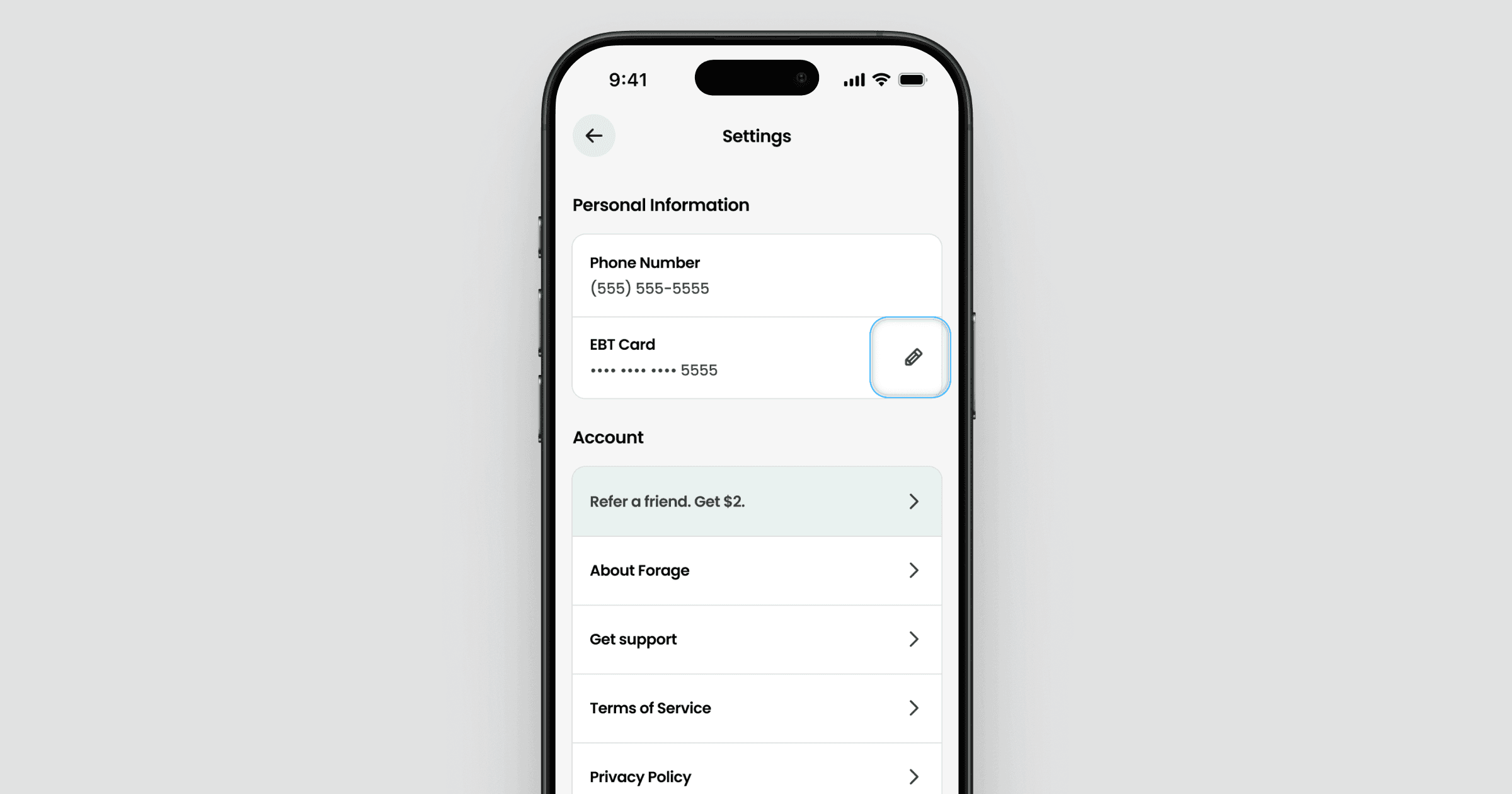
Open Forage and go to Settings.
Tap the pencil icon next to your EBT card.
Follow the prompts to unlink, then link the card you want to use.
Your rewards are safe when you switch. Once you've earned rewards, they're tied to your Forage account, not your EBT card. They stay in the Activity tab and you can withdraw them once you hit the minimum, even after you switch cards. Just remember you only can earn new rewards on purchases made with the card that's linked at the time.
A note on linking and unlinking often
For security reasons, there are limits on how often you can link and unlink cards. If you switch back and forth too frequently, you may temporarily be unable to link a card back to your account.
So switch only when you need to. If you find yourself swapping cards a lot, that's a sign you'd be better off with one card per account across your family members.
Got a Summer EBT card?
Summer EBT cards work like any other EBT card in Forage. This is a common time to end up with an extra card, so it's a good moment to get set up the right way.
If your household received a Summer EBT card on top of your regular SNAP card, the easiest approach is to have another family member (18+) create their own Forage account and link the new card. That way each card earns rewards on its own account, and no one has to switch back and forth.
Need a refresher on linking? See How do I link my EBT card to my Forage account?
Forage does not issue or manage your SNAP benefits. Linking or unlinking a card in Forage never changes your benefits or affects your EBT account.
Still need help?
If you're stuck switching cards or can't link a card back to your account, reach out to Forage Support from the app. Tell us which card you're trying to link and what message you're seeing, and we'll help sort it out.
Can I link more than one EBT card to my Forage account?
You currently can link one EBT card to your Forage account at a time. Here's how it works.
You can link one EBT card to your Forage account at a time. If you have more than one card, here's how to use them.
One card per account
Right now, you can link only one EBT card to your Forage account. You can change which card is linked whenever you need to, but you can't link two cards to the same account at the same time.
We know some of you have more than one card you'd like to use, and we hope to support that down the road.
The best way to use more than one card
If you regularly use more than one EBT card, the best setup is one card per Forage account, with a different family member on each account. Ask another adult in your household (18+) to download Forage and link the other card. Each account keeps its own balance and earns its own rewards.
We don't recommend creating more than one account for yourself. Accounts can't be merged later, so keeping one card per person is the simplest way to avoid headaches.
Switching between your cards
If you'd rather keep one account and switch cards now and then, you can:
Open Forage and go to Settings.
Tap the pencil icon next to your EBT card.
Follow the prompts to unlink, then link the card you want to use.
Your rewards are safe when you switch. Once you've earned rewards, they're tied to your Forage account, not your EBT card. They stay in the Activity tab and you can withdraw them once you hit the minimum, even after you switch cards. Just remember you only can earn new rewards on purchases made with the card that's linked at the time.
A note on linking and unlinking often
For security reasons, there are limits on how often you can link and unlink cards. If you switch back and forth too frequently, you may temporarily be unable to link a card back to your account.
So switch only when you need to. If you find yourself swapping cards a lot, that's a sign you'd be better off with one card per account across your family members.
Got a Summer EBT card?
Summer EBT cards work like any other EBT card in Forage. This is a common time to end up with an extra card, so it's a good moment to get set up the right way.
If your household received a Summer EBT card on top of your regular SNAP card, the easiest approach is to have another family member (18+) create their own Forage account and link the new card. That way each card earns rewards on its own account, and no one has to switch back and forth.
Need a refresher on linking? See How do I link my EBT card to my Forage account?
Forage does not issue or manage your SNAP benefits. Linking or unlinking a card in Forage never changes your benefits or affects your EBT account.
Still need help?
If you're stuck switching cards or can't link a card back to your account, reach out to Forage Support from the app. Tell us which card you're trying to link and what message you're seeing, and we'll help sort it out.
Can I link more than one EBT card to my Forage account?
You currently can link one EBT card to your Forage account at a time. Here's how it works.
You can link one EBT card to your Forage account at a time. If you have more than one card, here's how to use them.
One card per account
Right now, you can link only one EBT card to your Forage account. You can change which card is linked whenever you need to, but you can't link two cards to the same account at the same time.
We know some of you have more than one card you'd like to use, and we hope to support that down the road.
The best way to use more than one card
If you regularly use more than one EBT card, the best setup is one card per Forage account, with a different family member on each account. Ask another adult in your household (18+) to download Forage and link the other card. Each account keeps its own balance and earns its own rewards.
We don't recommend creating more than one account for yourself. Accounts can't be merged later, so keeping one card per person is the simplest way to avoid headaches.
Switching between your cards
If you'd rather keep one account and switch cards now and then, you can:
Open Forage and go to Settings.
Tap the pencil icon next to your EBT card.
Follow the prompts to unlink, then link the card you want to use.
Your rewards are safe when you switch. Once you've earned rewards, they're tied to your Forage account, not your EBT card. They stay in the Activity tab and you can withdraw them once you hit the minimum, even after you switch cards. Just remember you only can earn new rewards on purchases made with the card that's linked at the time.
A note on linking and unlinking often
For security reasons, there are limits on how often you can link and unlink cards. If you switch back and forth too frequently, you may temporarily be unable to link a card back to your account.
So switch only when you need to. If you find yourself swapping cards a lot, that's a sign you'd be better off with one card per account across your family members.
Got a Summer EBT card?
Summer EBT cards work like any other EBT card in Forage. This is a common time to end up with an extra card, so it's a good moment to get set up the right way.
If your household received a Summer EBT card on top of your regular SNAP card, the easiest approach is to have another family member (18+) create their own Forage account and link the new card. That way each card earns rewards on its own account, and no one has to switch back and forth.
Need a refresher on linking? See How do I link my EBT card to my Forage account?
Forage does not issue or manage your SNAP benefits. Linking or unlinking a card in Forage never changes your benefits or affects your EBT account.
Still need help?
If you're stuck switching cards or can't link a card back to your account, reach out to Forage Support from the app. Tell us which card you're trying to link and what message you're seeing, and we'll help sort it out.
Can I link more than one EBT card to my Forage account?
You currently can link one EBT card to your Forage account at a time. Here's how it works.
You can link one EBT card to your Forage account at a time. If you have more than one card, here's how to use them.
One card per account
Right now, you can link only one EBT card to your Forage account. You can change which card is linked whenever you need to, but you can't link two cards to the same account at the same time.
We know some of you have more than one card you'd like to use, and we hope to support that down the road.
The best way to use more than one card
If you regularly use more than one EBT card, the best setup is one card per Forage account, with a different family member on each account. Ask another adult in your household (18+) to download Forage and link the other card. Each account keeps its own balance and earns its own rewards.
We don't recommend creating more than one account for yourself. Accounts can't be merged later, so keeping one card per person is the simplest way to avoid headaches.
Switching between your cards
If you'd rather keep one account and switch cards now and then, you can:
Open Forage and go to Settings.
Tap the pencil icon next to your EBT card.
Follow the prompts to unlink, then link the card you want to use.
Your rewards are safe when you switch. Once you've earned rewards, they're tied to your Forage account, not your EBT card. They stay in the Activity tab and you can withdraw them once you hit the minimum, even after you switch cards. Just remember you only can earn new rewards on purchases made with the card that's linked at the time.
A note on linking and unlinking often
For security reasons, there are limits on how often you can link and unlink cards. If you switch back and forth too frequently, you may temporarily be unable to link a card back to your account.
So switch only when you need to. If you find yourself swapping cards a lot, that's a sign you'd be better off with one card per account across your family members.
Got a Summer EBT card?
Summer EBT cards work like any other EBT card in Forage. This is a common time to end up with an extra card, so it's a good moment to get set up the right way.
If your household received a Summer EBT card on top of your regular SNAP card, the easiest approach is to have another family member (18+) create their own Forage account and link the new card. That way each card earns rewards on its own account, and no one has to switch back and forth.
Need a refresher on linking? See How do I link my EBT card to my Forage account?
Forage does not issue or manage your SNAP benefits. Linking or unlinking a card in Forage never changes your benefits or affects your EBT account.
Still need help?
If you're stuck switching cards or can't link a card back to your account, reach out to Forage Support from the app. Tell us which card you're trying to link and what message you're seeing, and we'll help sort it out.
Can I link more than one EBT card to my Forage account?
You currently can link one EBT card to your Forage account at a time. Here's how it works.
You can link one EBT card to your Forage account at a time. If you have more than one card, here's how to use them.
One card per account
Right now, you can link only one EBT card to your Forage account. You can change which card is linked whenever you need to, but you can't link two cards to the same account at the same time.
We know some of you have more than one card you'd like to use, and we hope to support that down the road.
The best way to use more than one card
If you regularly use more than one EBT card, the best setup is one card per Forage account, with a different family member on each account. Ask another adult in your household (18+) to download Forage and link the other card. Each account keeps its own balance and earns its own rewards.
We don't recommend creating more than one account for yourself. Accounts can't be merged later, so keeping one card per person is the simplest way to avoid headaches.
Switching between your cards
If you'd rather keep one account and switch cards now and then, you can:
Open Forage and go to Settings.
Tap the pencil icon next to your EBT card.
Follow the prompts to unlink, then link the card you want to use.
Your rewards are safe when you switch. Once you've earned rewards, they're tied to your Forage account, not your EBT card. They stay in the Activity tab and you can withdraw them once you hit the minimum, even after you switch cards. Just remember you only can earn new rewards on purchases made with the card that's linked at the time.
A note on linking and unlinking often
For security reasons, there are limits on how often you can link and unlink cards. If you switch back and forth too frequently, you may temporarily be unable to link a card back to your account.
So switch only when you need to. If you find yourself swapping cards a lot, that's a sign you'd be better off with one card per account across your family members.
Got a Summer EBT card?
Summer EBT cards work like any other EBT card in Forage. This is a common time to end up with an extra card, so it's a good moment to get set up the right way.
If your household received a Summer EBT card on top of your regular SNAP card, the easiest approach is to have another family member (18+) create their own Forage account and link the new card. That way each card earns rewards on its own account, and no one has to switch back and forth.
Need a refresher on linking? See How do I link my EBT card to my Forage account?
Forage does not issue or manage your SNAP benefits. Linking or unlinking a card in Forage never changes your benefits or affects your EBT account.
Still need help?
If you're stuck switching cards or can't link a card back to your account, reach out to Forage Support from the app. Tell us which card you're trying to link and what message you're seeing, and we'll help sort it out.
Can I link more than one EBT card to my Forage account?
You currently can link one EBT card to your Forage account at a time. Here's how it works.
You can link one EBT card to your Forage account at a time. If you have more than one card, here's how to use them.
One card per account
Right now, you can link only one EBT card to your Forage account. You can change which card is linked whenever you need to, but you can't link two cards to the same account at the same time.
We know some of you have more than one card you'd like to use, and we hope to support that down the road.
The best way to use more than one card
If you regularly use more than one EBT card, the best setup is one card per Forage account, with a different family member on each account. Ask another adult in your household (18+) to download Forage and link the other card. Each account keeps its own balance and earns its own rewards.
We don't recommend creating more than one account for yourself. Accounts can't be merged later, so keeping one card per person is the simplest way to avoid headaches.
Switching between your cards
If you'd rather keep one account and switch cards now and then, you can:
Open Forage and go to Settings.
Tap the pencil icon next to your EBT card.
Follow the prompts to unlink, then link the card you want to use.
Your rewards are safe when you switch. Once you've earned rewards, they're tied to your Forage account, not your EBT card. They stay in the Activity tab and you can withdraw them once you hit the minimum, even after you switch cards. Just remember you only can earn new rewards on purchases made with the card that's linked at the time.
A note on linking and unlinking often
For security reasons, there are limits on how often you can link and unlink cards. If you switch back and forth too frequently, you may temporarily be unable to link a card back to your account.
So switch only when you need to. If you find yourself swapping cards a lot, that's a sign you'd be better off with one card per account across your family members.
Got a Summer EBT card?
Summer EBT cards work like any other EBT card in Forage. This is a common time to end up with an extra card, so it's a good moment to get set up the right way.
If your household received a Summer EBT card on top of your regular SNAP card, the easiest approach is to have another family member (18+) create their own Forage account and link the new card. That way each card earns rewards on its own account, and no one has to switch back and forth.
Need a refresher on linking? See How do I link my EBT card to my Forage account?
Forage does not issue or manage your SNAP benefits. Linking or unlinking a card in Forage never changes your benefits or affects your EBT account.
Still need help?
If you're stuck switching cards or can't link a card back to your account, reach out to Forage Support from the app. Tell us which card you're trying to link and what message you're seeing, and we'll help sort it out.
Can I link more than one EBT card to my Forage account?
You currently can link one EBT card to your Forage account at a time. Here's how it works.
You can link one EBT card to your Forage account at a time. If you have more than one card, here's how to use them.
One card per account
Right now, you can link only one EBT card to your Forage account. You can change which card is linked whenever you need to, but you can't link two cards to the same account at the same time.
We know some of you have more than one card you'd like to use, and we hope to support that down the road.
The best way to use more than one card
If you regularly use more than one EBT card, the best setup is one card per Forage account, with a different family member on each account. Ask another adult in your household (18+) to download Forage and link the other card. Each account keeps its own balance and earns its own rewards.
We don't recommend creating more than one account for yourself. Accounts can't be merged later, so keeping one card per person is the simplest way to avoid headaches.
Switching between your cards
If you'd rather keep one account and switch cards now and then, you can:
Open Forage and go to Settings.
Tap the pencil icon next to your EBT card.
Follow the prompts to unlink, then link the card you want to use.
Your rewards are safe when you switch. Once you've earned rewards, they're tied to your Forage account, not your EBT card. They stay in the Activity tab and you can withdraw them once you hit the minimum, even after you switch cards. Just remember you only can earn new rewards on purchases made with the card that's linked at the time.
A note on linking and unlinking often
For security reasons, there are limits on how often you can link and unlink cards. If you switch back and forth too frequently, you may temporarily be unable to link a card back to your account.
So switch only when you need to. If you find yourself swapping cards a lot, that's a sign you'd be better off with one card per account across your family members.
Got a Summer EBT card?
Summer EBT cards work like any other EBT card in Forage. This is a common time to end up with an extra card, so it's a good moment to get set up the right way.
If your household received a Summer EBT card on top of your regular SNAP card, the easiest approach is to have another family member (18+) create their own Forage account and link the new card. That way each card earns rewards on its own account, and no one has to switch back and forth.
Need a refresher on linking? See How do I link my EBT card to my Forage account?
Forage does not issue or manage your SNAP benefits. Linking or unlinking a card in Forage never changes your benefits or affects your EBT account.
Still need help?
If you're stuck switching cards or can't link a card back to your account, reach out to Forage Support from the app. Tell us which card you're trying to link and what message you're seeing, and we'll help sort it out.
Forage is equal opportunity. ©️ 2026 Forage Technology Corporation, Inc.
Forage is equal opportunity. ©️ 2026 Forage Technology Corporation, Inc.
Forage is equal opportunity. ©️ 2026 Forage Technology Corporation, Inc.
Forage is equal opportunity. ©️ 2026 Forage Technology Corporation, Inc.
Forage is equal opportunity. ©️ 2026 Forage Technology Corporation, Inc.
Forage is equal opportunity. ©️ 2026 Forage Technology Corporation, Inc.
Forage is equal opportunity. ©️ 2026 Forage Technology Corporation, Inc.