How do rewards work in Forage?
Learn how to start earning rewards on EBT.
How to earn rewards
There are two ways to earn rewards in Forage, depending on how you check out.
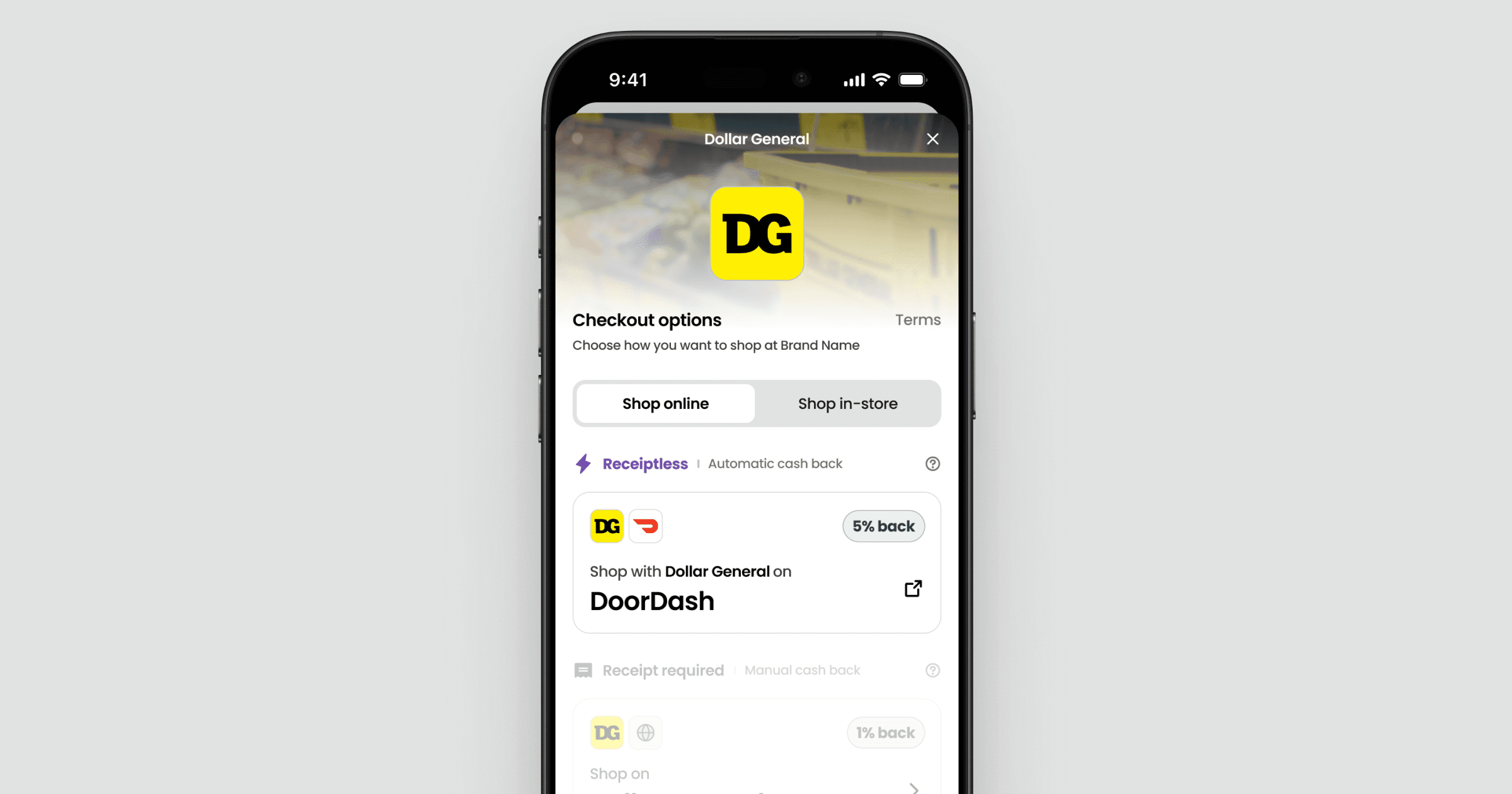
Receiptless checkout (automatic)
When you shop at certain partner stores in the Forage app, rewards are added automatically—no receipt needed.
How it works
Link your EBT card in Forage
Shop at a store marked Receiptless
Pay with your linked EBT card
Rewards are added after checkout
Why it’s instant
Forage processes the EBT payment at these stores, so we can confirm the purchase without a receipt.
Receipt Required checkout (manual)
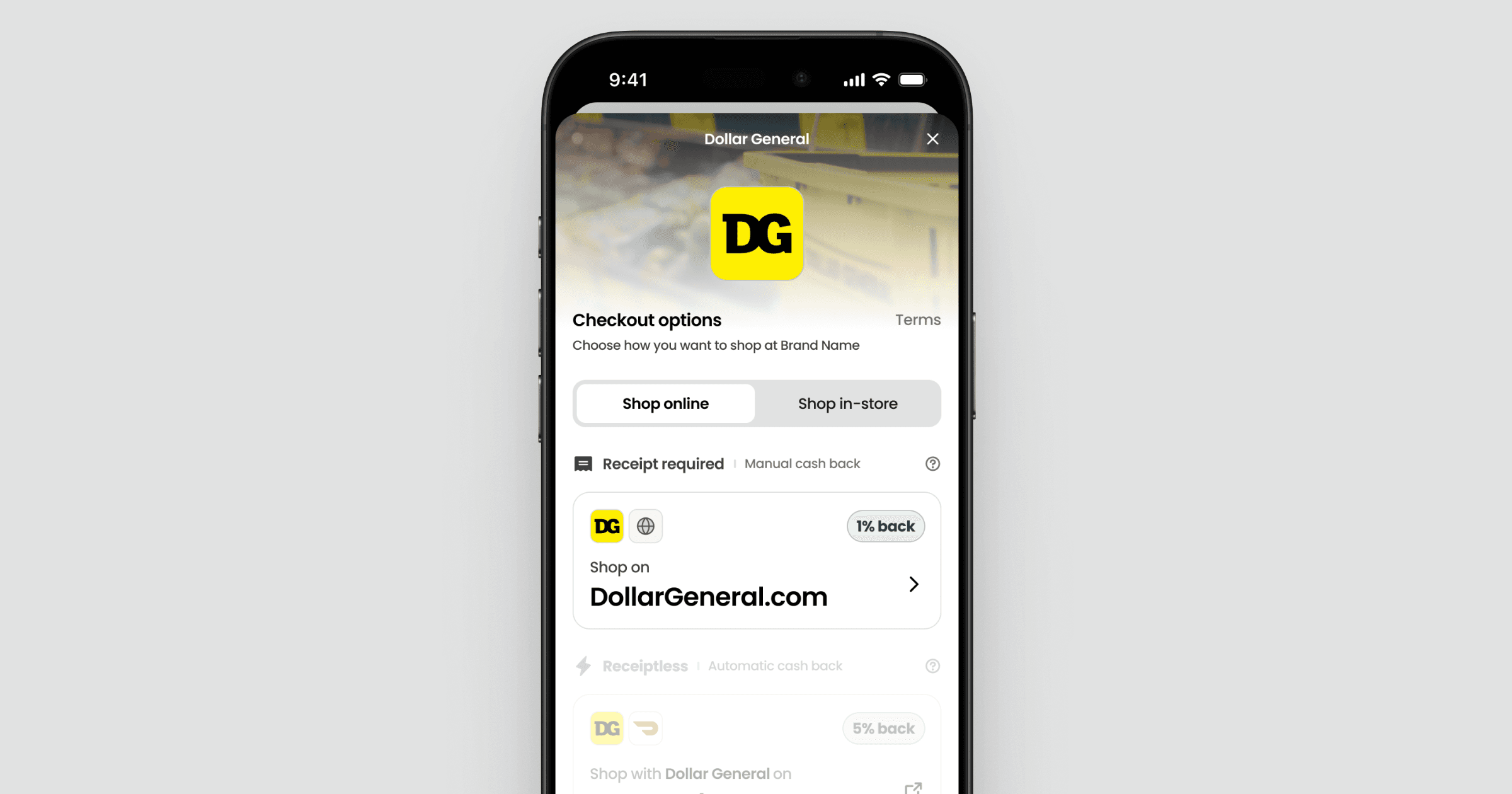
Receipt Required checkout lets you earn rewards anywhere SNAP EBT is accepted. Purchases are verified in one of two ways.
Option 1: Adding a receipt
Pay with your linked EBT card
Add a photo of your receipt in Forage within 7 days
Once verified, rewards are added to your account
Option 2: Linking your store account (read more)
Link your store account in Forage
Check out at that store (in-store or online) while signed into your linked account
Rewards are added within 1-2 days after purchase
Limits
With Receipt Required checkout, you can earn up to $5 per week and $15 per month. There is no weekly or monthly limit for Receiptless rewards.
What you can earn rewards on
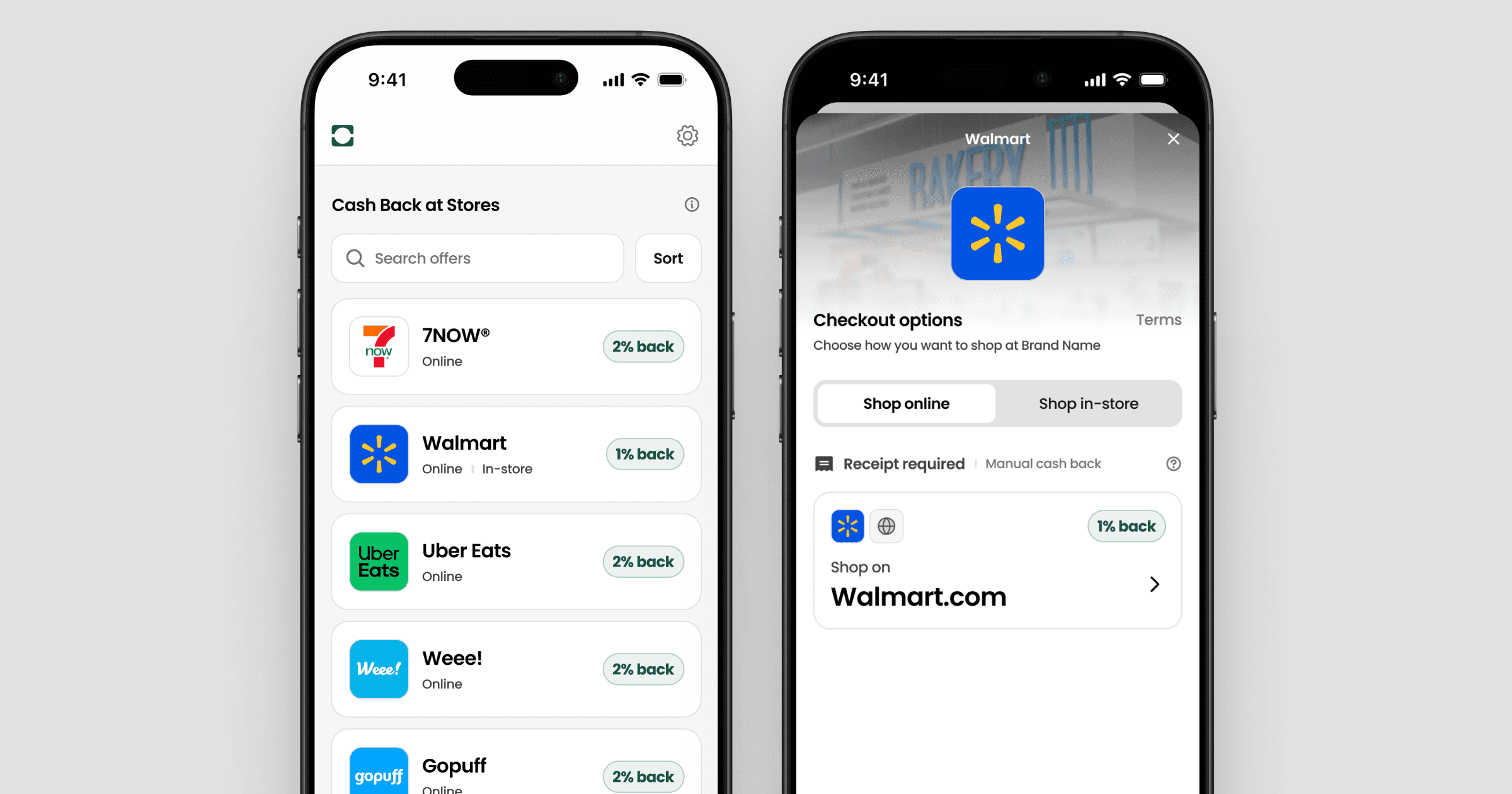
Store offers
Store offers give you a percentage back on your total EBT spend at any store.
Item offers
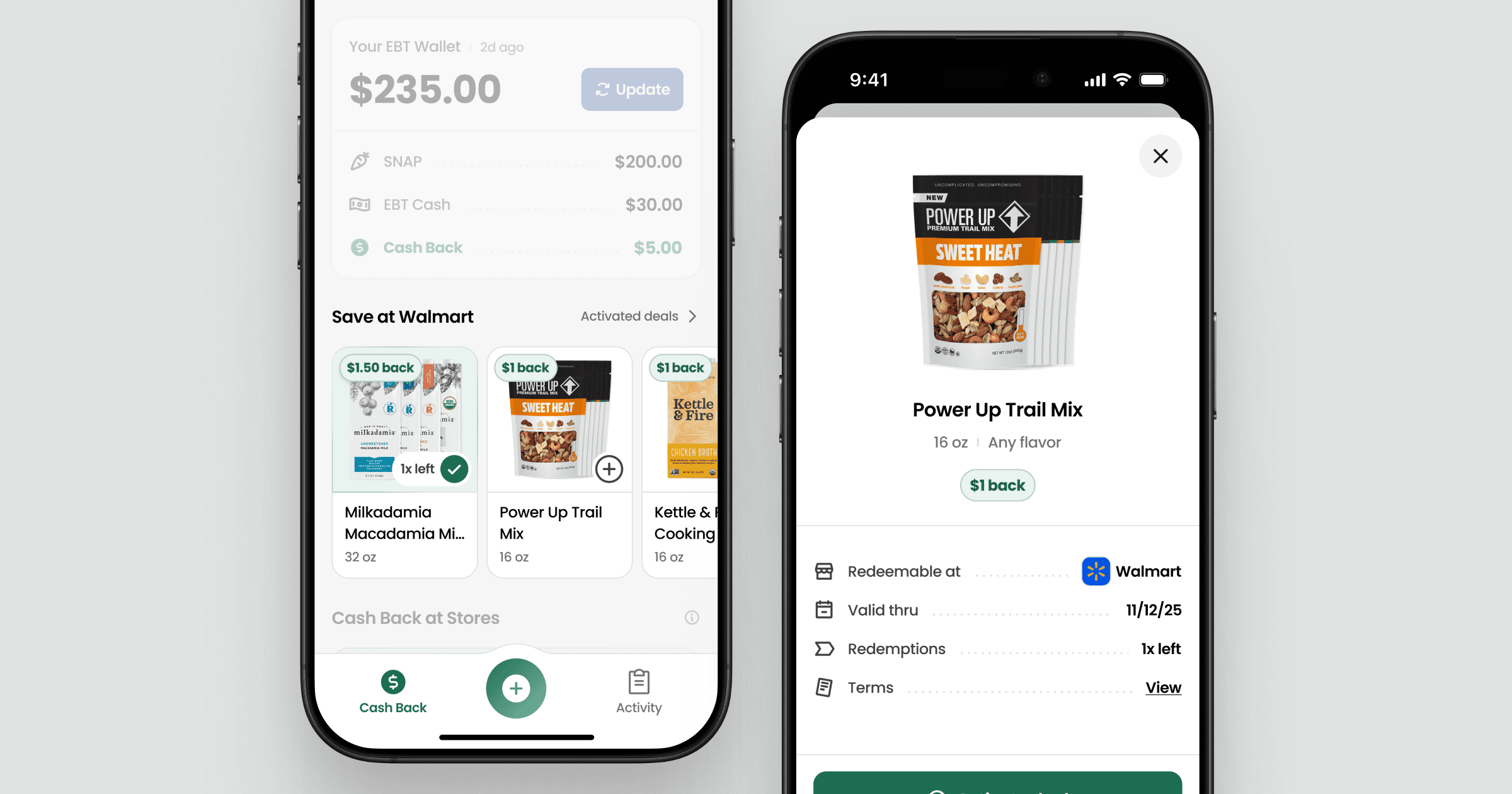
Item offers give you rewards on specific items when purchased at eligible stores. Item offers are currently available only at Walmart and Amazon.
To learn more about item offers, check out How do I earn rewards on items?
Where to find your rewards
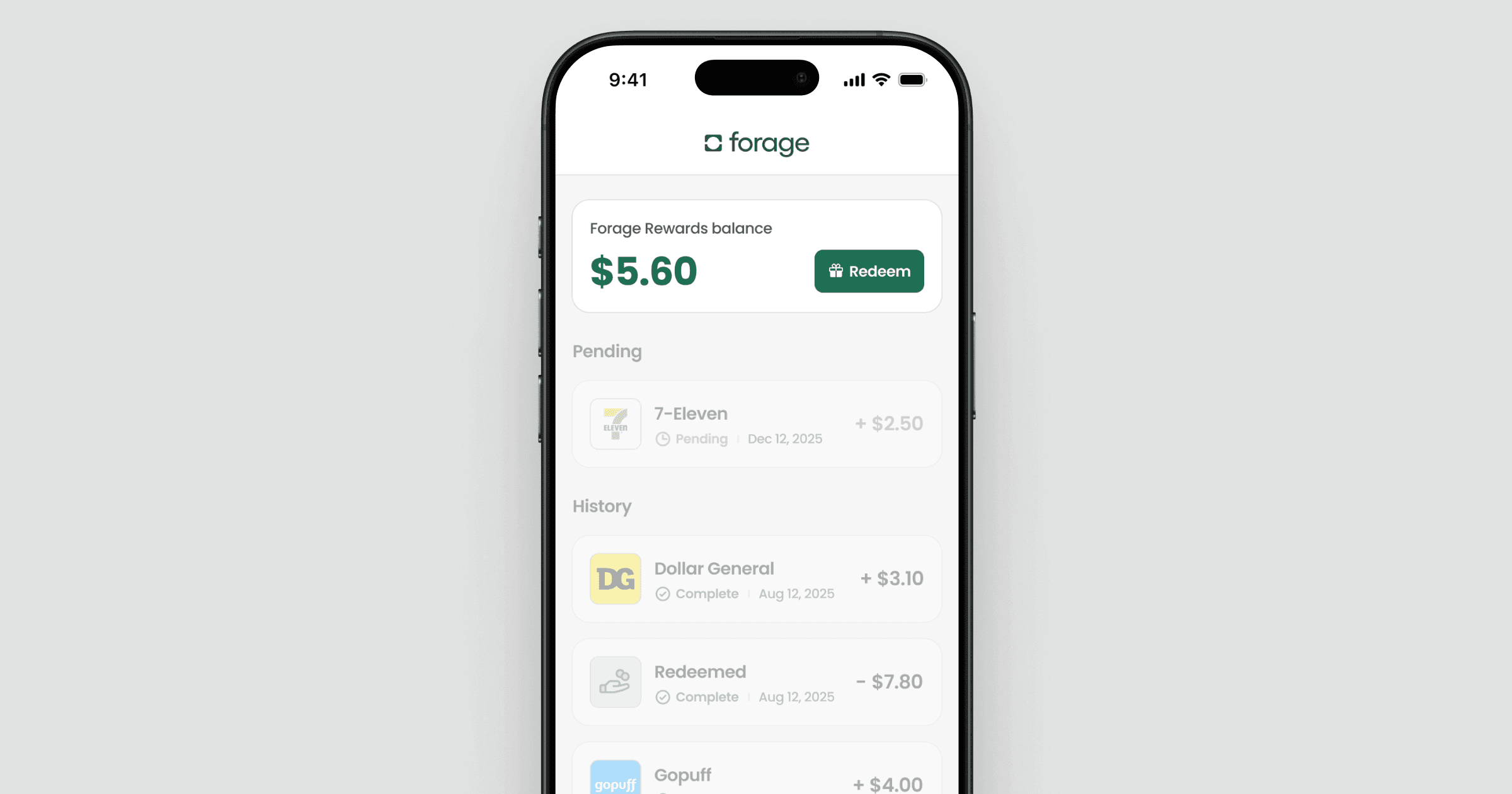
Your rewards appear in the Activity tab. This is where you can track pending receipts that are still being reviewed, see approved rewards, and view your total reward balance.
If you’re ever unsure whether something went through, Activity is the best place to check first.
How to redeem your rewards
Once your rewards balance is over $2, you can redeem it as a virtual Visa card. For step-by-step instructions, see How do I redeem my rewards?
Cash Back eligibility
Rewards are based on the amount paid with SNAP EBT. Purchases paid only with debit, credit, or OTC aren’t eligible. Uploaded receipts also need to meet receipt guidelines to be approved. Rewards are granted is subject to our terms.
Still have questions?
If something doesn’t look right, open the purchase in the Activity tab first—most answers are shown there. If you’re still unsure, you can contact Forage Support from the app and we’ll help you understand what happened.
How do rewards work in Forage?
Learn how to start earning rewards on EBT.
How to earn rewards
There are two ways to earn rewards in Forage, depending on how you check out.
Receiptless checkout (automatic)
When you shop at certain partner stores in the Forage app, rewards are added automatically—no receipt needed.
How it works
Link your EBT card in Forage
Shop at a store marked Receiptless
Pay with your linked EBT card
Rewards are added after checkout
Why it’s instant
Forage processes the EBT payment at these stores, so we can confirm the purchase without a receipt.
Receipt Required checkout (manual)
Receipt Required checkout lets you earn rewards anywhere SNAP EBT is accepted. Purchases are verified in one of two ways.
Option 1: Adding a receipt
Pay with your linked EBT card
Add a photo of your receipt in Forage within 7 days
Once verified, rewards are added to your account
Option 2: Linking your store account (read more)
Link your store account in Forage
Check out at that store (in-store or online) while signed into your linked account
Rewards are added within 1-2 days after purchase
Limits
With Receipt Required checkout, you can earn up to $5 per week and $15 per month. There is no weekly or monthly limit for Receiptless rewards.
What you can earn rewards on
Store offers
Store offers give you a percentage back on your total EBT spend at any store.
Item offers
Item offers give you rewards on specific items when purchased at eligible stores. Item offers are currently available only at Walmart and Amazon.
To learn more about item offers, check out How do I earn rewards on items?
Where to find your rewards
Your rewards appear in the Activity tab. This is where you can track pending receipts that are still being reviewed, see approved rewards, and view your total reward balance.
If you’re ever unsure whether something went through, Activity is the best place to check first.
How to redeem your rewards
Once your rewards balance is over $2, you can redeem it as a virtual Visa card. For step-by-step instructions, see How do I redeem my rewards?
Cash Back eligibility
Rewards are based on the amount paid with SNAP EBT. Purchases paid only with debit, credit, or OTC aren’t eligible. Uploaded receipts also need to meet receipt guidelines to be approved. Rewards are granted is subject to our terms.
Still have questions?
If something doesn’t look right, open the purchase in the Activity tab first—most answers are shown there. If you’re still unsure, you can contact Forage Support from the app and we’ll help you understand what happened.
How do rewards work in Forage?
Learn how to start earning rewards on EBT.
How to earn rewards
There are two ways to earn rewards in Forage, depending on how you check out.
Receiptless checkout (automatic)
When you shop at certain partner stores in the Forage app, rewards are added automatically—no receipt needed.
How it works
Link your EBT card in Forage
Shop at a store marked Receiptless
Pay with your linked EBT card
Rewards are added after checkout
Why it’s instant
Forage processes the EBT payment at these stores, so we can confirm the purchase without a receipt.
Receipt Required checkout (manual)
Receipt Required checkout lets you earn rewards anywhere SNAP EBT is accepted. Purchases are verified in one of two ways.
Option 1: Adding a receipt
Pay with your linked EBT card
Add a photo of your receipt in Forage within 7 days
Once verified, rewards are added to your account
Option 2: Linking your store account (read more)
Link your store account in Forage
Check out at that store (in-store or online) while signed into your linked account
Rewards are added within 1-2 days after purchase
Limits
With Receipt Required checkout, you can earn up to $5 per week and $15 per month. There is no weekly or monthly limit for Receiptless rewards.
What you can earn rewards on
Store offers
Store offers give you a percentage back on your total EBT spend at any store.
Item offers
Item offers give you rewards on specific items when purchased at eligible stores. Item offers are currently available only at Walmart and Amazon.
To learn more about item offers, check out How do I earn rewards on items?
Where to find your rewards
Your rewards appear in the Activity tab. This is where you can track pending receipts that are still being reviewed, see approved rewards, and view your total reward balance.
If you’re ever unsure whether something went through, Activity is the best place to check first.
How to redeem your rewards
Once your rewards balance is over $2, you can redeem it as a virtual Visa card. For step-by-step instructions, see How do I redeem my rewards?
Cash Back eligibility
Rewards are based on the amount paid with SNAP EBT. Purchases paid only with debit, credit, or OTC aren’t eligible. Uploaded receipts also need to meet receipt guidelines to be approved. Rewards are granted is subject to our terms.
Still have questions?
If something doesn’t look right, open the purchase in the Activity tab first—most answers are shown there. If you’re still unsure, you can contact Forage Support from the app and we’ll help you understand what happened.
How do rewards work in Forage?
Learn how to start earning rewards on EBT.
How to earn rewards
There are two ways to earn rewards in Forage, depending on how you check out.
Receiptless checkout (automatic)
When you shop at certain partner stores in the Forage app, rewards are added automatically—no receipt needed.
How it works
Link your EBT card in Forage
Shop at a store marked Receiptless
Pay with your linked EBT card
Rewards are added after checkout
Why it’s instant
Forage processes the EBT payment at these stores, so we can confirm the purchase without a receipt.
Receipt Required checkout (manual)
Receipt Required checkout lets you earn rewards anywhere SNAP EBT is accepted. Purchases are verified in one of two ways.
Option 1: Adding a receipt
Pay with your linked EBT card
Add a photo of your receipt in Forage within 7 days
Once verified, rewards are added to your account
Option 2: Linking your store account (read more)
Link your store account in Forage
Check out at that store (in-store or online) while signed into your linked account
Rewards are added within 1-2 days after purchase
Limits
With Receipt Required checkout, you can earn up to $5 per week and $15 per month. There is no weekly or monthly limit for Receiptless rewards.
What you can earn rewards on
Store offers
Store offers give you a percentage back on your total EBT spend at any store.
Item offers
Item offers give you rewards on specific items when purchased at eligible stores. Item offers are currently available only at Walmart and Amazon.
To learn more about item offers, check out How do I earn rewards on items?
Where to find your rewards
Your rewards appear in the Activity tab. This is where you can track pending receipts that are still being reviewed, see approved rewards, and view your total reward balance.
If you’re ever unsure whether something went through, Activity is the best place to check first.
How to redeem your rewards
Once your rewards balance is over $2, you can redeem it as a virtual Visa card. For step-by-step instructions, see How do I redeem my rewards?
Cash Back eligibility
Rewards are based on the amount paid with SNAP EBT. Purchases paid only with debit, credit, or OTC aren’t eligible. Uploaded receipts also need to meet receipt guidelines to be approved. Rewards are granted is subject to our terms.
Still have questions?
If something doesn’t look right, open the purchase in the Activity tab first—most answers are shown there. If you’re still unsure, you can contact Forage Support from the app and we’ll help you understand what happened.
How do rewards work in Forage?
Learn how to start earning rewards on EBT.
How to earn rewards
There are two ways to earn rewards in Forage, depending on how you check out.
Receiptless checkout (automatic)
When you shop at certain partner stores in the Forage app, rewards are added automatically—no receipt needed.
How it works
Link your EBT card in Forage
Shop at a store marked Receiptless
Pay with your linked EBT card
Rewards are added after checkout
Why it’s instant
Forage processes the EBT payment at these stores, so we can confirm the purchase without a receipt.
Receipt Required checkout (manual)
Receipt Required checkout lets you earn rewards anywhere SNAP EBT is accepted. Purchases are verified in one of two ways.
Option 1: Adding a receipt
Pay with your linked EBT card
Add a photo of your receipt in Forage within 7 days
Once verified, rewards are added to your account
Option 2: Linking your store account (read more)
Link your store account in Forage
Check out at that store (in-store or online) while signed into your linked account
Rewards are added within 1-2 days after purchase
Limits
With Receipt Required checkout, you can earn up to $5 per week and $15 per month. There is no weekly or monthly limit for Receiptless rewards.
What you can earn rewards on
Store offers
Store offers give you a percentage back on your total EBT spend at any store.
Item offers
Item offers give you rewards on specific items when purchased at eligible stores. Item offers are currently available only at Walmart and Amazon.
To learn more about item offers, check out How do I earn rewards on items?
Where to find your rewards
Your rewards appear in the Activity tab. This is where you can track pending receipts that are still being reviewed, see approved rewards, and view your total reward balance.
If you’re ever unsure whether something went through, Activity is the best place to check first.
How to redeem your rewards
Once your rewards balance is over $2, you can redeem it as a virtual Visa card. For step-by-step instructions, see How do I redeem my rewards?
Cash Back eligibility
Rewards are based on the amount paid with SNAP EBT. Purchases paid only with debit, credit, or OTC aren’t eligible. Uploaded receipts also need to meet receipt guidelines to be approved. Rewards are granted is subject to our terms.
Still have questions?
If something doesn’t look right, open the purchase in the Activity tab first—most answers are shown there. If you’re still unsure, you can contact Forage Support from the app and we’ll help you understand what happened.
How do rewards work in Forage?
Learn how to start earning rewards on EBT.
How to earn rewards
There are two ways to earn rewards in Forage, depending on how you check out.
Receiptless checkout (automatic)
When you shop at certain partner stores in the Forage app, rewards are added automatically—no receipt needed.
How it works
Link your EBT card in Forage
Shop at a store marked Receiptless
Pay with your linked EBT card
Rewards are added after checkout
Why it’s instant
Forage processes the EBT payment at these stores, so we can confirm the purchase without a receipt.
Receipt Required checkout (manual)
Receipt Required checkout lets you earn rewards anywhere SNAP EBT is accepted. Purchases are verified in one of two ways.
Option 1: Adding a receipt
Pay with your linked EBT card
Add a photo of your receipt in Forage within 7 days
Once verified, rewards are added to your account
Option 2: Linking your store account (read more)
Link your store account in Forage
Check out at that store (in-store or online) while signed into your linked account
Rewards are added within 1-2 days after purchase
Limits
With Receipt Required checkout, you can earn up to $5 per week and $15 per month. There is no weekly or monthly limit for Receiptless rewards.
What you can earn rewards on
Store offers
Store offers give you a percentage back on your total EBT spend at any store.
Item offers
Item offers give you rewards on specific items when purchased at eligible stores. Item offers are currently available only at Walmart and Amazon.
To learn more about item offers, check out How do I earn rewards on items?
Where to find your rewards
Your rewards appear in the Activity tab. This is where you can track pending receipts that are still being reviewed, see approved rewards, and view your total reward balance.
If you’re ever unsure whether something went through, Activity is the best place to check first.
How to redeem your rewards
Once your rewards balance is over $2, you can redeem it as a virtual Visa card. For step-by-step instructions, see How do I redeem my rewards?
Cash Back eligibility
Rewards are based on the amount paid with SNAP EBT. Purchases paid only with debit, credit, or OTC aren’t eligible. Uploaded receipts also need to meet receipt guidelines to be approved. Rewards are granted is subject to our terms.
Still have questions?
If something doesn’t look right, open the purchase in the Activity tab first—most answers are shown there. If you’re still unsure, you can contact Forage Support from the app and we’ll help you understand what happened.
How do rewards work in Forage?
Learn how to start earning rewards on EBT.
How to earn rewards
There are two ways to earn rewards in Forage, depending on how you check out.
Receiptless checkout (automatic)
When you shop at certain partner stores in the Forage app, rewards are added automatically—no receipt needed.
How it works
Link your EBT card in Forage
Shop at a store marked Receiptless
Pay with your linked EBT card
Rewards are added after checkout
Why it’s instant
Forage processes the EBT payment at these stores, so we can confirm the purchase without a receipt.
Receipt Required checkout (manual)
Receipt Required checkout lets you earn rewards anywhere SNAP EBT is accepted. Purchases are verified in one of two ways.
Option 1: Adding a receipt
Pay with your linked EBT card
Add a photo of your receipt in Forage within 7 days
Once verified, rewards are added to your account
Option 2: Linking your store account (read more)
Link your store account in Forage
Check out at that store (in-store or online) while signed into your linked account
Rewards are added within 1-2 days after purchase
Limits
With Receipt Required checkout, you can earn up to $5 per week and $15 per month. There is no weekly or monthly limit for Receiptless rewards.
What you can earn rewards on
Store offers
Store offers give you a percentage back on your total EBT spend at any store.
Item offers
Item offers give you rewards on specific items when purchased at eligible stores. Item offers are currently available only at Walmart and Amazon.
To learn more about item offers, check out How do I earn rewards on items?
Where to find your rewards
Your rewards appear in the Activity tab. This is where you can track pending receipts that are still being reviewed, see approved rewards, and view your total reward balance.
If you’re ever unsure whether something went through, Activity is the best place to check first.
How to redeem your rewards
Once your rewards balance is over $2, you can redeem it as a virtual Visa card. For step-by-step instructions, see How do I redeem my rewards?
Cash Back eligibility
Rewards are based on the amount paid with SNAP EBT. Purchases paid only with debit, credit, or OTC aren’t eligible. Uploaded receipts also need to meet receipt guidelines to be approved. Rewards are granted is subject to our terms.
Still have questions?
If something doesn’t look right, open the purchase in the Activity tab first—most answers are shown there. If you’re still unsure, you can contact Forage Support from the app and we’ll help you understand what happened.
Forage is equal opportunity. ©️ 2026 Forage Technology Corporation, Inc.
Forage is equal opportunity. ©️ 2026 Forage Technology Corporation, Inc.
Forage is equal opportunity. ©️ 2026 Forage Technology Corporation, Inc.
Forage is equal opportunity. ©️ 2026 Forage Technology Corporation, Inc.
Forage is equal opportunity. ©️ 2026 Forage Technology Corporation, Inc.
Forage is equal opportunity. ©️ 2026 Forage Technology Corporation, Inc.
Forage is equal opportunity. ©️ 2026 Forage Technology Corporation, Inc.