How do I withdraw my rewards?
Instructions to withdraw your rewards and what to check if your withdrawal didn't go through.
If you’re having trouble withdrawing your rewards, the issue is usually easy to resolve. This article walks through how withdrawals work in Forage and what to do if something doesn’t look right.
How reward withdrawals work
To withdraw your rewards in Forage:
Open the Activity tab
Tap Withdraw
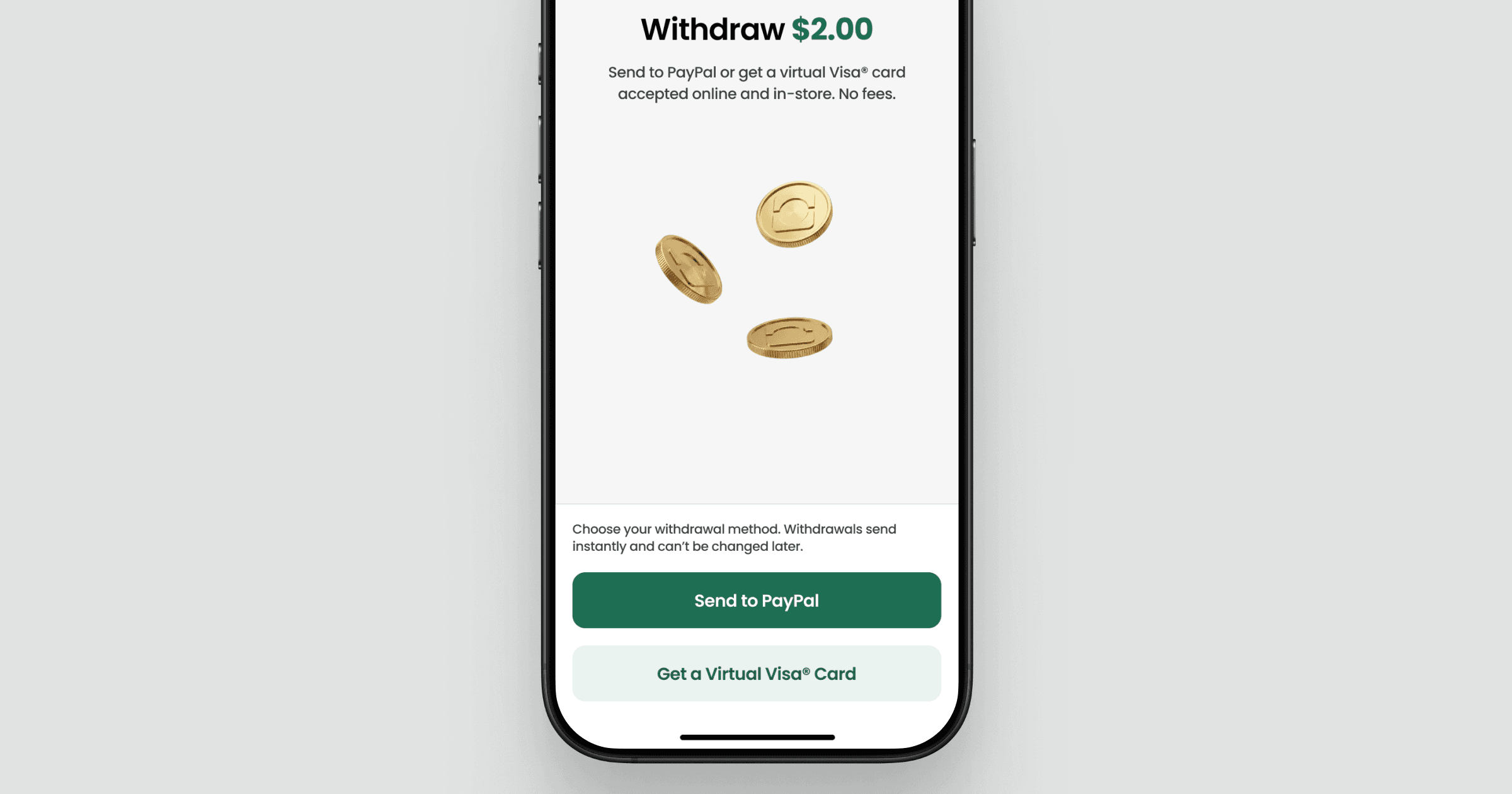
Choose your withdrawal method (PayPal or Virtual Visa Card)
After you select your withdrawal method, you can't change it later.
PayPal
If you choose to send your rewards to PayPal, you'll then be brought to a screen (hosted by our partner, Tremendous) where you'll be asked to sign in to your PayPal account to claim your rewards.
After you sign in, your rewards will be sent instantly to your account.
Virtual Visa Card
If you choose to get your rewards on a Virtual Visa Card, you'll then be brought to a screen (hosted by our partner, Tremendous) where you'll be asked to enter your email to receive your card.
After you enter your email, your Visa Card will be emailed to you within a few minutes.
Common issues and how to fix them
You hit the daily withdrawal limit
Reward withdrawals are limited to $20 per day.
If you've withdrawn $20 in a single day, you won’t be able to complete another withdrawal until the next calendar day.
You have trouble getting your rewards.
After you've selected your withdrawal method in Forage, we can no longer manage or adjust your rewards.
If you have trouble getting your rewards after choosing PayPal or Virtual Visa Card, visit the Tremendous Help Center or email Tremendous at help@tremendous.com.
Where to check your withdrawal status
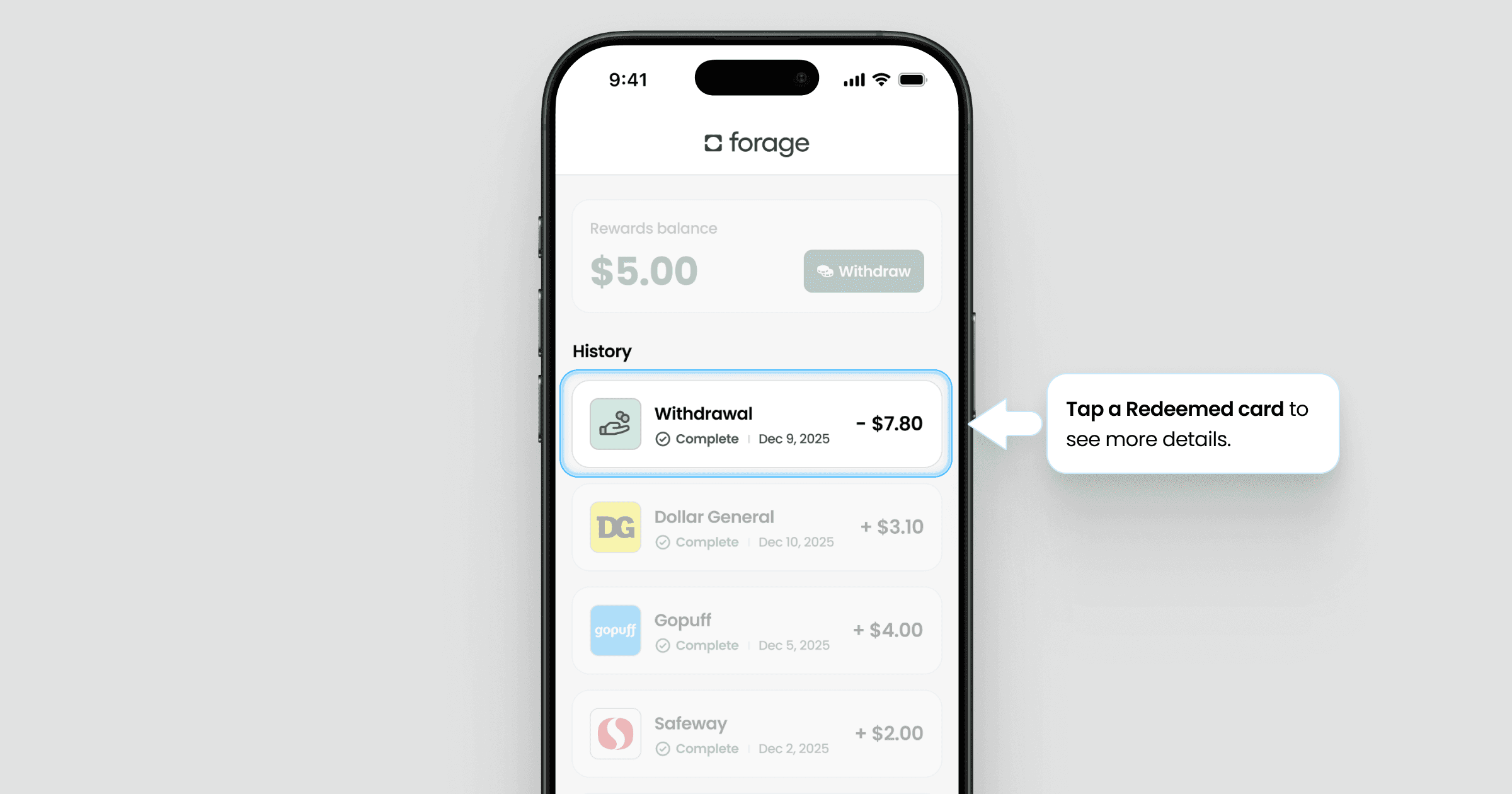
The Activity tab is the best place to confirm what’s happening. You can see:
Whether a withdrawal was started
Whether it was successful
Your remaining reward balance
If something failed or didn’t complete, that’s where it will show up first.
Still need help?
If you’ve checked the Activity tab and something still doesn’t look right, contact Forage Support from the app. Tell us:
When you withdrew
How much you withdrew
The withdrawal method you selected
The phone number linked to your account
We’ll help you take the next step.
How do I withdraw my rewards?
Instructions to withdraw your rewards and what to check if your withdrawal didn't go through.
If you’re having trouble withdrawing your rewards, the issue is usually easy to resolve. This article walks through how withdrawals work in Forage and what to do if something doesn’t look right.
How reward withdrawals work
To withdraw your rewards in Forage:
Open the Activity tab
Tap Withdraw
Choose your withdrawal method (PayPal or Virtual Visa Card)
After you select your withdrawal method, you can't change it later.
PayPal
If you choose to send your rewards to PayPal, you'll then be brought to a screen (hosted by our partner, Tremendous) where you'll be asked to sign in to your PayPal account to claim your rewards.
After you sign in, your rewards will be sent instantly to your account.
Virtual Visa Card
If you choose to get your rewards on a Virtual Visa Card, you'll then be brought to a screen (hosted by our partner, Tremendous) where you'll be asked to enter your email to receive your card.
After you enter your email, your Visa Card will be emailed to you within a few minutes.
Common issues and how to fix them
You hit the daily withdrawal limit
Reward withdrawals are limited to $20 per day.
If you've withdrawn $20 in a single day, you won’t be able to complete another withdrawal until the next calendar day.
You have trouble getting your rewards.
After you've selected your withdrawal method in Forage, we can no longer manage or adjust your rewards.
If you have trouble getting your rewards after choosing PayPal or Virtual Visa Card, visit the Tremendous Help Center or email Tremendous at help@tremendous.com.
Where to check your withdrawal status
The Activity tab is the best place to confirm what’s happening. You can see:
Whether a withdrawal was started
Whether it was successful
Your remaining reward balance
If something failed or didn’t complete, that’s where it will show up first.
Still need help?
If you’ve checked the Activity tab and something still doesn’t look right, contact Forage Support from the app. Tell us:
When you withdrew
How much you withdrew
The withdrawal method you selected
The phone number linked to your account
We’ll help you take the next step.
How do I withdraw my rewards?
Instructions to withdraw your rewards and what to check if your withdrawal didn't go through.
If you’re having trouble withdrawing your rewards, the issue is usually easy to resolve. This article walks through how withdrawals work in Forage and what to do if something doesn’t look right.
How reward withdrawals work
To withdraw your rewards in Forage:
Open the Activity tab
Tap Withdraw
Choose your withdrawal method (PayPal or Virtual Visa Card)
After you select your withdrawal method, you can't change it later.
PayPal
If you choose to send your rewards to PayPal, you'll then be brought to a screen (hosted by our partner, Tremendous) where you'll be asked to sign in to your PayPal account to claim your rewards.
After you sign in, your rewards will be sent instantly to your account.
Virtual Visa Card
If you choose to get your rewards on a Virtual Visa Card, you'll then be brought to a screen (hosted by our partner, Tremendous) where you'll be asked to enter your email to receive your card.
After you enter your email, your Visa Card will be emailed to you within a few minutes.
Common issues and how to fix them
You hit the daily withdrawal limit
Reward withdrawals are limited to $20 per day.
If you've withdrawn $20 in a single day, you won’t be able to complete another withdrawal until the next calendar day.
You have trouble getting your rewards.
After you've selected your withdrawal method in Forage, we can no longer manage or adjust your rewards.
If you have trouble getting your rewards after choosing PayPal or Virtual Visa Card, visit the Tremendous Help Center or email Tremendous at help@tremendous.com.
Where to check your withdrawal status
The Activity tab is the best place to confirm what’s happening. You can see:
Whether a withdrawal was started
Whether it was successful
Your remaining reward balance
If something failed or didn’t complete, that’s where it will show up first.
Still need help?
If you’ve checked the Activity tab and something still doesn’t look right, contact Forage Support from the app. Tell us:
When you withdrew
How much you withdrew
The withdrawal method you selected
The phone number linked to your account
We’ll help you take the next step.
How do I withdraw my rewards?
Instructions to withdraw your rewards and what to check if your withdrawal didn't go through.
If you’re having trouble withdrawing your rewards, the issue is usually easy to resolve. This article walks through how withdrawals work in Forage and what to do if something doesn’t look right.
How reward withdrawals work
To withdraw your rewards in Forage:
Open the Activity tab
Tap Withdraw
Choose your withdrawal method (PayPal or Virtual Visa Card)
After you select your withdrawal method, you can't change it later.
PayPal
If you choose to send your rewards to PayPal, you'll then be brought to a screen (hosted by our partner, Tremendous) where you'll be asked to sign in to your PayPal account to claim your rewards.
After you sign in, your rewards will be sent instantly to your account.
Virtual Visa Card
If you choose to get your rewards on a Virtual Visa Card, you'll then be brought to a screen (hosted by our partner, Tremendous) where you'll be asked to enter your email to receive your card.
After you enter your email, your Visa Card will be emailed to you within a few minutes.
Common issues and how to fix them
You hit the daily withdrawal limit
Reward withdrawals are limited to $20 per day.
If you've withdrawn $20 in a single day, you won’t be able to complete another withdrawal until the next calendar day.
You have trouble getting your rewards.
After you've selected your withdrawal method in Forage, we can no longer manage or adjust your rewards.
If you have trouble getting your rewards after choosing PayPal or Virtual Visa Card, visit the Tremendous Help Center or email Tremendous at help@tremendous.com.
Where to check your withdrawal status
The Activity tab is the best place to confirm what’s happening. You can see:
Whether a withdrawal was started
Whether it was successful
Your remaining reward balance
If something failed or didn’t complete, that’s where it will show up first.
Still need help?
If you’ve checked the Activity tab and something still doesn’t look right, contact Forage Support from the app. Tell us:
When you withdrew
How much you withdrew
The withdrawal method you selected
The phone number linked to your account
We’ll help you take the next step.
How do I withdraw my rewards?
Instructions to withdraw your rewards and what to check if your withdrawal didn't go through.
If you’re having trouble withdrawing your rewards, the issue is usually easy to resolve. This article walks through how withdrawals work in Forage and what to do if something doesn’t look right.
How reward withdrawals work
To withdraw your rewards in Forage:
Open the Activity tab
Tap Withdraw
Choose your withdrawal method (PayPal or Virtual Visa Card)
After you select your withdrawal method, you can't change it later.
PayPal
If you choose to send your rewards to PayPal, you'll then be brought to a screen (hosted by our partner, Tremendous) where you'll be asked to sign in to your PayPal account to claim your rewards.
After you sign in, your rewards will be sent instantly to your account.
Virtual Visa Card
If you choose to get your rewards on a Virtual Visa Card, you'll then be brought to a screen (hosted by our partner, Tremendous) where you'll be asked to enter your email to receive your card.
After you enter your email, your Visa Card will be emailed to you within a few minutes.
Common issues and how to fix them
You hit the daily withdrawal limit
Reward withdrawals are limited to $20 per day.
If you've withdrawn $20 in a single day, you won’t be able to complete another withdrawal until the next calendar day.
You have trouble getting your rewards.
After you've selected your withdrawal method in Forage, we can no longer manage or adjust your rewards.
If you have trouble getting your rewards after choosing PayPal or Virtual Visa Card, visit the Tremendous Help Center or email Tremendous at help@tremendous.com.
Where to check your withdrawal status
The Activity tab is the best place to confirm what’s happening. You can see:
Whether a withdrawal was started
Whether it was successful
Your remaining reward balance
If something failed or didn’t complete, that’s where it will show up first.
Still need help?
If you’ve checked the Activity tab and something still doesn’t look right, contact Forage Support from the app. Tell us:
When you withdrew
How much you withdrew
The withdrawal method you selected
The phone number linked to your account
We’ll help you take the next step.
How do I withdraw my rewards?
Instructions to withdraw your rewards and what to check if your withdrawal didn't go through.
If you’re having trouble withdrawing your rewards, the issue is usually easy to resolve. This article walks through how withdrawals work in Forage and what to do if something doesn’t look right.
How reward withdrawals work
To withdraw your rewards in Forage:
Open the Activity tab
Tap Withdraw
Choose your withdrawal method (PayPal or Virtual Visa Card)
After you select your withdrawal method, you can't change it later.
PayPal
If you choose to send your rewards to PayPal, you'll then be brought to a screen (hosted by our partner, Tremendous) where you'll be asked to sign in to your PayPal account to claim your rewards.
After you sign in, your rewards will be sent instantly to your account.
Virtual Visa Card
If you choose to get your rewards on a Virtual Visa Card, you'll then be brought to a screen (hosted by our partner, Tremendous) where you'll be asked to enter your email to receive your card.
After you enter your email, your Visa Card will be emailed to you within a few minutes.
Common issues and how to fix them
You hit the daily withdrawal limit
Reward withdrawals are limited to $20 per day.
If you've withdrawn $20 in a single day, you won’t be able to complete another withdrawal until the next calendar day.
You have trouble getting your rewards.
After you've selected your withdrawal method in Forage, we can no longer manage or adjust your rewards.
If you have trouble getting your rewards after choosing PayPal or Virtual Visa Card, visit the Tremendous Help Center or email Tremendous at help@tremendous.com.
Where to check your withdrawal status
The Activity tab is the best place to confirm what’s happening. You can see:
Whether a withdrawal was started
Whether it was successful
Your remaining reward balance
If something failed or didn’t complete, that’s where it will show up first.
Still need help?
If you’ve checked the Activity tab and something still doesn’t look right, contact Forage Support from the app. Tell us:
When you withdrew
How much you withdrew
The withdrawal method you selected
The phone number linked to your account
We’ll help you take the next step.
How do I withdraw my rewards?
Instructions to withdraw your rewards and what to check if your withdrawal didn't go through.
If you’re having trouble withdrawing your rewards, the issue is usually easy to resolve. This article walks through how withdrawals work in Forage and what to do if something doesn’t look right.
How reward withdrawals work
To withdraw your rewards in Forage:
Open the Activity tab
Tap Withdraw
Choose your withdrawal method (PayPal or Virtual Visa Card)
After you select your withdrawal method, you can't change it later.
PayPal
If you choose to send your rewards to PayPal, you'll then be brought to a screen (hosted by our partner, Tremendous) where you'll be asked to sign in to your PayPal account to claim your rewards.
After you sign in, your rewards will be sent instantly to your account.
Virtual Visa Card
If you choose to get your rewards on a Virtual Visa Card, you'll then be brought to a screen (hosted by our partner, Tremendous) where you'll be asked to enter your email to receive your card.
After you enter your email, your Visa Card will be emailed to you within a few minutes.
Common issues and how to fix them
You hit the daily withdrawal limit
Reward withdrawals are limited to $20 per day.
If you've withdrawn $20 in a single day, you won’t be able to complete another withdrawal until the next calendar day.
You have trouble getting your rewards.
After you've selected your withdrawal method in Forage, we can no longer manage or adjust your rewards.
If you have trouble getting your rewards after choosing PayPal or Virtual Visa Card, visit the Tremendous Help Center or email Tremendous at help@tremendous.com.
Where to check your withdrawal status
The Activity tab is the best place to confirm what’s happening. You can see:
Whether a withdrawal was started
Whether it was successful
Your remaining reward balance
If something failed or didn’t complete, that’s where it will show up first.
Still need help?
If you’ve checked the Activity tab and something still doesn’t look right, contact Forage Support from the app. Tell us:
When you withdrew
How much you withdrew
The withdrawal method you selected
The phone number linked to your account
We’ll help you take the next step.
Forage is equal opportunity. ©️ 2026 Forage Technology Corporation, Inc.
Forage is equal opportunity. ©️ 2026 Forage Technology Corporation, Inc.
Forage is equal opportunity. ©️ 2026 Forage Technology Corporation, Inc.
Forage is equal opportunity. ©️ 2026 Forage Technology Corporation, Inc.
Forage is equal opportunity. ©️ 2026 Forage Technology Corporation, Inc.
Forage is equal opportunity. ©️ 2026 Forage Technology Corporation, Inc.
Forage is equal opportunity. ©️ 2026 Forage Technology Corporation, Inc.