How do referrals work?
Forage's referral program lets you earn $2 when you share the app with a friend and they earn their first reward.
Who can refer a friend
To share a referral link, you need to have already earned rewards through Forage at least once. Your $1 welcome reward doesn’t count toward this.
You qualify once you’ve done any of the following:
Had a receipt approved that earned rewards
Earned rewards through a Forage Partner store
Completed a qualifying item offer via your linked account
If you haven’t earned yet, focus on that first. Once you do, your referral link will be available in Settings.
How to find your referral link
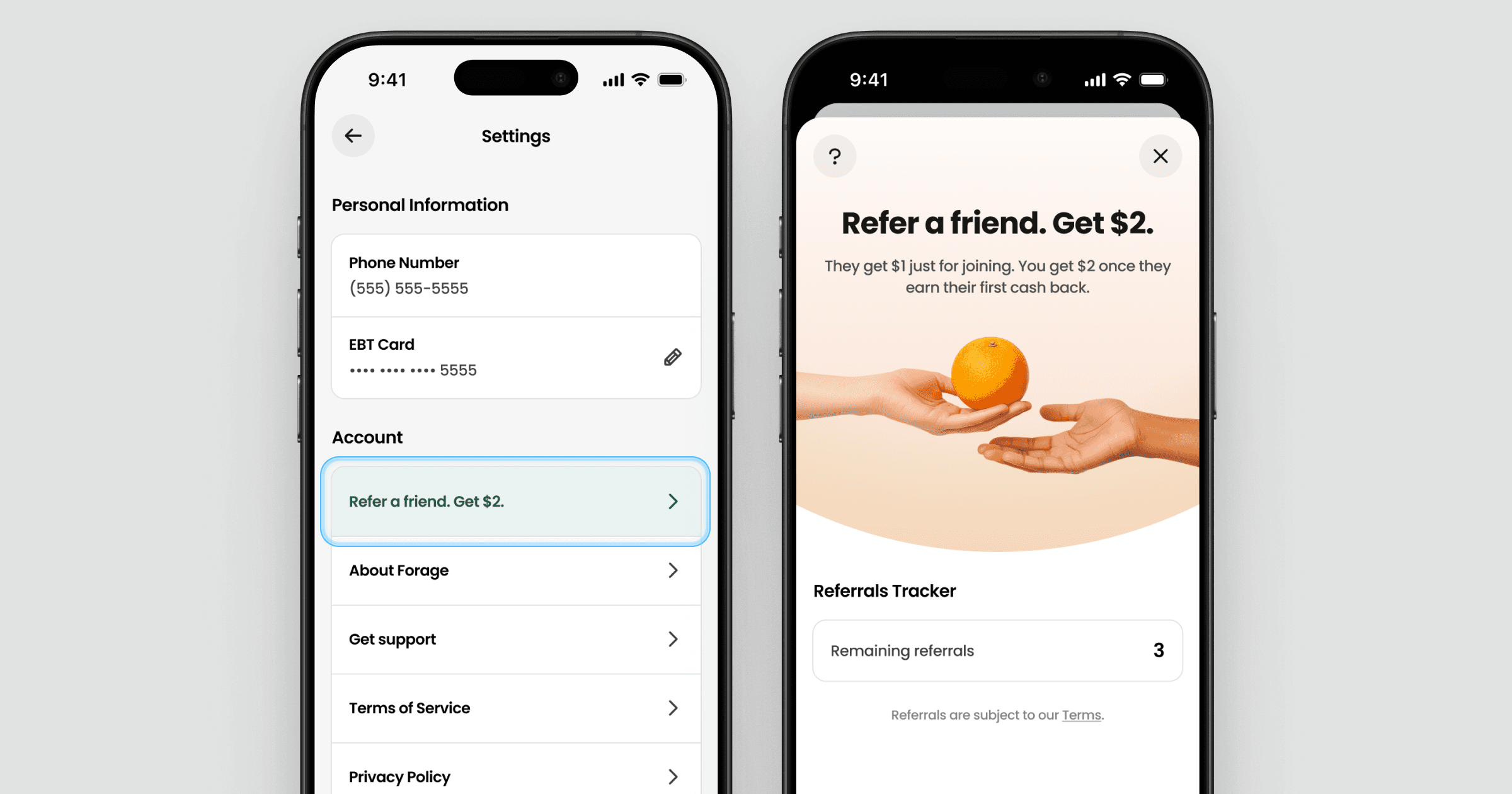
Open Settings
Tap the green referral row under Account
Tap Refer a friend to send your link via text, email, or any app on your phone
Your friend needs to use your link when they sign up. Links shared after someone already has an account won’t count.
What happens after you share
When your friend signs up using your link, they’ll receive the standard $1 welcome reward just for creating an account.
You earn your $2 bonus only after your friend earns their first reward outside the welcome reward. They have 7 days from sign-up to do that. If they don’t earn within that window, the referral expires and you’ll get that referral slot back to use again.
Once your friend earns, you’ll see the $2 added to your rewards balance automatically.
Tracking your referrals
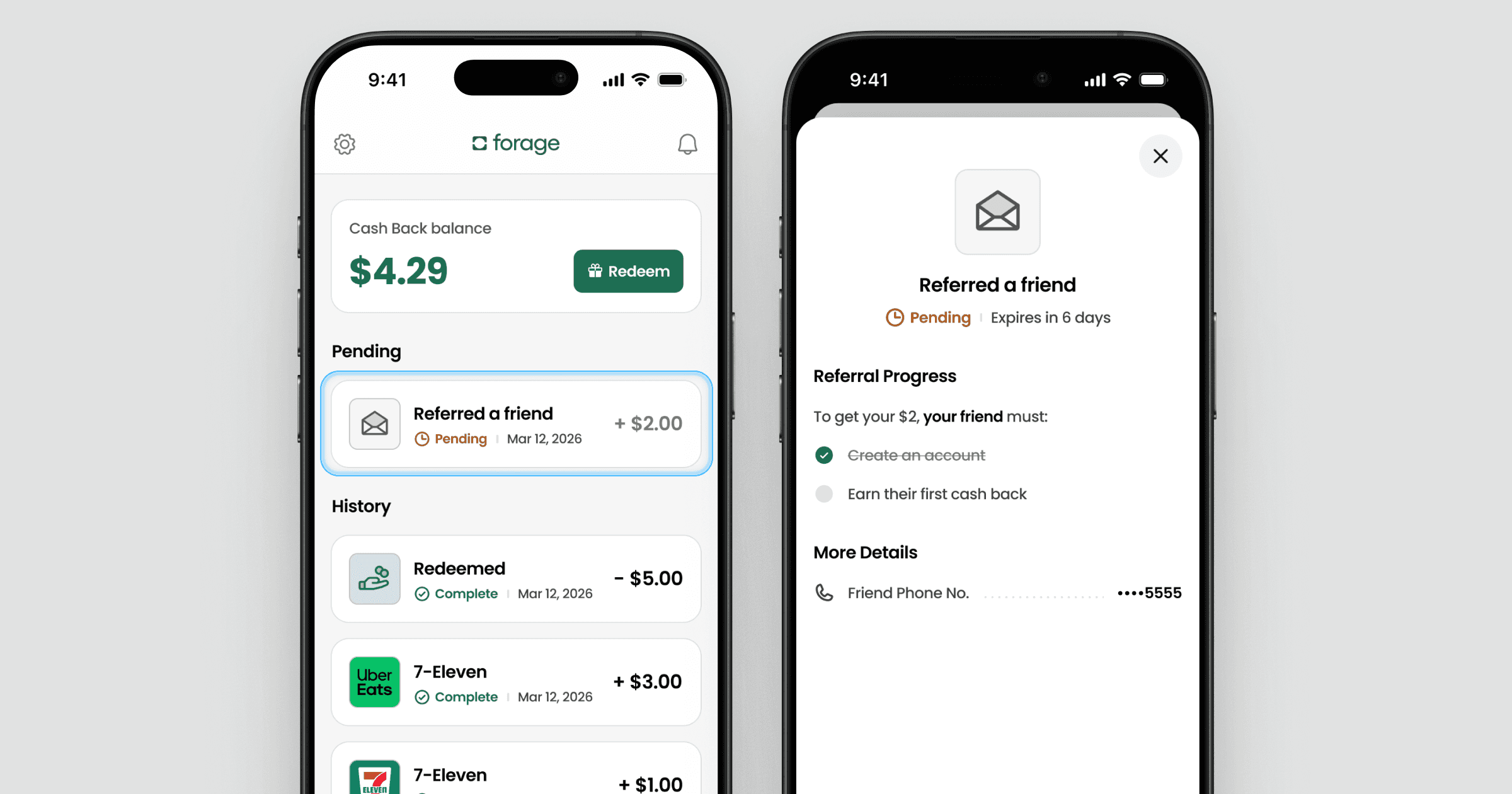
Every referral you send shows up as a “Referred a friend” card in your Activity tab. Tap it to see:
Whether your friend has signed up and earned their first reward
The expiration countdown
The last four digits of your friend’s phone number
Referral limits
You can earn the $2 bonus up to 3 times total. Once you’ve had 3 successful referrals, the program is complete for your account.
A referral counts as successful when your friend signs up using your link and earns their first reward within 7 days.
Common questions
My friend signed up but I haven’t gotten my bonus yet
Your bonus is credited to your account after your friend earns their first reward outside the $1 welcome reward, not when they sign up. Check the “Referred a friend” card in your Activity tab to see where they are in the process and how many days are left.
My referral is showing as expired
This means your friend signed up but didn’t earn rewards within 7 days. The referral slot returns to you automatically, so you can share with someone else.
My friend says they signed up but their account isn’t showing as referred
Your friend needs to have used your referral link when they created their account. If they signed up without it, their account can’t be linked to your referral after the fact.
I can’t find my referral link
Your referral link becomes available once you’ve earned rewards at least once outside the welcome reward. Check your Activity tab to see your earning history. If you haven’t earned yet, learn how to get started at How to earn rewards.
Still need help?
Reach out to Forage Support through the app, and let us know whether the issue is with sharing your link or tracking a referral bonus.
How do referrals work?
Forage's referral program lets you earn $2 when you share the app with a friend and they earn their first reward.
Who can refer a friend
To share a referral link, you need to have already earned rewards through Forage at least once. Your $1 welcome reward doesn’t count toward this.
You qualify once you’ve done any of the following:
Had a receipt approved that earned rewards
Earned rewards through a Forage Partner store
Completed a qualifying item offer via your linked account
If you haven’t earned yet, focus on that first. Once you do, your referral link will be available in Settings.
How to find your referral link
Open Settings
Tap the green referral row under Account
Tap Refer a friend to send your link via text, email, or any app on your phone
Your friend needs to use your link when they sign up. Links shared after someone already has an account won’t count.
What happens after you share
When your friend signs up using your link, they’ll receive the standard $1 welcome reward just for creating an account.
You earn your $2 bonus only after your friend earns their first reward outside the welcome reward. They have 7 days from sign-up to do that. If they don’t earn within that window, the referral expires and you’ll get that referral slot back to use again.
Once your friend earns, you’ll see the $2 added to your rewards balance automatically.
Tracking your referrals
Every referral you send shows up as a “Referred a friend” card in your Activity tab. Tap it to see:
Whether your friend has signed up and earned their first reward
The expiration countdown
The last four digits of your friend’s phone number
Referral limits
You can earn the $2 bonus up to 3 times total. Once you’ve had 3 successful referrals, the program is complete for your account.
A referral counts as successful when your friend signs up using your link and earns their first reward within 7 days.
Common questions
My friend signed up but I haven’t gotten my bonus yet
Your bonus is credited to your account after your friend earns their first reward outside the $1 welcome reward, not when they sign up. Check the “Referred a friend” card in your Activity tab to see where they are in the process and how many days are left.
My referral is showing as expired
This means your friend signed up but didn’t earn rewards within 7 days. The referral slot returns to you automatically, so you can share with someone else.
My friend says they signed up but their account isn’t showing as referred
Your friend needs to have used your referral link when they created their account. If they signed up without it, their account can’t be linked to your referral after the fact.
I can’t find my referral link
Your referral link becomes available once you’ve earned rewards at least once outside the welcome reward. Check your Activity tab to see your earning history. If you haven’t earned yet, learn how to get started at How to earn rewards.
Still need help?
Reach out to Forage Support through the app, and let us know whether the issue is with sharing your link or tracking a referral bonus.
How do referrals work?
Forage's referral program lets you earn $2 when you share the app with a friend and they earn their first reward.
Who can refer a friend
To share a referral link, you need to have already earned rewards through Forage at least once. Your $1 welcome reward doesn’t count toward this.
You qualify once you’ve done any of the following:
Had a receipt approved that earned rewards
Earned rewards through a Forage Partner store
Completed a qualifying item offer via your linked account
If you haven’t earned yet, focus on that first. Once you do, your referral link will be available in Settings.
How to find your referral link
Open Settings
Tap the green referral row under Account
Tap Refer a friend to send your link via text, email, or any app on your phone
Your friend needs to use your link when they sign up. Links shared after someone already has an account won’t count.
What happens after you share
When your friend signs up using your link, they’ll receive the standard $1 welcome reward just for creating an account.
You earn your $2 bonus only after your friend earns their first reward outside the welcome reward. They have 7 days from sign-up to do that. If they don’t earn within that window, the referral expires and you’ll get that referral slot back to use again.
Once your friend earns, you’ll see the $2 added to your rewards balance automatically.
Tracking your referrals
Every referral you send shows up as a “Referred a friend” card in your Activity tab. Tap it to see:
Whether your friend has signed up and earned their first reward
The expiration countdown
The last four digits of your friend’s phone number
Referral limits
You can earn the $2 bonus up to 3 times total. Once you’ve had 3 successful referrals, the program is complete for your account.
A referral counts as successful when your friend signs up using your link and earns their first reward within 7 days.
Common questions
My friend signed up but I haven’t gotten my bonus yet
Your bonus is credited to your account after your friend earns their first reward outside the $1 welcome reward, not when they sign up. Check the “Referred a friend” card in your Activity tab to see where they are in the process and how many days are left.
My referral is showing as expired
This means your friend signed up but didn’t earn rewards within 7 days. The referral slot returns to you automatically, so you can share with someone else.
My friend says they signed up but their account isn’t showing as referred
Your friend needs to have used your referral link when they created their account. If they signed up without it, their account can’t be linked to your referral after the fact.
I can’t find my referral link
Your referral link becomes available once you’ve earned rewards at least once outside the welcome reward. Check your Activity tab to see your earning history. If you haven’t earned yet, learn how to get started at How to earn rewards.
Still need help?
Reach out to Forage Support through the app, and let us know whether the issue is with sharing your link or tracking a referral bonus.
How do referrals work?
Forage's referral program lets you earn $2 when you share the app with a friend and they earn their first reward.
Who can refer a friend
To share a referral link, you need to have already earned rewards through Forage at least once. Your $1 welcome reward doesn’t count toward this.
You qualify once you’ve done any of the following:
Had a receipt approved that earned rewards
Earned rewards through a Forage Partner store
Completed a qualifying item offer via your linked account
If you haven’t earned yet, focus on that first. Once you do, your referral link will be available in Settings.
How to find your referral link
Open Settings
Tap the green referral row under Account
Tap Refer a friend to send your link via text, email, or any app on your phone
Your friend needs to use your link when they sign up. Links shared after someone already has an account won’t count.
What happens after you share
When your friend signs up using your link, they’ll receive the standard $1 welcome reward just for creating an account.
You earn your $2 bonus only after your friend earns their first reward outside the welcome reward. They have 7 days from sign-up to do that. If they don’t earn within that window, the referral expires and you’ll get that referral slot back to use again.
Once your friend earns, you’ll see the $2 added to your rewards balance automatically.
Tracking your referrals
Every referral you send shows up as a “Referred a friend” card in your Activity tab. Tap it to see:
Whether your friend has signed up and earned their first reward
The expiration countdown
The last four digits of your friend’s phone number
Referral limits
You can earn the $2 bonus up to 3 times total. Once you’ve had 3 successful referrals, the program is complete for your account.
A referral counts as successful when your friend signs up using your link and earns their first reward within 7 days.
Common questions
My friend signed up but I haven’t gotten my bonus yet
Your bonus is credited to your account after your friend earns their first reward outside the $1 welcome reward, not when they sign up. Check the “Referred a friend” card in your Activity tab to see where they are in the process and how many days are left.
My referral is showing as expired
This means your friend signed up but didn’t earn rewards within 7 days. The referral slot returns to you automatically, so you can share with someone else.
My friend says they signed up but their account isn’t showing as referred
Your friend needs to have used your referral link when they created their account. If they signed up without it, their account can’t be linked to your referral after the fact.
I can’t find my referral link
Your referral link becomes available once you’ve earned rewards at least once outside the welcome reward. Check your Activity tab to see your earning history. If you haven’t earned yet, learn how to get started at How to earn rewards.
Still need help?
Reach out to Forage Support through the app, and let us know whether the issue is with sharing your link or tracking a referral bonus.
How do referrals work?
Forage's referral program lets you earn $2 when you share the app with a friend and they earn their first reward.
Who can refer a friend
To share a referral link, you need to have already earned rewards through Forage at least once. Your $1 welcome reward doesn’t count toward this.
You qualify once you’ve done any of the following:
Had a receipt approved that earned rewards
Earned rewards through a Forage Partner store
Completed a qualifying item offer via your linked account
If you haven’t earned yet, focus on that first. Once you do, your referral link will be available in Settings.
How to find your referral link
Open Settings
Tap the green referral row under Account
Tap Refer a friend to send your link via text, email, or any app on your phone
Your friend needs to use your link when they sign up. Links shared after someone already has an account won’t count.
What happens after you share
When your friend signs up using your link, they’ll receive the standard $1 welcome reward just for creating an account.
You earn your $2 bonus only after your friend earns their first reward outside the welcome reward. They have 7 days from sign-up to do that. If they don’t earn within that window, the referral expires and you’ll get that referral slot back to use again.
Once your friend earns, you’ll see the $2 added to your rewards balance automatically.
Tracking your referrals
Every referral you send shows up as a “Referred a friend” card in your Activity tab. Tap it to see:
Whether your friend has signed up and earned their first reward
The expiration countdown
The last four digits of your friend’s phone number
Referral limits
You can earn the $2 bonus up to 3 times total. Once you’ve had 3 successful referrals, the program is complete for your account.
A referral counts as successful when your friend signs up using your link and earns their first reward within 7 days.
Common questions
My friend signed up but I haven’t gotten my bonus yet
Your bonus is credited to your account after your friend earns their first reward outside the $1 welcome reward, not when they sign up. Check the “Referred a friend” card in your Activity tab to see where they are in the process and how many days are left.
My referral is showing as expired
This means your friend signed up but didn’t earn rewards within 7 days. The referral slot returns to you automatically, so you can share with someone else.
My friend says they signed up but their account isn’t showing as referred
Your friend needs to have used your referral link when they created their account. If they signed up without it, their account can’t be linked to your referral after the fact.
I can’t find my referral link
Your referral link becomes available once you’ve earned rewards at least once outside the welcome reward. Check your Activity tab to see your earning history. If you haven’t earned yet, learn how to get started at How to earn rewards.
Still need help?
Reach out to Forage Support through the app, and let us know whether the issue is with sharing your link or tracking a referral bonus.
How do referrals work?
Forage's referral program lets you earn $2 when you share the app with a friend and they earn their first reward.
Who can refer a friend
To share a referral link, you need to have already earned rewards through Forage at least once. Your $1 welcome reward doesn’t count toward this.
You qualify once you’ve done any of the following:
Had a receipt approved that earned rewards
Earned rewards through a Forage Partner store
Completed a qualifying item offer via your linked account
If you haven’t earned yet, focus on that first. Once you do, your referral link will be available in Settings.
How to find your referral link
Open Settings
Tap the green referral row under Account
Tap Refer a friend to send your link via text, email, or any app on your phone
Your friend needs to use your link when they sign up. Links shared after someone already has an account won’t count.
What happens after you share
When your friend signs up using your link, they’ll receive the standard $1 welcome reward just for creating an account.
You earn your $2 bonus only after your friend earns their first reward outside the welcome reward. They have 7 days from sign-up to do that. If they don’t earn within that window, the referral expires and you’ll get that referral slot back to use again.
Once your friend earns, you’ll see the $2 added to your rewards balance automatically.
Tracking your referrals
Every referral you send shows up as a “Referred a friend” card in your Activity tab. Tap it to see:
Whether your friend has signed up and earned their first reward
The expiration countdown
The last four digits of your friend’s phone number
Referral limits
You can earn the $2 bonus up to 3 times total. Once you’ve had 3 successful referrals, the program is complete for your account.
A referral counts as successful when your friend signs up using your link and earns their first reward within 7 days.
Common questions
My friend signed up but I haven’t gotten my bonus yet
Your bonus is credited to your account after your friend earns their first reward outside the $1 welcome reward, not when they sign up. Check the “Referred a friend” card in your Activity tab to see where they are in the process and how many days are left.
My referral is showing as expired
This means your friend signed up but didn’t earn rewards within 7 days. The referral slot returns to you automatically, so you can share with someone else.
My friend says they signed up but their account isn’t showing as referred
Your friend needs to have used your referral link when they created their account. If they signed up without it, their account can’t be linked to your referral after the fact.
I can’t find my referral link
Your referral link becomes available once you’ve earned rewards at least once outside the welcome reward. Check your Activity tab to see your earning history. If you haven’t earned yet, learn how to get started at How to earn rewards.
Still need help?
Reach out to Forage Support through the app, and let us know whether the issue is with sharing your link or tracking a referral bonus.
How do referrals work?
Forage's referral program lets you earn $2 when you share the app with a friend and they earn their first reward.
Who can refer a friend
To share a referral link, you need to have already earned rewards through Forage at least once. Your $1 welcome reward doesn’t count toward this.
You qualify once you’ve done any of the following:
Had a receipt approved that earned rewards
Earned rewards through a Forage Partner store
Completed a qualifying item offer via your linked account
If you haven’t earned yet, focus on that first. Once you do, your referral link will be available in Settings.
How to find your referral link
Open Settings
Tap the green referral row under Account
Tap Refer a friend to send your link via text, email, or any app on your phone
Your friend needs to use your link when they sign up. Links shared after someone already has an account won’t count.
What happens after you share
When your friend signs up using your link, they’ll receive the standard $1 welcome reward just for creating an account.
You earn your $2 bonus only after your friend earns their first reward outside the welcome reward. They have 7 days from sign-up to do that. If they don’t earn within that window, the referral expires and you’ll get that referral slot back to use again.
Once your friend earns, you’ll see the $2 added to your rewards balance automatically.
Tracking your referrals
Every referral you send shows up as a “Referred a friend” card in your Activity tab. Tap it to see:
Whether your friend has signed up and earned their first reward
The expiration countdown
The last four digits of your friend’s phone number
Referral limits
You can earn the $2 bonus up to 3 times total. Once you’ve had 3 successful referrals, the program is complete for your account.
A referral counts as successful when your friend signs up using your link and earns their first reward within 7 days.
Common questions
My friend signed up but I haven’t gotten my bonus yet
Your bonus is credited to your account after your friend earns their first reward outside the $1 welcome reward, not when they sign up. Check the “Referred a friend” card in your Activity tab to see where they are in the process and how many days are left.
My referral is showing as expired
This means your friend signed up but didn’t earn rewards within 7 days. The referral slot returns to you automatically, so you can share with someone else.
My friend says they signed up but their account isn’t showing as referred
Your friend needs to have used your referral link when they created their account. If they signed up without it, their account can’t be linked to your referral after the fact.
I can’t find my referral link
Your referral link becomes available once you’ve earned rewards at least once outside the welcome reward. Check your Activity tab to see your earning history. If you haven’t earned yet, learn how to get started at How to earn rewards.
Still need help?
Reach out to Forage Support through the app, and let us know whether the issue is with sharing your link or tracking a referral bonus.
Forage is equal opportunity. ©️ 2026 Forage Technology Corporation, Inc.
Forage is equal opportunity. ©️ 2026 Forage Technology Corporation, Inc.
Forage is equal opportunity. ©️ 2026 Forage Technology Corporation, Inc.
Forage is equal opportunity. ©️ 2026 Forage Technology Corporation, Inc.
Forage is equal opportunity. ©️ 2026 Forage Technology Corporation, Inc.
Forage is equal opportunity. ©️ 2026 Forage Technology Corporation, Inc.
Forage is equal opportunity. ©️ 2026 Forage Technology Corporation, Inc.