How do I add my Visa card to my Google Wallet?
Follow these steps to use your Visa card in Google Pay.
Adding your rewards to Google Wallet
After withdrawing your rewards as a prepaid Visa card (via Tremendous), you can add it to your Google Wallet to make online and in-store checkout easier with Google Pay.
Follow these steps:
Open Google Wallet on your Android device
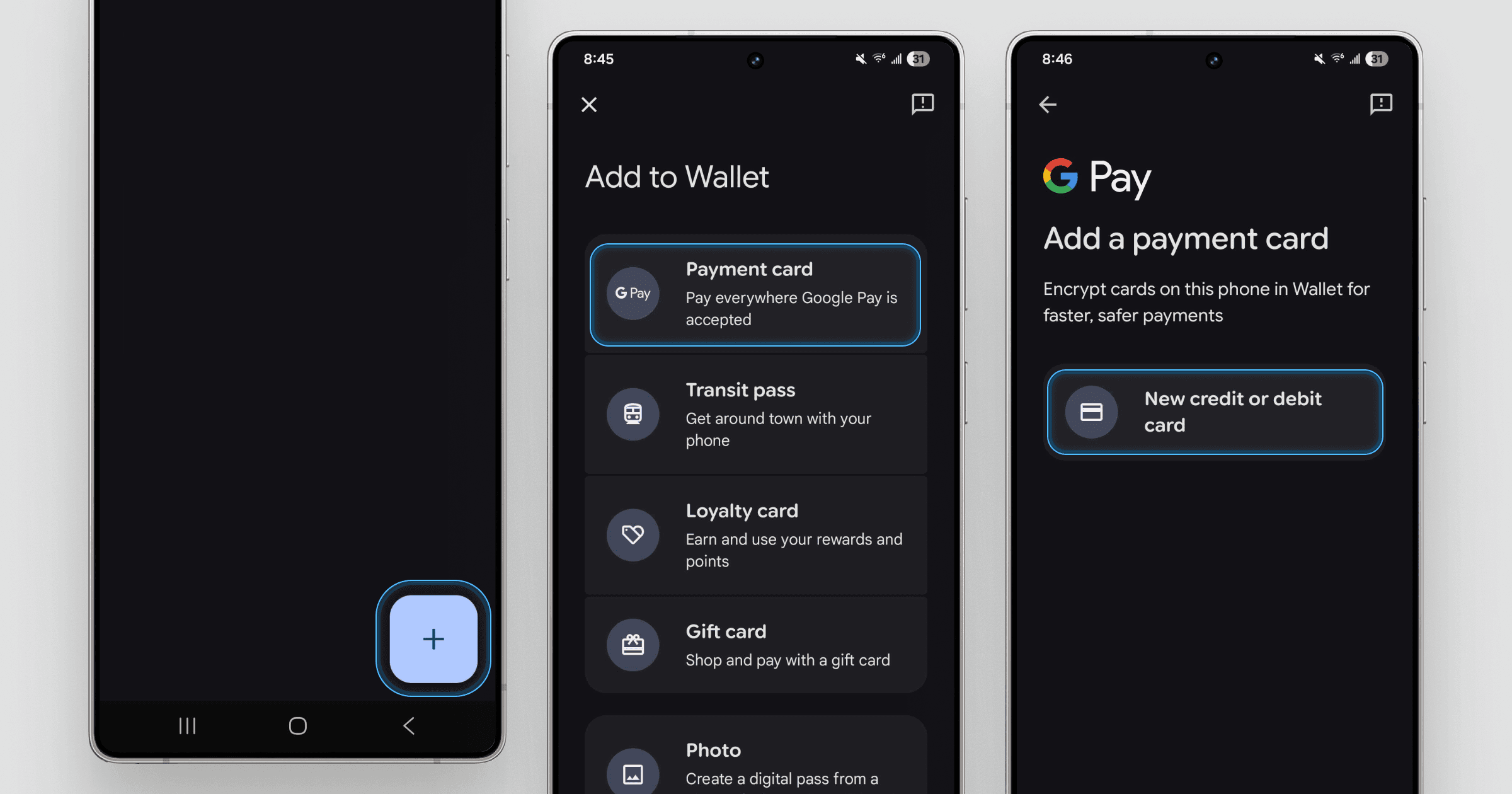
Tap the + button at the bottom-right of the screen
Select Payment card
Tap New credit or debit card
Tap Or enter details manually at the bottom of the screen
Enter the details of your prepaid Visa card
Tap Save and continue to finish
Once added, you can use your rewards anywhere Google Pay and Visa are accepted.
Still have questions?
If you’re having trouble using your prepaid Visa card, contact Forage Support from the app and we’ll help. You can also read our article: Will Forage add more ways to withdraw rewards?
How do I add my Visa card to my Google Wallet?
Follow these steps to use your Visa card in Google Pay.
Adding your rewards to Google Wallet
After withdrawing your rewards as a prepaid Visa card (via Tremendous), you can add it to your Google Wallet to make online and in-store checkout easier with Google Pay.
Follow these steps:
Open Google Wallet on your Android device
Tap the + button at the bottom-right of the screen
Select Payment card
Tap New credit or debit card
Tap Or enter details manually at the bottom of the screen
Enter the details of your prepaid Visa card
Tap Save and continue to finish
Once added, you can use your rewards anywhere Google Pay and Visa are accepted.
Still have questions?
If you’re having trouble using your prepaid Visa card, contact Forage Support from the app and we’ll help. You can also read our article: Will Forage add more ways to withdraw rewards?
How do I add my Visa card to my Google Wallet?
Follow these steps to use your Visa card in Google Pay.
Adding your rewards to Google Wallet
After withdrawing your rewards as a prepaid Visa card (via Tremendous), you can add it to your Google Wallet to make online and in-store checkout easier with Google Pay.
Follow these steps:
Open Google Wallet on your Android device
Tap the + button at the bottom-right of the screen
Select Payment card
Tap New credit or debit card
Tap Or enter details manually at the bottom of the screen
Enter the details of your prepaid Visa card
Tap Save and continue to finish
Once added, you can use your rewards anywhere Google Pay and Visa are accepted.
Still have questions?
If you’re having trouble using your prepaid Visa card, contact Forage Support from the app and we’ll help. You can also read our article: Will Forage add more ways to withdraw rewards?
How do I add my Visa card to my Google Wallet?
Follow these steps to use your Visa card in Google Pay.
Adding your rewards to Google Wallet
After withdrawing your rewards as a prepaid Visa card (via Tremendous), you can add it to your Google Wallet to make online and in-store checkout easier with Google Pay.
Follow these steps:
Open Google Wallet on your Android device
Tap the + button at the bottom-right of the screen
Select Payment card
Tap New credit or debit card
Tap Or enter details manually at the bottom of the screen
Enter the details of your prepaid Visa card
Tap Save and continue to finish
Once added, you can use your rewards anywhere Google Pay and Visa are accepted.
Still have questions?
If you’re having trouble using your prepaid Visa card, contact Forage Support from the app and we’ll help. You can also read our article: Will Forage add more ways to withdraw rewards?
How do I add my Visa card to my Google Wallet?
Follow these steps to use your Visa card in Google Pay.
Adding your rewards to Google Wallet
After withdrawing your rewards as a prepaid Visa card (via Tremendous), you can add it to your Google Wallet to make online and in-store checkout easier with Google Pay.
Follow these steps:
Open Google Wallet on your Android device
Tap the + button at the bottom-right of the screen
Select Payment card
Tap New credit or debit card
Tap Or enter details manually at the bottom of the screen
Enter the details of your prepaid Visa card
Tap Save and continue to finish
Once added, you can use your rewards anywhere Google Pay and Visa are accepted.
Still have questions?
If you’re having trouble using your prepaid Visa card, contact Forage Support from the app and we’ll help. You can also read our article: Will Forage add more ways to withdraw rewards?
How do I add my Visa card to my Google Wallet?
Follow these steps to use your Visa card in Google Pay.
Adding your rewards to Google Wallet
After withdrawing your rewards as a prepaid Visa card (via Tremendous), you can add it to your Google Wallet to make online and in-store checkout easier with Google Pay.
Follow these steps:
Open Google Wallet on your Android device
Tap the + button at the bottom-right of the screen
Select Payment card
Tap New credit or debit card
Tap Or enter details manually at the bottom of the screen
Enter the details of your prepaid Visa card
Tap Save and continue to finish
Once added, you can use your rewards anywhere Google Pay and Visa are accepted.
Still have questions?
If you’re having trouble using your prepaid Visa card, contact Forage Support from the app and we’ll help. You can also read our article: Will Forage add more ways to withdraw rewards?
How do I add my Visa card to my Google Wallet?
Follow these steps to use your Visa card in Google Pay.
Adding your rewards to Google Wallet
After withdrawing your rewards as a prepaid Visa card (via Tremendous), you can add it to your Google Wallet to make online and in-store checkout easier with Google Pay.
Follow these steps:
Open Google Wallet on your Android device
Tap the + button at the bottom-right of the screen
Select Payment card
Tap New credit or debit card
Tap Or enter details manually at the bottom of the screen
Enter the details of your prepaid Visa card
Tap Save and continue to finish
Once added, you can use your rewards anywhere Google Pay and Visa are accepted.
Still have questions?
If you’re having trouble using your prepaid Visa card, contact Forage Support from the app and we’ll help. You can also read our article: Will Forage add more ways to withdraw rewards?
Forage is equal opportunity. ©️ 2026 Forage Technology Corporation, Inc.
Forage is equal opportunity. ©️ 2026 Forage Technology Corporation, Inc.
Forage is equal opportunity. ©️ 2026 Forage Technology Corporation, Inc.
Forage is equal opportunity. ©️ 2026 Forage Technology Corporation, Inc.
Forage is equal opportunity. ©️ 2026 Forage Technology Corporation, Inc.
Forage is equal opportunity. ©️ 2026 Forage Technology Corporation, Inc.
Forage is equal opportunity. ©️ 2026 Forage Technology Corporation, Inc.