Delete my account
How to permanently delete your Forage account.
If you no longer want to use Forage, you can delete your account directly in the app.
What happens when you delete your account
Deleting your account will permanently delete your Forage account and associated personal information. This action cannot be undone.
A few important things to know before you proceed:
You won't be able to sign back in to the same account
Any account history, settings, and linked information will be deleted
Your rewards balance will be handled subject to our Terms
Before you delete your account
If you're running into an issue or something isn't working as expected, you may want to check our Help Center or contact Forage Support first. We're happy to help if there's a way to resolve the problem without deleting your account.
How to delete your account
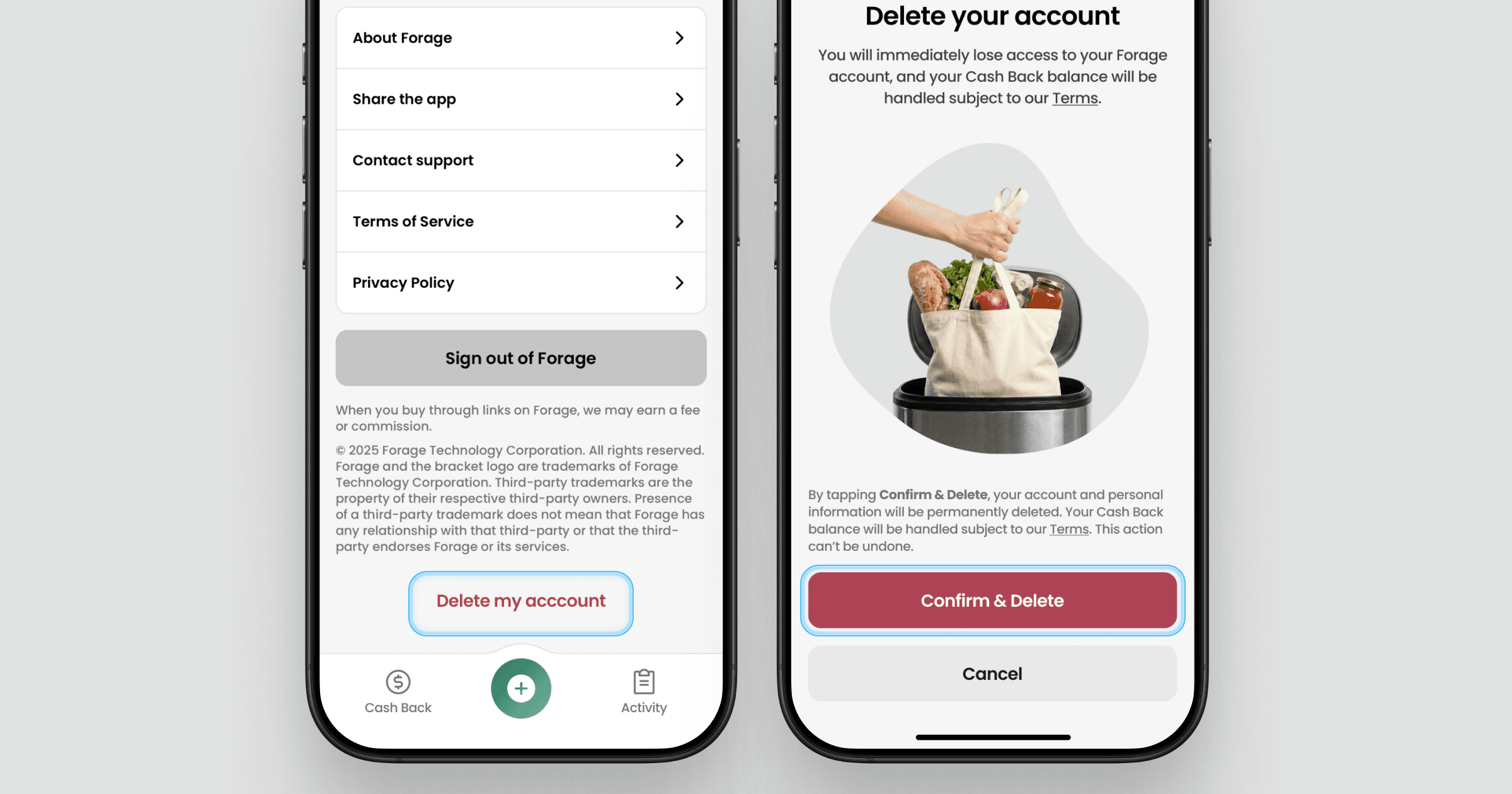
You can delete your account from the Settings screen in the app.
Open Forage
Navigate to Settings
Scroll to the bottom of the screen
Tap "Delete account"
Tap "Confirm & Delete" to complete account deletion
Still have questions?
If you’re unsure about deleting your account or have questions about what happens next, contact Forage Support from the app and we’ll help explain your options.
Delete my account
How to permanently delete your Forage account.
If you no longer want to use Forage, you can delete your account directly in the app.
What happens when you delete your account
Deleting your account will permanently delete your Forage account and associated personal information. This action cannot be undone.
A few important things to know before you proceed:
You won't be able to sign back in to the same account
Any account history, settings, and linked information will be deleted
Your rewards balance will be handled subject to our Terms
Before you delete your account
If you're running into an issue or something isn't working as expected, you may want to check our Help Center or contact Forage Support first. We're happy to help if there's a way to resolve the problem without deleting your account.
How to delete your account
You can delete your account from the Settings screen in the app.
Open Forage
Navigate to Settings
Scroll to the bottom of the screen
Tap "Delete account"
Tap "Confirm & Delete" to complete account deletion
Still have questions?
If you’re unsure about deleting your account or have questions about what happens next, contact Forage Support from the app and we’ll help explain your options.
Delete my account
How to permanently delete your Forage account.
If you no longer want to use Forage, you can delete your account directly in the app.
What happens when you delete your account
Deleting your account will permanently delete your Forage account and associated personal information. This action cannot be undone.
A few important things to know before you proceed:
You won't be able to sign back in to the same account
Any account history, settings, and linked information will be deleted
Your rewards balance will be handled subject to our Terms
Before you delete your account
If you're running into an issue or something isn't working as expected, you may want to check our Help Center or contact Forage Support first. We're happy to help if there's a way to resolve the problem without deleting your account.
How to delete your account
You can delete your account from the Settings screen in the app.
Open Forage
Navigate to Settings
Scroll to the bottom of the screen
Tap "Delete account"
Tap "Confirm & Delete" to complete account deletion
Still have questions?
If you’re unsure about deleting your account or have questions about what happens next, contact Forage Support from the app and we’ll help explain your options.
Delete my account
How to permanently delete your Forage account.
If you no longer want to use Forage, you can delete your account directly in the app.
What happens when you delete your account
Deleting your account will permanently delete your Forage account and associated personal information. This action cannot be undone.
A few important things to know before you proceed:
You won't be able to sign back in to the same account
Any account history, settings, and linked information will be deleted
Your rewards balance will be handled subject to our Terms
Before you delete your account
If you're running into an issue or something isn't working as expected, you may want to check our Help Center or contact Forage Support first. We're happy to help if there's a way to resolve the problem without deleting your account.
How to delete your account
You can delete your account from the Settings screen in the app.
Open Forage
Navigate to Settings
Scroll to the bottom of the screen
Tap "Delete account"
Tap "Confirm & Delete" to complete account deletion
Still have questions?
If you’re unsure about deleting your account or have questions about what happens next, contact Forage Support from the app and we’ll help explain your options.
Delete my account
How to permanently delete your Forage account.
If you no longer want to use Forage, you can delete your account directly in the app.
What happens when you delete your account
Deleting your account will permanently delete your Forage account and associated personal information. This action cannot be undone.
A few important things to know before you proceed:
You won't be able to sign back in to the same account
Any account history, settings, and linked information will be deleted
Your rewards balance will be handled subject to our Terms
Before you delete your account
If you're running into an issue or something isn't working as expected, you may want to check our Help Center or contact Forage Support first. We're happy to help if there's a way to resolve the problem without deleting your account.
How to delete your account
You can delete your account from the Settings screen in the app.
Open Forage
Navigate to Settings
Scroll to the bottom of the screen
Tap "Delete account"
Tap "Confirm & Delete" to complete account deletion
Still have questions?
If you’re unsure about deleting your account or have questions about what happens next, contact Forage Support from the app and we’ll help explain your options.
Delete my account
How to permanently delete your Forage account.
If you no longer want to use Forage, you can delete your account directly in the app.
What happens when you delete your account
Deleting your account will permanently delete your Forage account and associated personal information. This action cannot be undone.
A few important things to know before you proceed:
You won't be able to sign back in to the same account
Any account history, settings, and linked information will be deleted
Your rewards balance will be handled subject to our Terms
Before you delete your account
If you're running into an issue or something isn't working as expected, you may want to check our Help Center or contact Forage Support first. We're happy to help if there's a way to resolve the problem without deleting your account.
How to delete your account
You can delete your account from the Settings screen in the app.
Open Forage
Navigate to Settings
Scroll to the bottom of the screen
Tap "Delete account"
Tap "Confirm & Delete" to complete account deletion
Still have questions?
If you’re unsure about deleting your account or have questions about what happens next, contact Forage Support from the app and we’ll help explain your options.
Delete my account
How to permanently delete your Forage account.
If you no longer want to use Forage, you can delete your account directly in the app.
What happens when you delete your account
Deleting your account will permanently delete your Forage account and associated personal information. This action cannot be undone.
A few important things to know before you proceed:
You won't be able to sign back in to the same account
Any account history, settings, and linked information will be deleted
Your rewards balance will be handled subject to our Terms
Before you delete your account
If you're running into an issue or something isn't working as expected, you may want to check our Help Center or contact Forage Support first. We're happy to help if there's a way to resolve the problem without deleting your account.
How to delete your account
You can delete your account from the Settings screen in the app.
Open Forage
Navigate to Settings
Scroll to the bottom of the screen
Tap "Delete account"
Tap "Confirm & Delete" to complete account deletion
Still have questions?
If you’re unsure about deleting your account or have questions about what happens next, contact Forage Support from the app and we’ll help explain your options.
Forage is equal opportunity. ©️ 2026 Forage Technology Corporation, Inc.
Forage is equal opportunity. ©️ 2026 Forage Technology Corporation, Inc.
Forage is equal opportunity. ©️ 2026 Forage Technology Corporation, Inc.
Forage is equal opportunity. ©️ 2026 Forage Technology Corporation, Inc.
Forage is equal opportunity. ©️ 2026 Forage Technology Corporation, Inc.
Forage is equal opportunity. ©️ 2026 Forage Technology Corporation, Inc.
Forage is equal opportunity. ©️ 2026 Forage Technology Corporation, Inc.