My balance or benefits look wrong
Having trouble with your EBT balance or a missing deposit? We can help you find the right info for your state.
Note: Forage does not manage or issue SNAP benefits. We connect securely to your state's EBT system so you can check your balance and earn rewards on groceries, but your state controls when benefits are added and how much you receive.
If the balance you see in Forage doesn't match what you expected, there are a few common reasons.
Common reasons your balance looks wrong
Your balance hasn't been updated in Forage
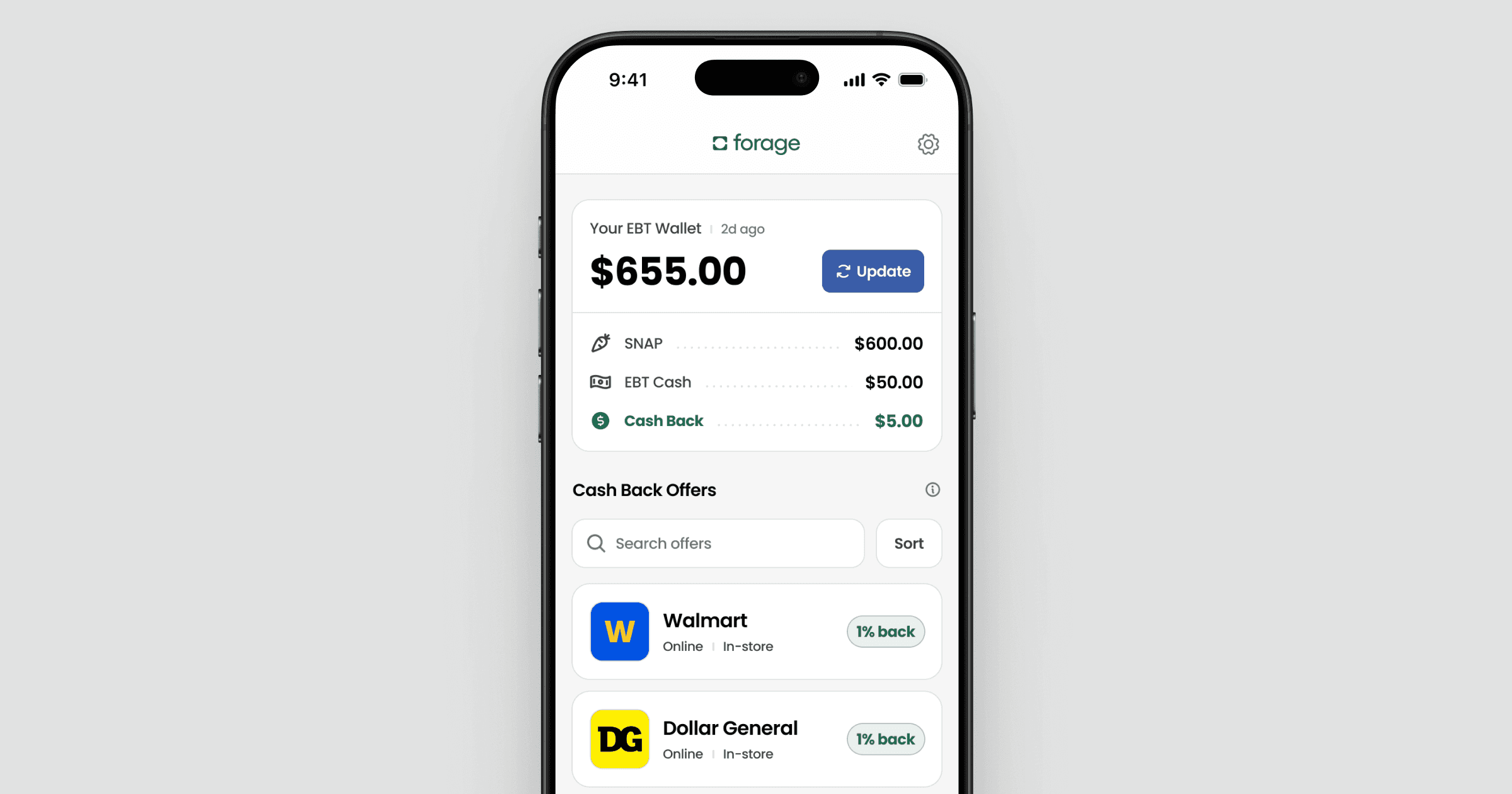
For security reasons, Forage doesn't automatically update your balance in the background. Your balance only updates each time you enter your EBT PIN.
What to do:
Open Forage
Tap Update
Enter your EBT PIN
This pulls the most recent balance directly from your state.

Benefits haven't been redeposited yet
Most states release benefits on a schedule throughout the month, not all at once.
What to do:
Check your state’s SNAP deposit schedule to confirm your deposit date.
Paperwork or recertification is missing
If the state is waiting on a form or recertification, benefits may be paused until it’s completed.
What to do:
Log into your state benefits portal and look for notices or document requests.
Ways to check your balance
Use the Forage app
Tap Update balance and enter your EBT PIN to see the latest balance available from your state.
Call the number on the back of your EBT card
These call centers are available 24/7 in most states. You’ll need the phone number for your state, your card number, and your PIN.
Use your state's official EBT app
Each state offers an official EBT app that shows your SNAP and EBT Cash balances, recent transactions, and deposit history.
If your balance is still wrong
If your deposit day has passed and your balance hasn't updated, contact your state or county office. Have your name, case ID, and the month you’re missing benefits ready.
Still need help?
If you’ve tried the steps above and your balance still looks wrong in the Forage app, contact Forage Support from the app and tell us what you’re seeing and which state you’re in. We’ll help you take the next step.
My balance or benefits look wrong
Having trouble with your EBT balance or a missing deposit? We can help you find the right info for your state.
Note: Forage does not manage or issue SNAP benefits. We connect securely to your state's EBT system so you can check your balance and earn rewards on groceries, but your state controls when benefits are added and how much you receive.
If the balance you see in Forage doesn't match what you expected, there are a few common reasons.
Common reasons your balance looks wrong
Your balance hasn't been updated in Forage
For security reasons, Forage doesn't automatically update your balance in the background. Your balance only updates each time you enter your EBT PIN.
What to do:
Open Forage
Tap Update
Enter your EBT PIN
This pulls the most recent balance directly from your state.
Benefits haven't been redeposited yet
Most states release benefits on a schedule throughout the month, not all at once.
What to do:
Check your state’s SNAP deposit schedule to confirm your deposit date.
Paperwork or recertification is missing
If the state is waiting on a form or recertification, benefits may be paused until it’s completed.
What to do:
Log into your state benefits portal and look for notices or document requests.
Ways to check your balance
Use the Forage app
Tap Update balance and enter your EBT PIN to see the latest balance available from your state.
Call the number on the back of your EBT card
These call centers are available 24/7 in most states. You’ll need the phone number for your state, your card number, and your PIN.
Use your state's official EBT app
Each state offers an official EBT app that shows your SNAP and EBT Cash balances, recent transactions, and deposit history.
If your balance is still wrong
If your deposit day has passed and your balance hasn't updated, contact your state or county office. Have your name, case ID, and the month you’re missing benefits ready.
Still need help?
If you’ve tried the steps above and your balance still looks wrong in the Forage app, contact Forage Support from the app and tell us what you’re seeing and which state you’re in. We’ll help you take the next step.
My balance or benefits look wrong
Having trouble with your EBT balance or a missing deposit? We can help you find the right info for your state.
Note: Forage does not manage or issue SNAP benefits. We connect securely to your state's EBT system so you can check your balance and earn rewards on groceries, but your state controls when benefits are added and how much you receive.
If the balance you see in Forage doesn't match what you expected, there are a few common reasons.
Common reasons your balance looks wrong
Your balance hasn't been updated in Forage
For security reasons, Forage doesn't automatically update your balance in the background. Your balance only updates each time you enter your EBT PIN.
What to do:
Open Forage
Tap Update
Enter your EBT PIN
This pulls the most recent balance directly from your state.
Benefits haven't been redeposited yet
Most states release benefits on a schedule throughout the month, not all at once.
What to do:
Check your state’s SNAP deposit schedule to confirm your deposit date.
Paperwork or recertification is missing
If the state is waiting on a form or recertification, benefits may be paused until it’s completed.
What to do:
Log into your state benefits portal and look for notices or document requests.
Ways to check your balance
Use the Forage app
Tap Update balance and enter your EBT PIN to see the latest balance available from your state.
Call the number on the back of your EBT card
These call centers are available 24/7 in most states. You’ll need the phone number for your state, your card number, and your PIN.
Use your state's official EBT app
Each state offers an official EBT app that shows your SNAP and EBT Cash balances, recent transactions, and deposit history.
If your balance is still wrong
If your deposit day has passed and your balance hasn't updated, contact your state or county office. Have your name, case ID, and the month you’re missing benefits ready.
Still need help?
If you’ve tried the steps above and your balance still looks wrong in the Forage app, contact Forage Support from the app and tell us what you’re seeing and which state you’re in. We’ll help you take the next step.
My balance or benefits look wrong
Having trouble with your EBT balance or a missing deposit? We can help you find the right info for your state.
Note: Forage does not manage or issue SNAP benefits. We connect securely to your state's EBT system so you can check your balance and earn rewards on groceries, but your state controls when benefits are added and how much you receive.
If the balance you see in Forage doesn't match what you expected, there are a few common reasons.
Common reasons your balance looks wrong
Your balance hasn't been updated in Forage
For security reasons, Forage doesn't automatically update your balance in the background. Your balance only updates each time you enter your EBT PIN.
What to do:
Open Forage
Tap Update
Enter your EBT PIN
This pulls the most recent balance directly from your state.
Benefits haven't been redeposited yet
Most states release benefits on a schedule throughout the month, not all at once.
What to do:
Check your state’s SNAP deposit schedule to confirm your deposit date.
Paperwork or recertification is missing
If the state is waiting on a form or recertification, benefits may be paused until it’s completed.
What to do:
Log into your state benefits portal and look for notices or document requests.
Ways to check your balance
Use the Forage app
Tap Update balance and enter your EBT PIN to see the latest balance available from your state.
Call the number on the back of your EBT card
These call centers are available 24/7 in most states. You’ll need the phone number for your state, your card number, and your PIN.
Use your state's official EBT app
Each state offers an official EBT app that shows your SNAP and EBT Cash balances, recent transactions, and deposit history.
If your balance is still wrong
If your deposit day has passed and your balance hasn't updated, contact your state or county office. Have your name, case ID, and the month you’re missing benefits ready.
Still need help?
If you’ve tried the steps above and your balance still looks wrong in the Forage app, contact Forage Support from the app and tell us what you’re seeing and which state you’re in. We’ll help you take the next step.
My balance or benefits look wrong
Having trouble with your EBT balance or a missing deposit? We can help you find the right info for your state.
Note: Forage does not manage or issue SNAP benefits. We connect securely to your state's EBT system so you can check your balance and earn rewards on groceries, but your state controls when benefits are added and how much you receive.
If the balance you see in Forage doesn't match what you expected, there are a few common reasons.
Common reasons your balance looks wrong
Your balance hasn't been updated in Forage
For security reasons, Forage doesn't automatically update your balance in the background. Your balance only updates each time you enter your EBT PIN.
What to do:
Open Forage
Tap Update
Enter your EBT PIN
This pulls the most recent balance directly from your state.
Benefits haven't been redeposited yet
Most states release benefits on a schedule throughout the month, not all at once.
What to do:
Check your state’s SNAP deposit schedule to confirm your deposit date.
Paperwork or recertification is missing
If the state is waiting on a form or recertification, benefits may be paused until it’s completed.
What to do:
Log into your state benefits portal and look for notices or document requests.
Ways to check your balance
Use the Forage app
Tap Update balance and enter your EBT PIN to see the latest balance available from your state.
Call the number on the back of your EBT card
These call centers are available 24/7 in most states. You’ll need the phone number for your state, your card number, and your PIN.
Use your state's official EBT app
Each state offers an official EBT app that shows your SNAP and EBT Cash balances, recent transactions, and deposit history.
If your balance is still wrong
If your deposit day has passed and your balance hasn't updated, contact your state or county office. Have your name, case ID, and the month you’re missing benefits ready.
Still need help?
If you’ve tried the steps above and your balance still looks wrong in the Forage app, contact Forage Support from the app and tell us what you’re seeing and which state you’re in. We’ll help you take the next step.
My balance or benefits look wrong
Having trouble with your EBT balance or a missing deposit? We can help you find the right info for your state.
Note: Forage does not manage or issue SNAP benefits. We connect securely to your state's EBT system so you can check your balance and earn rewards on groceries, but your state controls when benefits are added and how much you receive.
If the balance you see in Forage doesn't match what you expected, there are a few common reasons.
Common reasons your balance looks wrong
Your balance hasn't been updated in Forage
For security reasons, Forage doesn't automatically update your balance in the background. Your balance only updates each time you enter your EBT PIN.
What to do:
Open Forage
Tap Update
Enter your EBT PIN
This pulls the most recent balance directly from your state.
Benefits haven't been redeposited yet
Most states release benefits on a schedule throughout the month, not all at once.
What to do:
Check your state’s SNAP deposit schedule to confirm your deposit date.
Paperwork or recertification is missing
If the state is waiting on a form or recertification, benefits may be paused until it’s completed.
What to do:
Log into your state benefits portal and look for notices or document requests.
Ways to check your balance
Use the Forage app
Tap Update balance and enter your EBT PIN to see the latest balance available from your state.
Call the number on the back of your EBT card
These call centers are available 24/7 in most states. You’ll need the phone number for your state, your card number, and your PIN.
Use your state's official EBT app
Each state offers an official EBT app that shows your SNAP and EBT Cash balances, recent transactions, and deposit history.
If your balance is still wrong
If your deposit day has passed and your balance hasn't updated, contact your state or county office. Have your name, case ID, and the month you’re missing benefits ready.
Still need help?
If you’ve tried the steps above and your balance still looks wrong in the Forage app, contact Forage Support from the app and tell us what you’re seeing and which state you’re in. We’ll help you take the next step.
My balance or benefits look wrong
Having trouble with your EBT balance or a missing deposit? We can help you find the right info for your state.
Note: Forage does not manage or issue SNAP benefits. We connect securely to your state's EBT system so you can check your balance and earn rewards on groceries, but your state controls when benefits are added and how much you receive.
If the balance you see in Forage doesn't match what you expected, there are a few common reasons.
Common reasons your balance looks wrong
Your balance hasn't been updated in Forage
For security reasons, Forage doesn't automatically update your balance in the background. Your balance only updates each time you enter your EBT PIN.
What to do:
Open Forage
Tap Update
Enter your EBT PIN
This pulls the most recent balance directly from your state.
Benefits haven't been redeposited yet
Most states release benefits on a schedule throughout the month, not all at once.
What to do:
Check your state’s SNAP deposit schedule to confirm your deposit date.
Paperwork or recertification is missing
If the state is waiting on a form or recertification, benefits may be paused until it’s completed.
What to do:
Log into your state benefits portal and look for notices or document requests.
Ways to check your balance
Use the Forage app
Tap Update balance and enter your EBT PIN to see the latest balance available from your state.
Call the number on the back of your EBT card
These call centers are available 24/7 in most states. You’ll need the phone number for your state, your card number, and your PIN.
Use your state's official EBT app
Each state offers an official EBT app that shows your SNAP and EBT Cash balances, recent transactions, and deposit history.
If your balance is still wrong
If your deposit day has passed and your balance hasn't updated, contact your state or county office. Have your name, case ID, and the month you’re missing benefits ready.
Still need help?
If you’ve tried the steps above and your balance still looks wrong in the Forage app, contact Forage Support from the app and tell us what you’re seeing and which state you’re in. We’ll help you take the next step.
Forage is equal opportunity. ©️ 2026 Forage Technology Corporation, Inc.
Forage is equal opportunity. ©️ 2026 Forage Technology Corporation, Inc.
Forage is equal opportunity. ©️ 2026 Forage Technology Corporation, Inc.
Forage is equal opportunity. ©️ 2026 Forage Technology Corporation, Inc.
Forage is equal opportunity. ©️ 2026 Forage Technology Corporation, Inc.
Forage is equal opportunity. ©️ 2026 Forage Technology Corporation, Inc.
Forage is equal opportunity. ©️ 2026 Forage Technology Corporation, Inc.