How do I check my EBT balance on Forage?
Learn how to check your EBT balance and troubleshoot any issues.
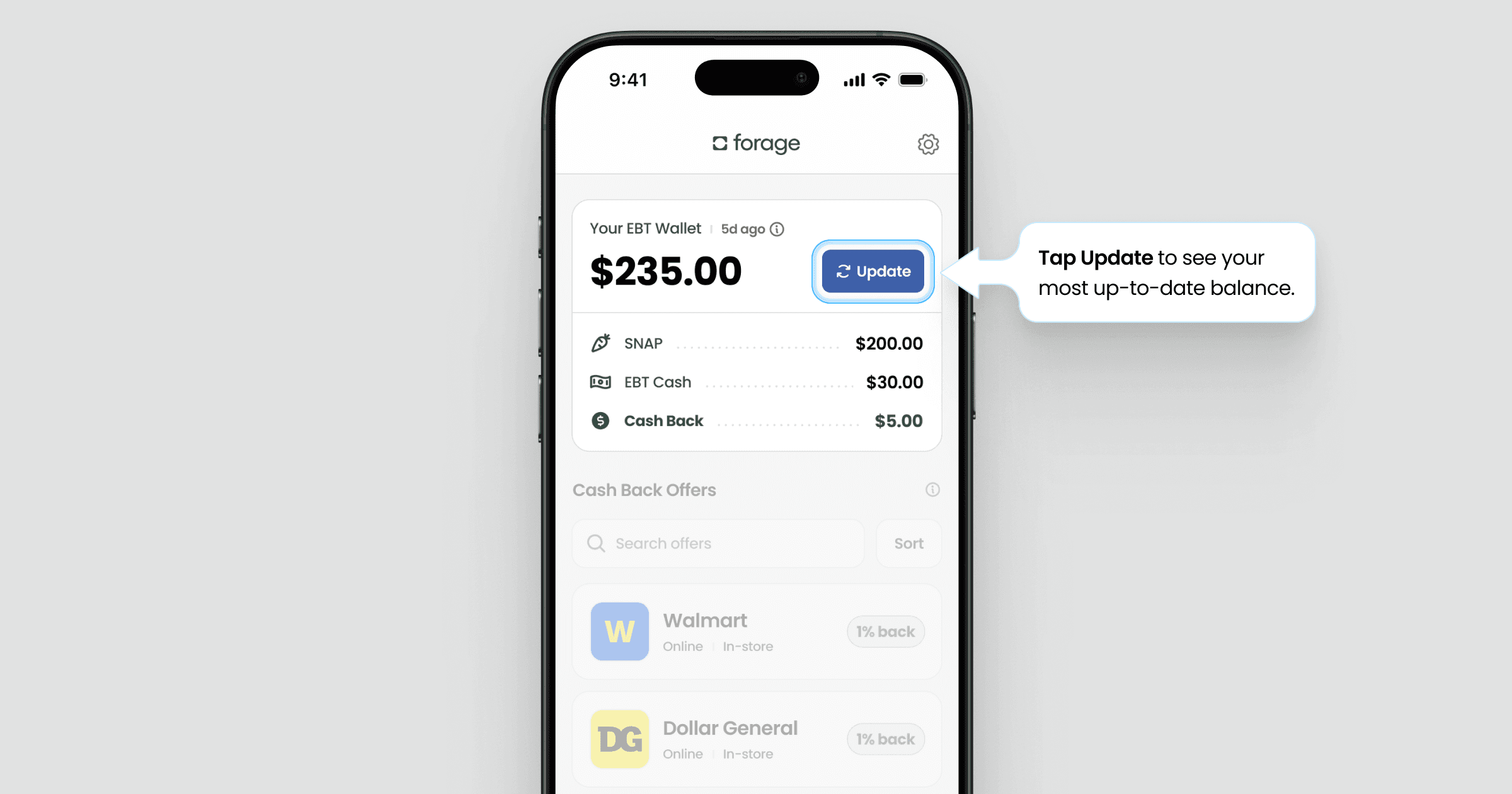
For security reasons, Forage doesn't automatically update your balance in the background. Your balance only updates each time you enter your EBT PIN.
How to check your balance
To check your EBT balance on Forage, follow these steps:
Open Forage
Tap Update
Enter your EBT PIN
This pulls the most recent balance directly from your state.
Troubleshooting
If you’re having trouble checking your balance in Forage—such as seeing an error message or not getting a response—here's what to do.
Check your card details
Most balance check issues happen when there’s a problem with the card information being used.
Make sure:
The EBT card number linked to your account is correct
You’re entering the correct EBT PIN
If the card number or PIN is off, Forage won’t be able to retrieve your balance.
If you’re unsure, double-check your card or try again carefully.
Check your balance outside of Forage
Next, confirm whether the issue is specific to Forage or coming from the state system.
Try checking your balance using one of these official options.
If you’re able to check your balance successfully there, that’s a good sign your card and PIN are working.
Contact Forage
If your balance shows up through your state but not in the Forage app, the issue is likely on our side. Please contact Forage Support from the app and let us know:
What error message you’re seeing (if any)
Your state
Whether you were able to check your balance elsewhere
This helps us troubleshoot faster and get things back on track.
How do I check my EBT balance on Forage?
Learn how to check your EBT balance and troubleshoot any issues.
For security reasons, Forage doesn't automatically update your balance in the background. Your balance only updates each time you enter your EBT PIN.
How to check your balance
To check your EBT balance on Forage, follow these steps:
Open Forage
Tap Update
Enter your EBT PIN
This pulls the most recent balance directly from your state.
Troubleshooting
If you’re having trouble checking your balance in Forage—such as seeing an error message or not getting a response—here's what to do.
Check your card details
Most balance check issues happen when there’s a problem with the card information being used.
Make sure:
The EBT card number linked to your account is correct
You’re entering the correct EBT PIN
If the card number or PIN is off, Forage won’t be able to retrieve your balance.
If you’re unsure, double-check your card or try again carefully.
Check your balance outside of Forage
Next, confirm whether the issue is specific to Forage or coming from the state system.
Try checking your balance using one of these official options.
If you’re able to check your balance successfully there, that’s a good sign your card and PIN are working.
Contact Forage
If your balance shows up through your state but not in the Forage app, the issue is likely on our side. Please contact Forage Support from the app and let us know:
What error message you’re seeing (if any)
Your state
Whether you were able to check your balance elsewhere
This helps us troubleshoot faster and get things back on track.
How do I check my EBT balance on Forage?
Learn how to check your EBT balance and troubleshoot any issues.
For security reasons, Forage doesn't automatically update your balance in the background. Your balance only updates each time you enter your EBT PIN.
How to check your balance
To check your EBT balance on Forage, follow these steps:
Open Forage
Tap Update
Enter your EBT PIN
This pulls the most recent balance directly from your state.
Troubleshooting
If you’re having trouble checking your balance in Forage—such as seeing an error message or not getting a response—here's what to do.
Check your card details
Most balance check issues happen when there’s a problem with the card information being used.
Make sure:
The EBT card number linked to your account is correct
You’re entering the correct EBT PIN
If the card number or PIN is off, Forage won’t be able to retrieve your balance.
If you’re unsure, double-check your card or try again carefully.
Check your balance outside of Forage
Next, confirm whether the issue is specific to Forage or coming from the state system.
Try checking your balance using one of these official options.
If you’re able to check your balance successfully there, that’s a good sign your card and PIN are working.
Contact Forage
If your balance shows up through your state but not in the Forage app, the issue is likely on our side. Please contact Forage Support from the app and let us know:
What error message you’re seeing (if any)
Your state
Whether you were able to check your balance elsewhere
This helps us troubleshoot faster and get things back on track.
How do I check my EBT balance on Forage?
Learn how to check your EBT balance and troubleshoot any issues.
For security reasons, Forage doesn't automatically update your balance in the background. Your balance only updates each time you enter your EBT PIN.
How to check your balance
To check your EBT balance on Forage, follow these steps:
Open Forage
Tap Update
Enter your EBT PIN
This pulls the most recent balance directly from your state.
Troubleshooting
If you’re having trouble checking your balance in Forage—such as seeing an error message or not getting a response—here's what to do.
Check your card details
Most balance check issues happen when there’s a problem with the card information being used.
Make sure:
The EBT card number linked to your account is correct
You’re entering the correct EBT PIN
If the card number or PIN is off, Forage won’t be able to retrieve your balance.
If you’re unsure, double-check your card or try again carefully.
Check your balance outside of Forage
Next, confirm whether the issue is specific to Forage or coming from the state system.
Try checking your balance using one of these official options.
If you’re able to check your balance successfully there, that’s a good sign your card and PIN are working.
Contact Forage
If your balance shows up through your state but not in the Forage app, the issue is likely on our side. Please contact Forage Support from the app and let us know:
What error message you’re seeing (if any)
Your state
Whether you were able to check your balance elsewhere
This helps us troubleshoot faster and get things back on track.
How do I check my EBT balance on Forage?
Learn how to check your EBT balance and troubleshoot any issues.
For security reasons, Forage doesn't automatically update your balance in the background. Your balance only updates each time you enter your EBT PIN.
How to check your balance
To check your EBT balance on Forage, follow these steps:
Open Forage
Tap Update
Enter your EBT PIN
This pulls the most recent balance directly from your state.
Troubleshooting
If you’re having trouble checking your balance in Forage—such as seeing an error message or not getting a response—here's what to do.
Check your card details
Most balance check issues happen when there’s a problem with the card information being used.
Make sure:
The EBT card number linked to your account is correct
You’re entering the correct EBT PIN
If the card number or PIN is off, Forage won’t be able to retrieve your balance.
If you’re unsure, double-check your card or try again carefully.
Check your balance outside of Forage
Next, confirm whether the issue is specific to Forage or coming from the state system.
Try checking your balance using one of these official options.
If you’re able to check your balance successfully there, that’s a good sign your card and PIN are working.
Contact Forage
If your balance shows up through your state but not in the Forage app, the issue is likely on our side. Please contact Forage Support from the app and let us know:
What error message you’re seeing (if any)
Your state
Whether you were able to check your balance elsewhere
This helps us troubleshoot faster and get things back on track.
How do I check my EBT balance on Forage?
Learn how to check your EBT balance and troubleshoot any issues.
For security reasons, Forage doesn't automatically update your balance in the background. Your balance only updates each time you enter your EBT PIN.
How to check your balance
To check your EBT balance on Forage, follow these steps:
Open Forage
Tap Update
Enter your EBT PIN
This pulls the most recent balance directly from your state.
Troubleshooting
If you’re having trouble checking your balance in Forage—such as seeing an error message or not getting a response—here's what to do.
Check your card details
Most balance check issues happen when there’s a problem with the card information being used.
Make sure:
The EBT card number linked to your account is correct
You’re entering the correct EBT PIN
If the card number or PIN is off, Forage won’t be able to retrieve your balance.
If you’re unsure, double-check your card or try again carefully.
Check your balance outside of Forage
Next, confirm whether the issue is specific to Forage or coming from the state system.
Try checking your balance using one of these official options.
If you’re able to check your balance successfully there, that’s a good sign your card and PIN are working.
Contact Forage
If your balance shows up through your state but not in the Forage app, the issue is likely on our side. Please contact Forage Support from the app and let us know:
What error message you’re seeing (if any)
Your state
Whether you were able to check your balance elsewhere
This helps us troubleshoot faster and get things back on track.
How do I check my EBT balance on Forage?
Learn how to check your EBT balance and troubleshoot any issues.
For security reasons, Forage doesn't automatically update your balance in the background. Your balance only updates each time you enter your EBT PIN.
How to check your balance
To check your EBT balance on Forage, follow these steps:
Open Forage
Tap Update
Enter your EBT PIN
This pulls the most recent balance directly from your state.
Troubleshooting
If you’re having trouble checking your balance in Forage—such as seeing an error message or not getting a response—here's what to do.
Check your card details
Most balance check issues happen when there’s a problem with the card information being used.
Make sure:
The EBT card number linked to your account is correct
You’re entering the correct EBT PIN
If the card number or PIN is off, Forage won’t be able to retrieve your balance.
If you’re unsure, double-check your card or try again carefully.
Check your balance outside of Forage
Next, confirm whether the issue is specific to Forage or coming from the state system.
Try checking your balance using one of these official options.
If you’re able to check your balance successfully there, that’s a good sign your card and PIN are working.
Contact Forage
If your balance shows up through your state but not in the Forage app, the issue is likely on our side. Please contact Forage Support from the app and let us know:
What error message you’re seeing (if any)
Your state
Whether you were able to check your balance elsewhere
This helps us troubleshoot faster and get things back on track.
Forage is equal opportunity. ©️ 2026 Forage Technology Corporation, Inc.
Forage is equal opportunity. ©️ 2026 Forage Technology Corporation, Inc.
Forage is equal opportunity. ©️ 2026 Forage Technology Corporation, Inc.
Forage is equal opportunity. ©️ 2026 Forage Technology Corporation, Inc.
Forage is equal opportunity. ©️ 2026 Forage Technology Corporation, Inc.
Forage is equal opportunity. ©️ 2026 Forage Technology Corporation, Inc.
Forage is equal opportunity. ©️ 2026 Forage Technology Corporation, Inc.